

De beste Typeform-alternativene kombinerer friksjonsfri innsamling av leads med CRM-synkronisering, kvalifisering, ruting og pålitelige svardata.
Hvis Typeforms priser, innsendingsgrenser, integrasjoner eller arbeidsflytkontroller ikke passer til inntektsprosessen din, sammenligner denne listen plattformer som er utviklet for ulike behov. Her finner du alternativer for samtalebaserte skjemaer, spørrekonkurranser, kalkulatorer, betalinger, undersøkelser og tilbakemeldinger fra virksomheter. Hvert alternativ fremhever funksjonene, integrasjonene, prisbetraktningene og avveiningene som påvirker synligheten i salgstrakten og overleveringene mellom markedsføring, salg og kundesuksess.
Hva er Typeform?
Typeform er en nettbasert plattform for skjemaer og undersøkelser som presenterer spørsmål i et samtalebasert format, ett spørsmål om gangen. Den støtter innsamling av leads, innhenting av tilbakemeldinger, spørrekonkurranser og andre arbeidsflyter for datainnsamling. Typeform-alternativer er konkurrerende plattformer som tilbyr ulike kombinasjoner av integrasjoner, svargrenser, analyse, betalinger, poengberegning, ruting og CRM-synkronisering.
Hvorfor du kan stole på våre programvareanbefalinger
6,700+
Reviews
20
Industry experts
16+
Evaluation factors
14
Years
Anmeldelsene våre bygger på vår uavhengige vurdering, ikke på salgsargumenter. Les hvordan vi sørger for åpenhet.
I denne guiden har vi vurdert verktøyene gjennom praktisk testing og uavhengig research og gitt dem poeng ut fra våre utvelgelseskriterier.
Anmeldelsene våre bygger på vår egen redaksjonelle vurdering. De er ikke et salgsargument.
Sammenlign de beste Typeform-alternativene
Sammenlign priser og spesifikasjoner side om side for Typeform-alternativene som kom med på kortlisten min.
| Tool | Best For | Trial Info | Price | ||
|---|---|---|---|---|---|
| 1 | Best for quiz and calculator-led lead capture | Free trial available | From $14/month (billed annually) | Website | |
| 2 | Best for unlimited responses on a free plan | Free plan available | From $19/month (billed annually) | Website | |
| 3 | Best for Salesforce-native form and data capture | 14-day free trial | From $83/month (billed annually) | Website | |
| 4 | Best for enterprise CX research and feedback programs | Free demo available | Pricing upon request | Website | |
| 5 | Best for CRM-connected form and data capture | Free plan available | Pricing upon request | Website | |
| 6 | Best for forms with no submission caps | 7-day free trial | From $49/month (billed annually) | Website | |
| 7 | Best for research-grade survey analytics | Free plan available | From $30/user/month (billed annually) | Website | |
| 8 | Best for forms with built-in CRO and lead routing | Free plan available | From $15/month | Website | |
| 9 | Best for forms with built-in CRM and scoring | 14-day free trial | From $29/month (billed annually) | Website | |
| 10 | Best for forms requiring multiple payment gateways | Free plan available | Pricing upon request | Website |


Anmeldelser av de beste Typeform-alternativene
Nedenfor finner du sammendrag av de beste Typeform-alternativene som kom med på kortlisten min. I anmeldelsene mine undersøker jeg funksjonene, prisene og integrasjonene til hver plattform for å hjelpe deg med å finne det som passer best.
 Best for quiz and calculator-led lead capture
- Free trial available
- From $14/month (billed annually)
Visit WebsiteCustomer Rating:4.8/5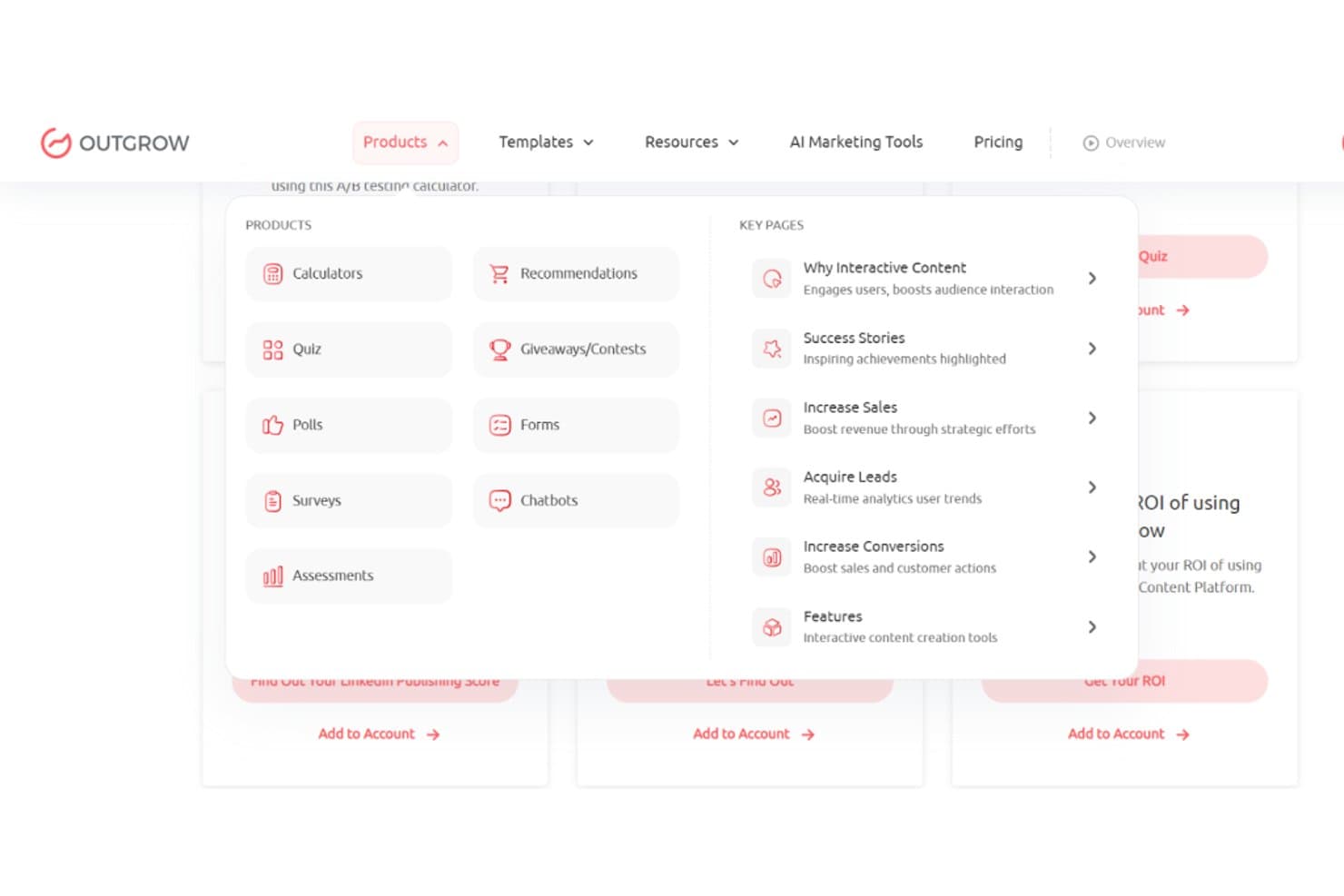
Outgrow offers diverse interactive content types for lead generation. Outgrow is an interactive content platform for marketers and revenue teams seeking a Typeform alternative with no-code quizzes, calculators, forms, and assessments for capturing and qualifying leads.
Who Is Outgrow Best For?
Outgrow suits marketing and revenue teams that use interactive quizzes, calculators, and assessments to qualify inbound leads before routing them to sales.
Why Outgrow Is a Good Typeform Alternative
I picked Outgrow because it’s built for quiz and calculator-led lead capture. I use no-code quizzes, calculators, and assessments to collect responses, qualify leads, and route prospects based on their answers. That makes it a focused Typeform alternative for interactive lead generation.
Outgrow Key Features
- Branded content customization: Apply your colors, logos, fonts, and design styles.
- Template library: Start with templates for calculators, quizzes, finance, and ecommerce.
- Native integrations: Connect Outgrow with HubSpot, ActiveCampaign, Mailchimp, and Stripe.
- Publishing options: Embed content on pages, popups, chat, exit-intent prompts, or subdomains.
Outgrow Integrations
Outgrow offers native integrations with HubSpot, ActiveCampaign, Mailchimp, and Stripe.
Pros and Cons
Pros:
- Embeds across pages, popups, and chat
- Branching quizzes support personalized lead journeys
- Interactive calculators qualify leads before submission
Cons:
- Mobile layouts can require manual checking
- Advanced designs require more setup time
Learn more about Outgrow: Best for unlimited responses on a free plan
- Free plan available
- From $19/month (billed annually)
Visit WebsiteCustomer Rating:4.6/5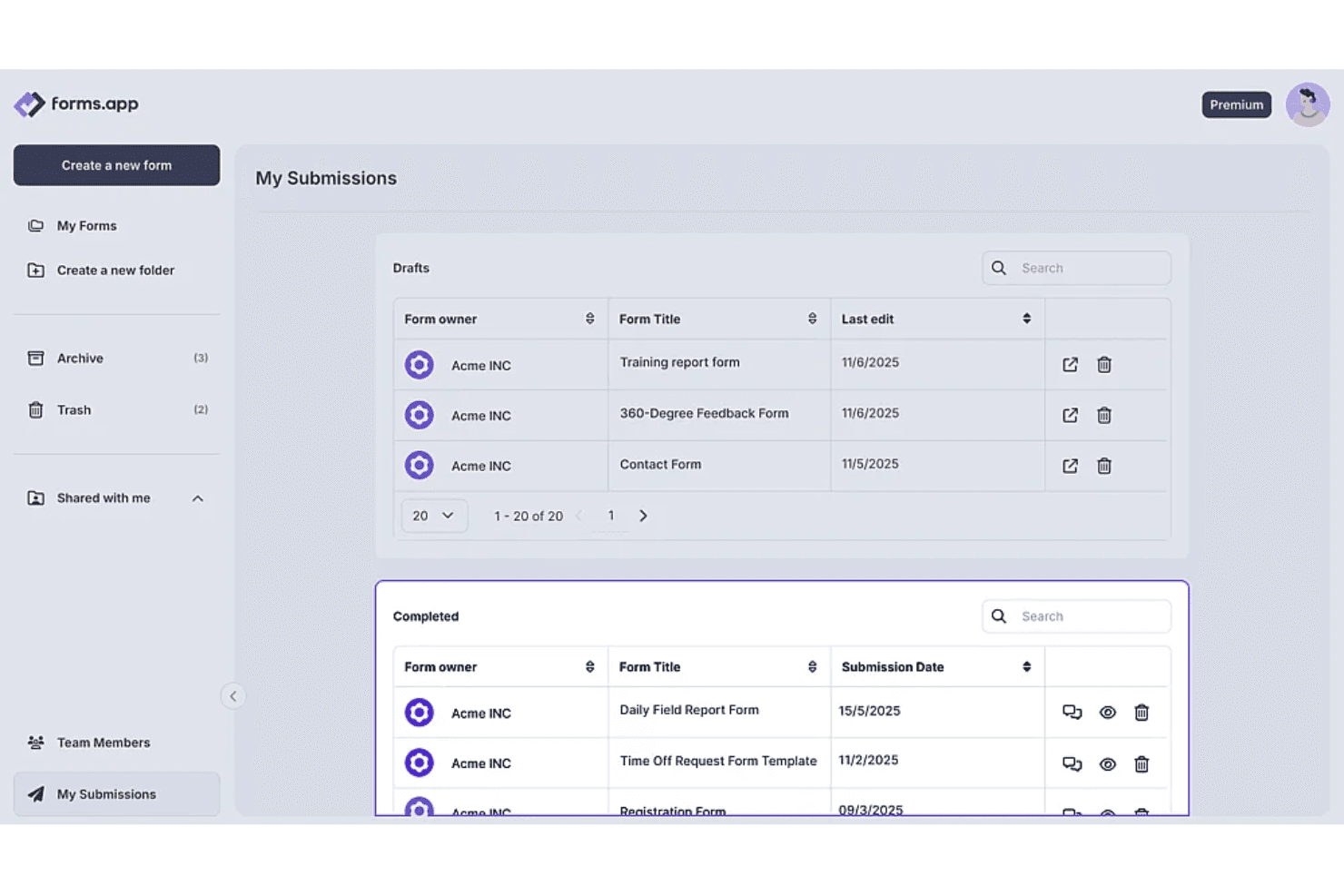
forms.app lets users track draft and completed form submissions in one place. forms.app is a no-code form builder for marketers and growing businesses that need a Typeform alternative for branded lead capture, conditional questions, embedded forms, and connections to CRM and spreadsheet tools.
Who Is forms.app Best For?
forms.app suits small marketing and sales teams that need branded lead-capture forms, conditional questions, and CRM or spreadsheet connections without coding.
Why forms.app Is a Good Typeform Alternative
I picked forms.app because its free plan supports unlimited responses, which suits ongoing lead capture campaigns. I use branded forms with conditional questions to qualify prospects, then embed them on landing pages or route submissions into CRM and spreadsheet workflows.
forms.app Key Features
- Mobile-responsive layouts: Forms adapt to phones, tablets, and desktop screens.
- Multiple-page forms: Add page breaks to organize longer forms.
- E-signatures: Collect legally binding signatures and export signed forms as PDFs.
- Notifications: Receive email, web, or mobile push alerts for submissions.
forms.app Integrations
forms.app offers native integrations with Google Sheets, Microsoft Excel, Slack, Notion, HubSpot CRM, Mailchimp, ActiveCampaign, Google Drive, and Google Analytics, and connects with Zapier. It also provides webhooks and API access for custom integrations.
Pros and Cons
Pros:
- E-signatures and PDF exports support approvals
- Conditional logic supports prospect qualification
- Unlimited responses on the free plan
Cons:
- Editing submitted responses can be awkward
- Advanced analytics feel limited against larger competitors
Learn more about forms.app: Best for Salesforce-native form and data capture
- 14-day free trial
- From $83/month (billed annually)
Visit WebsiteCustomer Rating:4.2/5
Formstack lets users build custom feedback forms with drag-and-drop fields. Formstack is an online form builder for revenue teams that need a Typeform alternative with branded lead capture, conditional forms, and structured data collection across sales and marketing workflows.
Who Is Formstack Best For?
Formstack suits sales and marketing teams that need Salesforce-native forms for branded lead capture and structured data collection.
Why Formstack Is a Good Typeform Alternative
I picked Formstack because its Salesforce-native forms support branded lead capture and structured data collection. I use conditional forms to tailor questions as prospects respond, then capture consistent records for sales and marketing workflows. This makes Formstack a practical Typeform alternative when Salesforce is your system of record.
Formstack Key Features
- Mobile-friendly forms: Forms adapt to smartphones, tablets, and desktop screens.
- File uploads: Collect documents, images, videos, and other attachments.
- Save and resume: Let respondents save unfinished forms and return later.
- Campaign tracking: Attribute form submissions to specific marketing campaigns.
Formstack Integrations
Formstack lists 250+ integrations across its suite, including a native Salesforce integration, Amazon S3, PayPal, Stripe, HubSpot, Airtable, and Microsoft. Formstack Forms also supports Zapier, a REST API, and webhooks for custom integrations.
Pros and Cons
Pros:
- File uploads handle documents and media
- Save-and-resume supports longer data collection
- Conditional logic supports tailored respondent paths
Cons:
- Complex forms take longer to configure
- Design customization feels limited in reviews
Learn more about Formstack: Best for enterprise CX research and feedback programs
- Free demo available
- Pricing upon request
Visit WebsiteCustomer Rating:3.9/5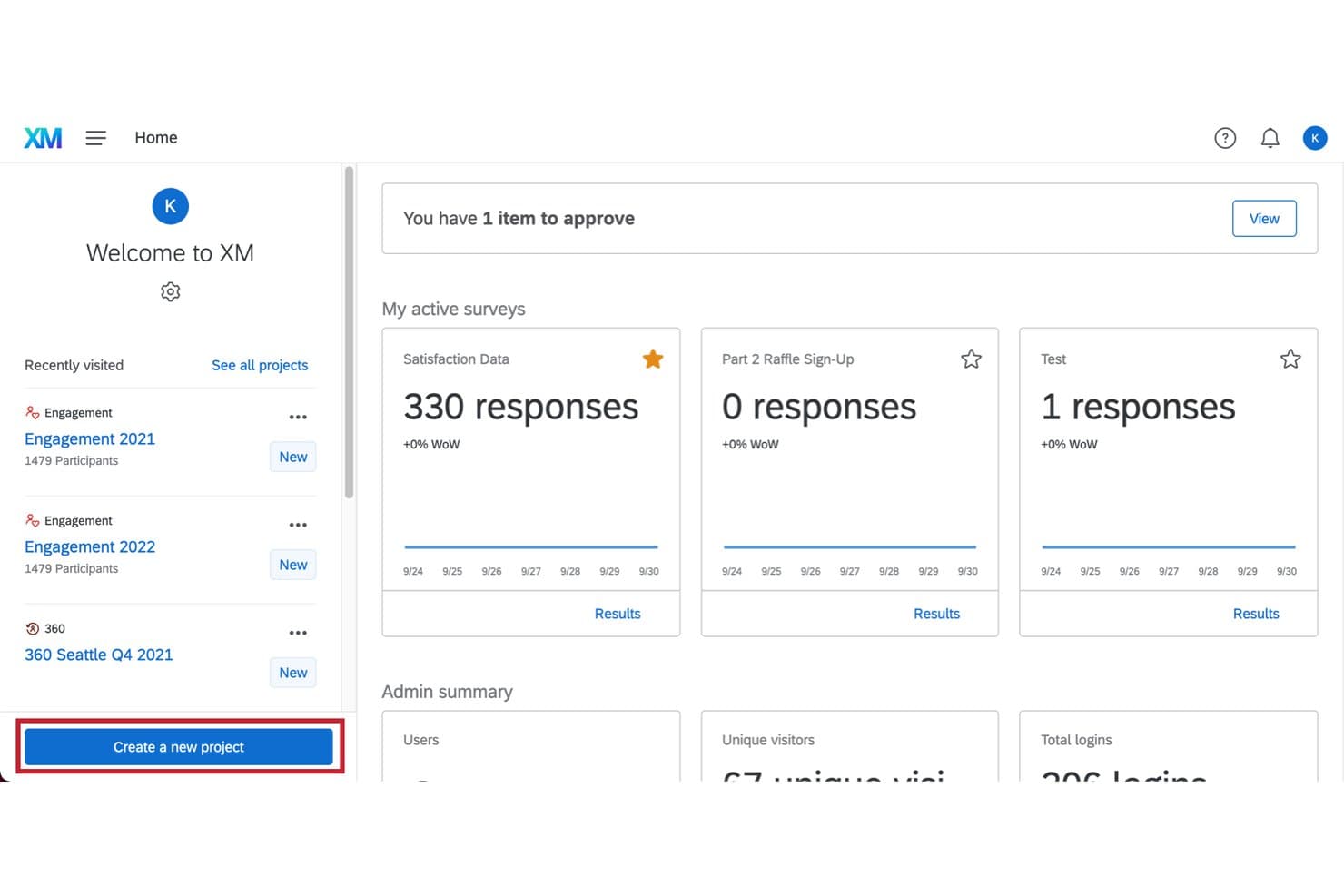
Qualtrics lets users manage multiple active surveys from one dashboard. Qualtrics is an enterprise survey and experience management platform for revenue teams that need more than Typeform-style forms to capture customer feedback, conduct research, and organize insights across complex programs.
Who Is Qualtrics Best For?
Qualtrics fits enterprise CX, research, and insights teams that need structured feedback programs across multiple customer touchpoints.
Why Qualtrics Is a Good Typeform Alternative
I picked Qualtrics because it supports enterprise CX research and feedback programs beyond one-off forms. I use its survey software to collect customer feedback, conduct structured research, and organize insights across multiple touchpoints. That makes it a practical choice when lead capture needs to connect with broader customer experience programs.
Qualtrics Key Features
- Drag-and-drop builder: Create surveys with templates and 23 question types.
- Smart logic: Add branching, quotas, and conditional survey paths.
- Multichannel distribution: Share surveys through email, SMS, QR codes, and website embeds.
- Real-time dashboards: Monitor responses with customizable charts and reporting views.
Qualtrics Integrations
Qualtrics offers documented extensions for Salesforce, HubSpot, Marketo, Microsoft Dynamics, Slack, Microsoft Teams, Jira, ServiceNow, Zendesk, and Zapier. Availability can depend on your license, and the Qualtrics API and Developer Portal support custom integrations.
Pros and Cons
Pros:
- Multichannel distribution extends surveys beyond email
- Real-time dashboards organize feedback across touchpoints
- Advanced branching supports complex research workflows
Cons:
- Reporting options can overwhelm smaller teams
- Enterprise setup requires significant administrative planning
Learn more about Qualtrics: Best for CRM-connected form and data capture
- Free plan available
- Pricing upon request
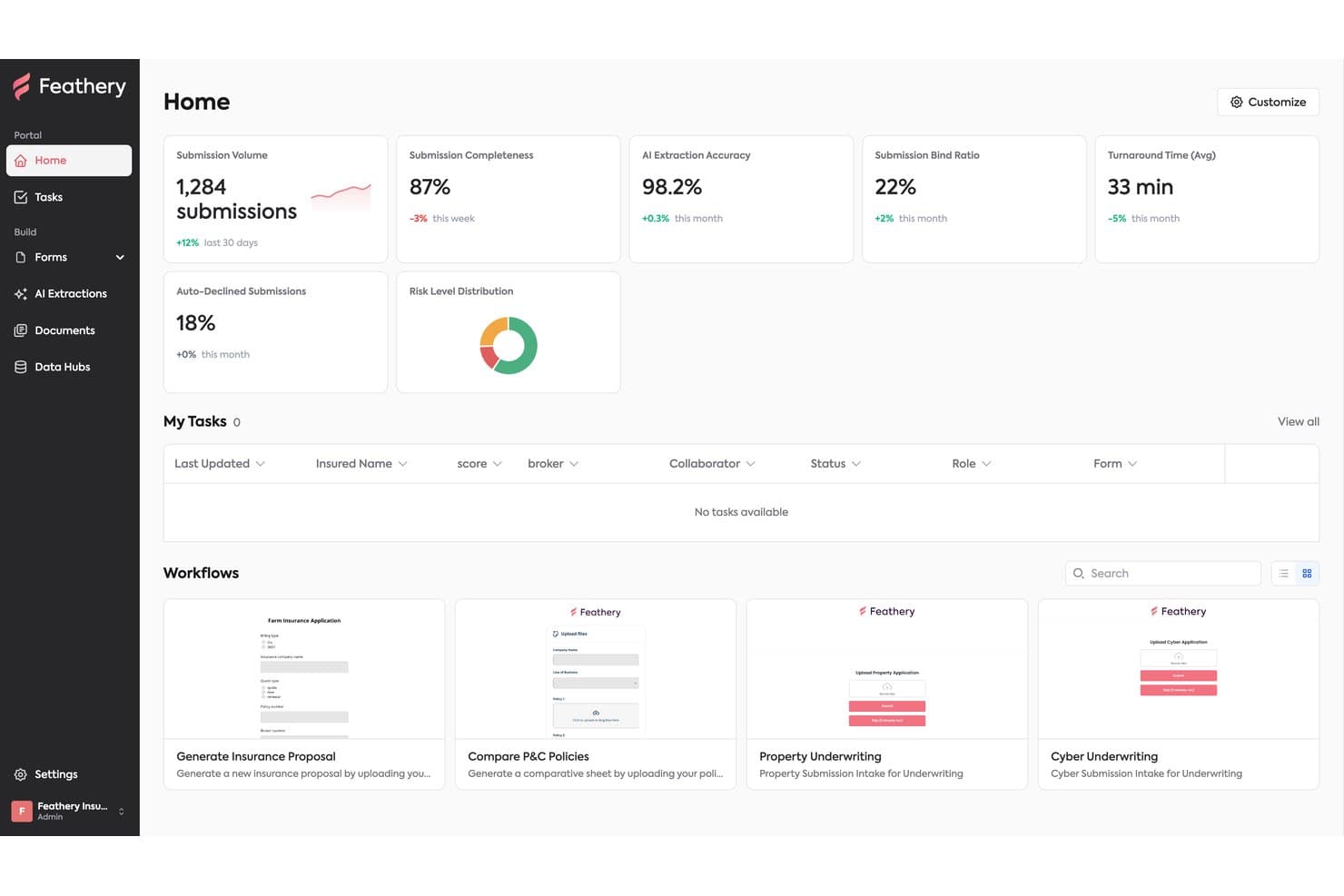
Feathery tracks submissions, AI accuracy, and workflows in one dashboard. Feathery is a customizable form builder for revenue teams that need Typeform alternatives with flexible lead capture, data collection, and CRM-connected workflows.
Who Is Feathery Best For?
Revenue teams in financial services that need CRM-connected forms, client onboarding workflows, and structured data capture.
Why Feathery Is a Good Typeform Alternative
I picked Feathery because its CRM-connected forms and data capture support structured onboarding workflows. I use conditional logic to collect client details, then sync account-opening data with CRM and custodian systems. That fits financial services teams replacing basic Typeform questionnaires with guided intake and workflow handoffs.
Feathery Key Features
- No-code form builder: Build forms with 25+ field types and reusable components.
- File uploads: Accept PDFs, images, spreadsheets, Word files, and audio.
- E-signatures: Add legally compliant e-signature workflows to documents.
- CAPTCHA verification: Add CAPTCHA checks to validate form submissions.
Feathery Integrations
Feathery offers integrations with Salesforce, HubSpot, Applied Epic, Charles Schwab, Plaid, Stripe, Calendly, ActiveCampaign, PostgreSQL, and Segment. It also supports Zapier, Power Automate, webhooks, and API connectors for custom integrations.
Pros and Cons
Pros:
- Responsive support helps resolve implementation questions
- Advanced logic fits complex onboarding workflows
- Drag-and-drop design produces polished intake forms
Cons:
- Less suitable for basic forms
- Advanced setups can challenge nontechnical users
Learn more about Feathery: Best for forms with no submission caps
- 7-day free trial
- From $49/month (billed annually)
Visit WebsiteCustomer Rating:4.7/5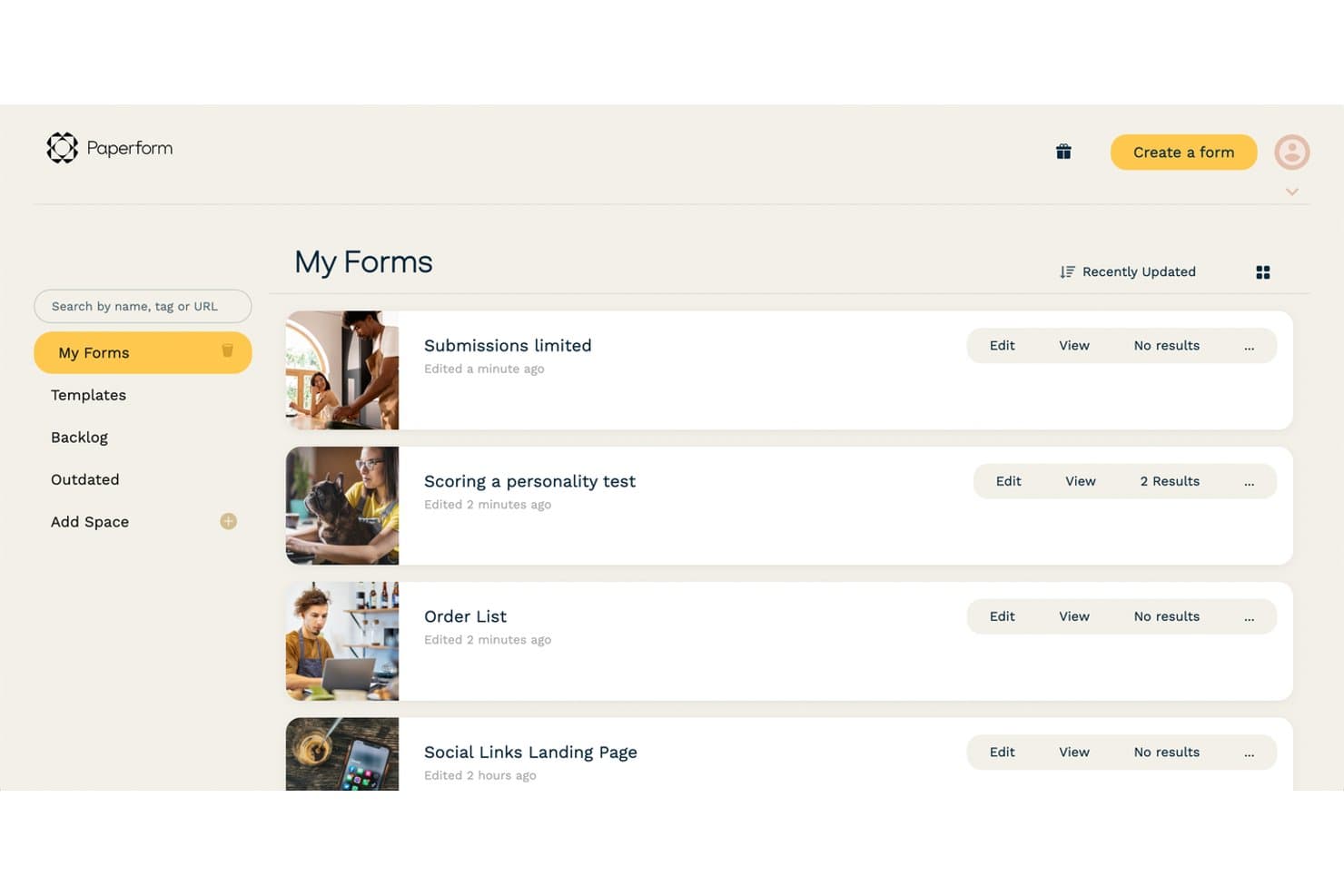
Paperform lets users manage multiple forms from a clean dashboard. Paperform is a branded online form builder for marketers, agencies, and service teams seeking a Typeform alternative for lead capture, client intake, payments, and bookings without relying on developers.
Who Is Paperform Best For?
Paperform suits marketers, agencies, and service teams that need branded forms for lead capture, client intake, payments, or bookings.
Why Paperform Is a Good Typeform Alternative
I picked Paperform because it’s best for forms with no submission caps, which suits lead capture campaigns with high response volumes. I use its branded forms to collect prospect details, accept payments, or manage booking requests in one workflow.
Paperform Key Features
- Conditional logic: Display questions based on previous answers.
- AI form creation: Generate forms and receive logic or calculation suggestions.
- Templates: Start with 30,000+ prebuilt templates.
- App integrations: Connect forms to 2,000+ apps through native integrations, webhooks, Zapier, and Make.
Paperform Integrations
Paperform connects forms to 2,000+ apps through native integrations, webhooks, Make, and Zapier.
Pros and Cons
Pros:
- Payments and bookings fit form workflows
- Page-style layouts support branded experiences
- No submission caps for high-volume forms
Cons:
- Advanced forms require more configuration
- Less conversational than Typeform’s interface
Learn more about Paperform: Best for research-grade survey analytics
- Free plan available
- From $30/user/month (billed annually)
Visit WebsiteCustomer Rating:4.6/5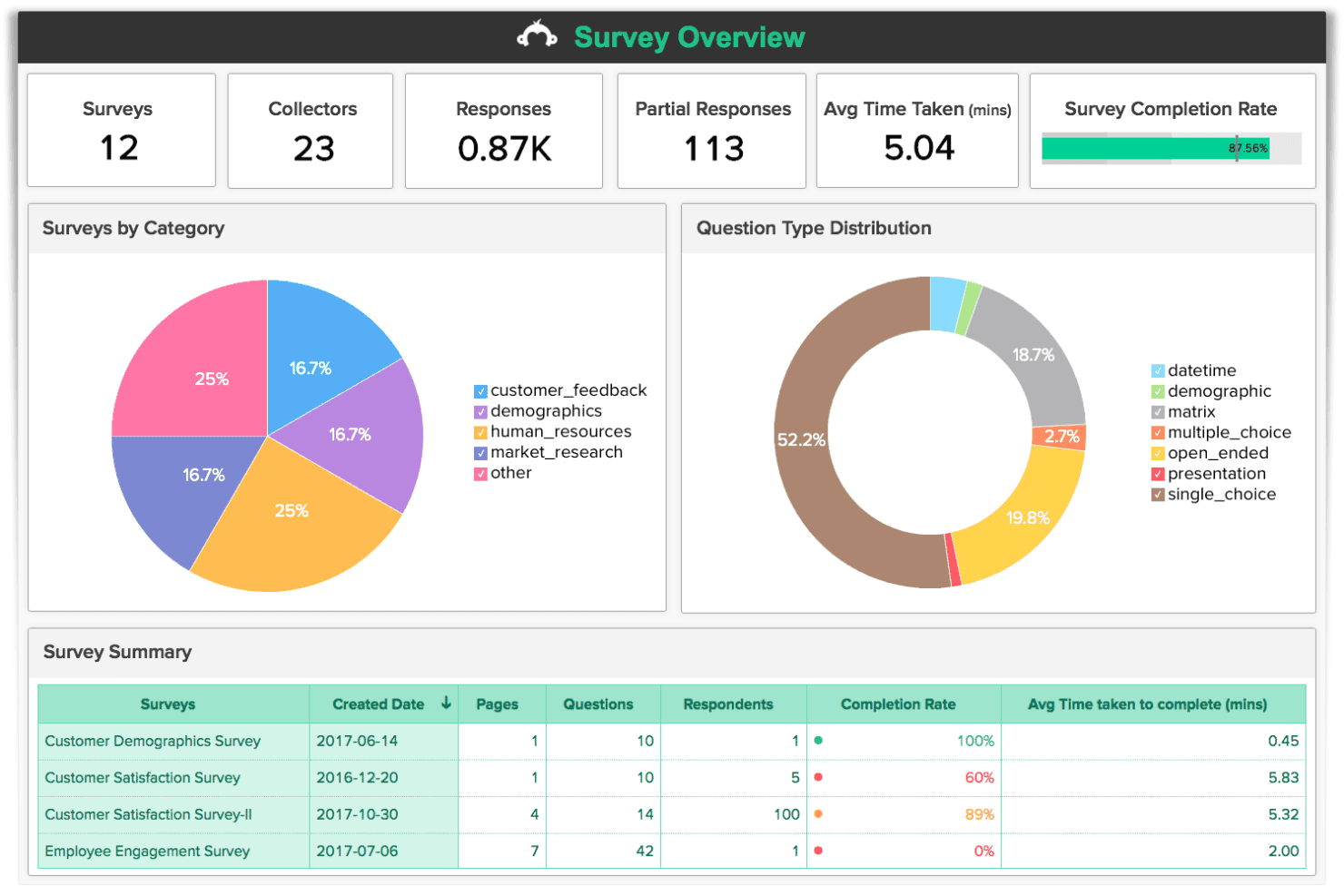
SurveyMonkey tracks response rates, completion data, and question types at a glance. SurveyMonkey is an online survey and form platform for teams seeking a Typeform alternative to capture prospect information, collect feedback, and turn responses into usable lead data, and is best for research-grade survey analytics.
Who Is SurveyMonkey Best For?
SurveyMonkey suits research, insights, and RevOps teams that need structured surveys, detailed response analysis, and reporting.
Why SurveyMonkey Is a Good Typeform Alternative
I picked SurveyMonkey because its research-grade survey analytics support lead capture beyond basic form submissions. I use question logic to tailor qualification paths, then apply filters and cross-tab analysis to compare responses by segment. That helps my team identify high-intent prospects and route follow-up based on evidence.
SurveyMonkey Key Features
- Survey templates: Choose from 400+ templates for registrations, feedback, and research.
- Online forms: Create forms for event registrations and prospect information.
- Multilingual surveys: Build surveys in supported languages, including English, Spanish, and Japanese.
- Integrations: Connect SurveyMonkey with supported third-party tools.
SurveyMonkey Integrations
SurveyMonkey offers 200+ pre-built integrations through its App Directory, including Salesforce, Microsoft Power BI, Tableau, Microsoft Teams, Slack, Google Sheets, Microsoft Excel, Marketo, Zendesk, and Zoom. It also supports Zapier and provides an API for custom integrations.
Pros and Cons
Pros:
- Advanced question logic supports qualification paths
- Extensive templates for research surveys
- Detailed filters and cross-tab analysis
Cons:
- Free plan restricts reporting and responses
- Design feels less conversational than Typeform
Learn more about SurveyMonkey: Best for forms with built-in CRO and lead routing
- Free plan available
- From $15/month
Visit WebsiteCustomer Rating:5/5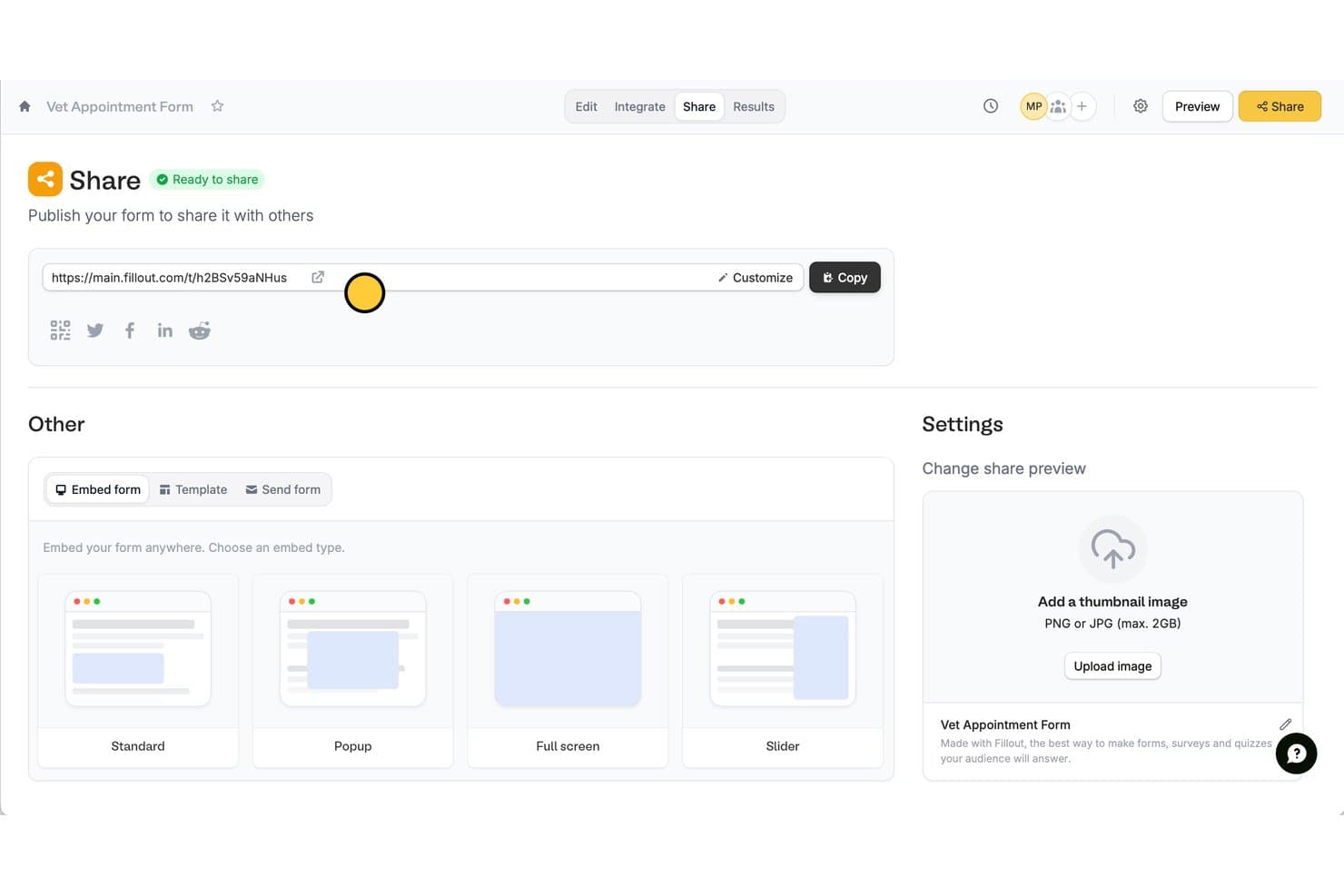
FillOut lets users share forms via link, embed, or social media. Fillout is a flexible form builder for marketing, sales, and operations teams seeking a Typeform alternative for branded lead capture, smart routing, embedded forms, and connected data intake.
Who Is Fillout Best For?
Fillout suits marketing and revenue operations teams that need branded forms, conditional routing, and connected data intake without building custom workflows.
Why FillOut Is a Good Typeform Alternative
I picked Fillout because its forms support built-in CRO and lead routing. I use branded forms with conditional logic to qualify leads, then route submissions based on answers, such as company size or product interest. Connected data intake keeps each response tied to the right revenue workflow.
FillOut Key Features
- Drag-and-drop builder: Create forms from scratch without coding.
- Custom domain sharing: Publish forms through your own domain or QR code.
- Response editing: Let respondents update existing submissions through login forms.
- Analytics and views: Review response data through flexible views and analytics.
FillOut Integrations
Fillout offers 50+ native integrations, including Airtable, HubSpot, Notion, Stripe, Google Sheets, Salesforce, Slack, Calendly, and ClickUp, plus Zapier. It also supports webhooks for custom REST API connections.
Pros and Cons
Pros:
- Respondents can edit existing submissions
- Conditional fields adapt each respondent’s path
- Built-in scoring supports qualified lead routing
Cons:
- Complex conditional flows require careful testing
- Display-only fields need awkward workarounds
Learn more about FillOut: Best for forms with built-in CRM and scoring
- 14-day free trial
- From $29/month (billed annually)
Visit WebsiteCustomer Rating:4.5/5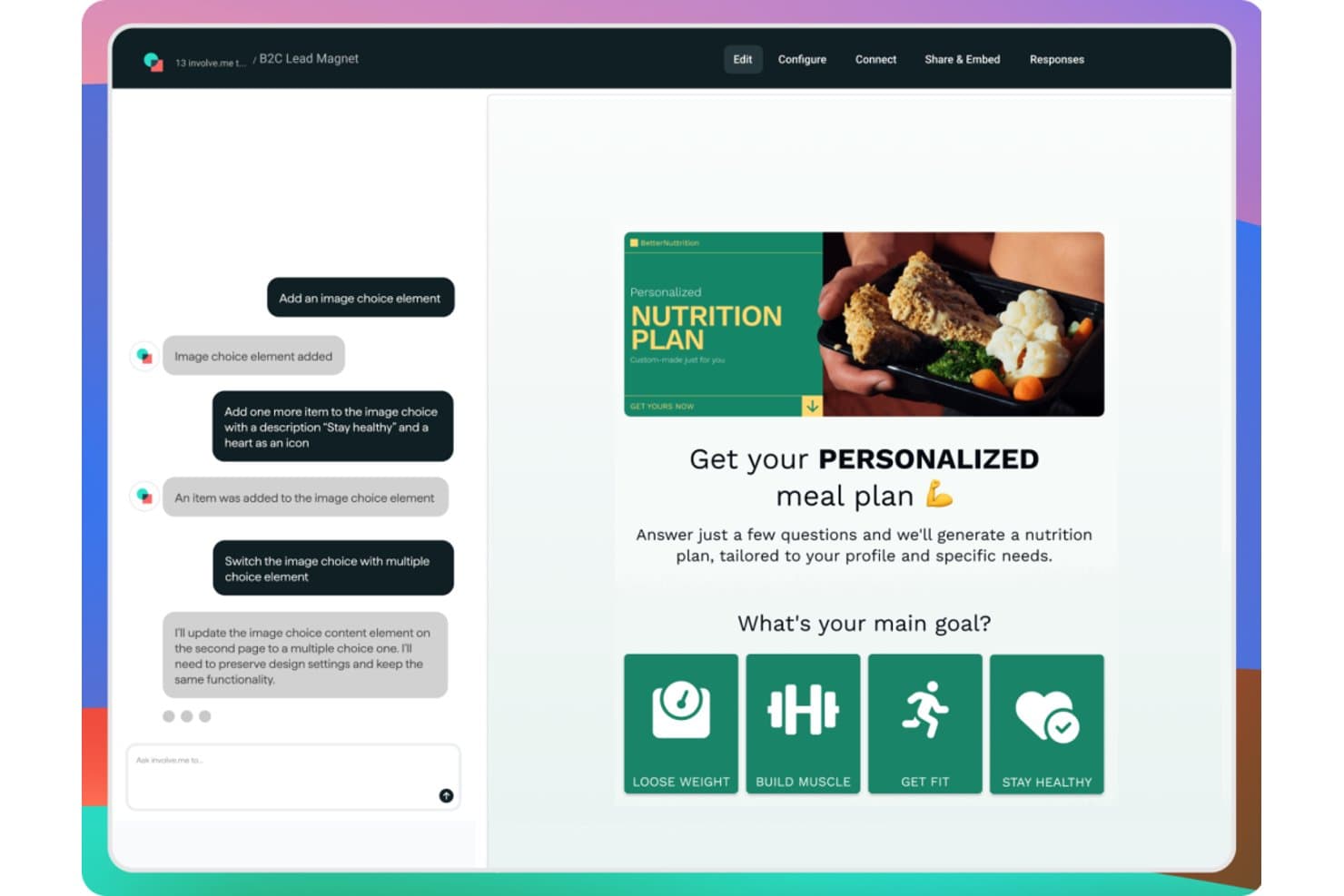
involve.me lets users build personalized quizzes with an AI chat interface. involve.me is a no-code lead capture platform for businesses that need interactive quizzes, calculators, and forms to qualify prospects, personalize follow-up, and manage contacts without stitching together multiple tools.
Who Is involve.me Best For?
involve.me suits marketing and RevOps teams that need interactive forms to capture, score, and qualify leads while managing contacts in one workspace.
Why involve.me Is a Good Typeform Alternative
I picked involve.me because it combines interactive forms with built-in CRM and scoring. I use quizzes, calculators, and forms to capture contacts, qualify leads, and route follow-up based on responses. This gives me more context than a standalone form when evaluating Typeform alternatives.
involve.me Key Features
- Email automation: Trigger personalized email sequences from responses, clicks, outcomes, and payments.
- Payment collection: Accept one-time payments or subscriptions through Stripe, PayPal, and Mollie.
- A/B testing: Test questions, designs, scoring rules, and outcome pages within the platform.
- Native integrations: Connect with HubSpot, Salesforce, Mailchimp, Zapier, webhooks, and other tools.
involve.me Integrations
involve.me offers native integrations with HubSpot, Salesforce, and Mailchimp, plus webhooks for custom connections and Zapier.
Pros and Cons
Pros:
- Outcome pages personalize follow-up paths
- Calculators capture richer buyer context
- Built-in lead scoring qualifies responses
Cons:
- Analytics can feel limited for deeper reporting
- Advanced logic takes setup time
Learn more about involve.me: 10Best for forms requiring multiple payment gateways
Jotform
- Free plan available
- Pricing upon request
Visit WebsiteCustomer Rating:4.7/5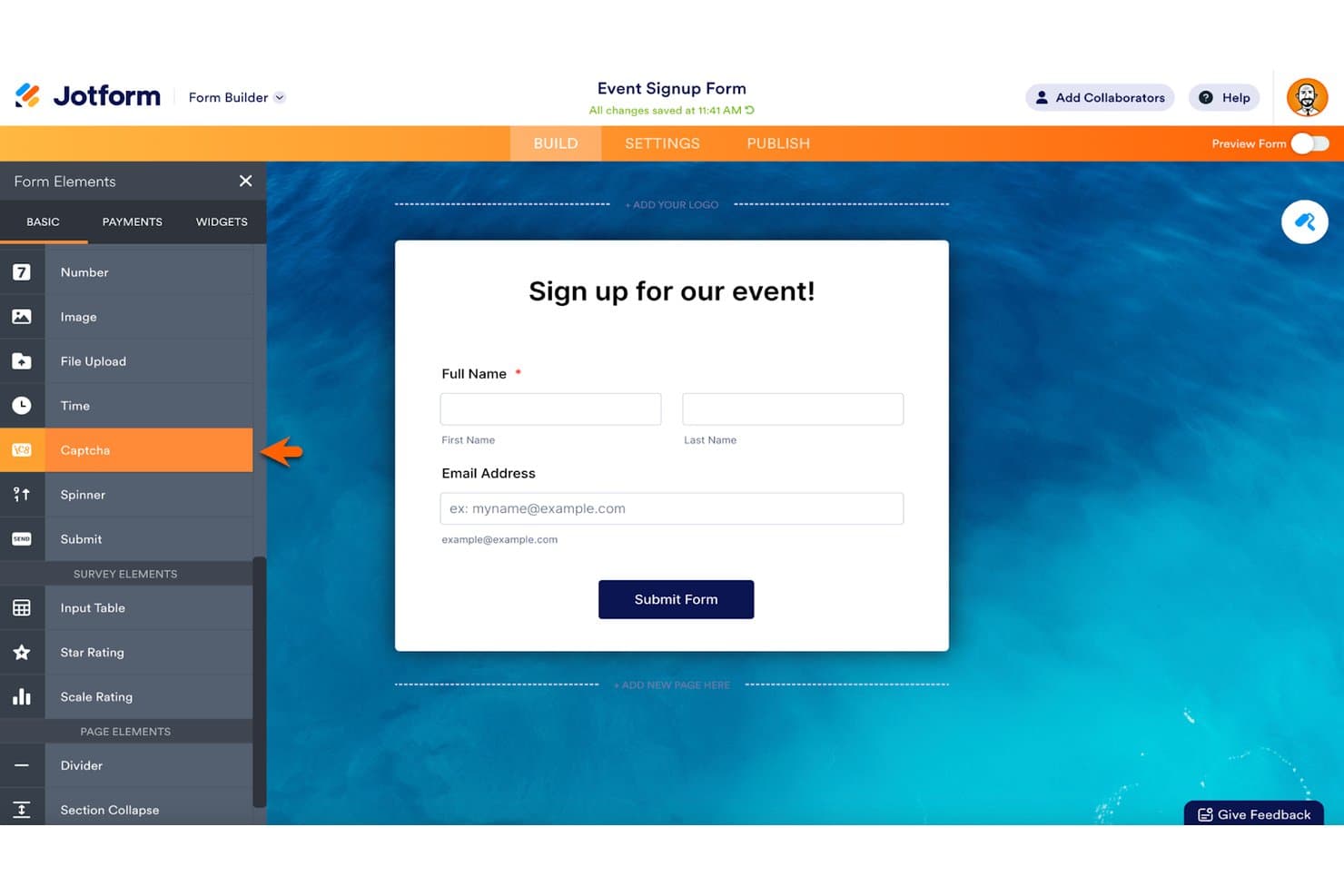
Jotform lets users build event signup forms with drag-and-drop elements. Jotform is a no-code form builder for teams that need customizable lead capture, conditional logic, payment collection, and integrations with CRMs, email marketing services, and other business apps.
Who Is Jotform Best For?
Jotform suits revenue operations teams that collect leads, payments, and customer data through customizable forms connected to business apps.
Why Jotform Is a Good Typeform Alternative
I picked Jotform because its forms support 40+ payment gateways, giving my team more options for paid lead capture. I use conditional logic to show relevant questions based on each response, then collect payments in the same form. That fits campaigns where prospects need to submit details and pay a deposit.
Jotform Key Features
- No-code form builder: Create forms without writing code.
- Custom branding: Add your logo, fonts, and colors.
- Business app integrations: Connect submissions with 150+ business apps.
- Submission reports: Generate reports from collected form data.
Jotform Integrations
Jotform offers 150+ native integrations, including Salesforce, HubSpot, Google Sheets, Airtable, Slack, Asana, Trello, Stripe, PayPal, and Square, plus Zapier.
Pros and Cons
Pros:
- Extensive templates accelerate form creation
- Conditional logic handles complex questionnaires
- Supports over 40 payment gateways
Cons:
- Advanced customization requires technical workarounds
- Complex forms can experience slower loading
Learn more about Jotform:
Andre Typeform-alternativer
Her er noen flere Typeform-alternativer som ikke kom med på kortlisten min, men som likevel er verdt å se nærmere på:
- 11SurvicateBest for multichannel CX surveys with CRM sync
- 12Zonka FeedbackBest for closed-loop CX feedback across channels
- 13SurveySparrowBest for chat-style surveys with NPS built in
- 14WPFormsBest for WordPress-native form analytics
- 15AlchemerBest for research-grade surveys with CRM sync
- 16FormAssemblyBest for compliance-grade forms with Salesforce sync
- 17Zoho FormsBest for Zoho ecosystem-native form capture
- 18FormbricksBest for open-source, self-hosted survey forms
- 19HubSpot for HealthcareBest for CRM-native lead capture and automation
How I Evaluate Typeform Alternatives
I split my evaluation into three parts. First, core functionality—the alternative must let you build custom forms without code and reliably capture and export response data; this carries the most weight. Second, I look for standout features like conversational one-question flow or AI-assisted form generation. Third, I consider pricing model fit and CRM compatibility beyond the feature set itself.
Core Functionality (Table Stakes For This List)
When I'm selecting tools for my list, I score each one on a scale from 0 (does not offer the functionality) to 5 (excels in this area) for each core functionality listed below. I then convert the total into a percentage to help assess each tool's overall fit, with extra weight on any functionalities I've deemed essential.
- Custom Form Builder (Essential): I look for no-code builders that go beyond basic templates, checking whether you can control layout, branding, and multi-step flow to match your site experience.
- Data Collection and Export (Essential): Each tool needs to capture complete response data and get it out reliably, whether that's CSV export, real-time API access, or direct CRM sync like you'd set up with Salesforce or HubSpot.
- Logic and Branching: I evaluate how well conditional paths adapt the respondent journey, such as routing a high-intent lead to a demo booking while sending a low-score contact to a nurture sequence.
- Third-Party Integrations: The integration library matters, but so does depth. I check whether CRM field mapping, webhook triggers, and connections to tools like Slack or marketing automation platforms actually pass structured data, not just notifications.
- Response Analytics: Submission counts alone aren't enough. I look for drop-off reporting by question, completion rate trends, and segment-level views that help you spot where leads abandon a form.
- Multi-Format Question Types: A solid mix of input types—rating scales, file uploads, date pickers, payment fields—determines how many use cases one platform can cover without bolting on extra tools.
Once I have a list of tools that meet the criteria, I consider what sets each platform apart.
Differentiating Factors (What Sets Vendors Apart)
Here's how I compare and contrast different vendors:
Standout Features
I look for AI-assisted form generation that goes beyond layout suggestions—tools like Typeform and FORT can auto-generate follow-up questions or summarize open-text responses, which cuts build time when you're launching across multiple campaigns. Payment collection fields matter too, especially for event registrations or deposit workflows where routing a buyer to a separate checkout adds friction and kills conversion. I also evaluate whether a platform supports conversational one-question flow, since presenting questions one at a time consistently lowers drop-off on longer qualification forms.
Beyond Features
I evaluate how each tool's pricing model scales with submission volume, since a form that works for one campaign can blow past response caps when you roll it out across business units. CRM compatibility matters just as much—I check whether a platform offers native two-way sync with Salesforce or HubSpot, or if you're stuck routing data through Zapier to keep lead routing and follow-up automation intact. I also look at white-labeling depth, because forms on a custom domain with no vendor watermark keep the buyer journey cohesive.
Hvorfor se etter Typeform-alternativer?
Selv om Typeform er et godt valg for programvare for innsamling av leads, ser noen brukere etter alternative løsninger for spesifikke driftsbehov. Det kan hende du ser etter et Typeform-alternativ fordi …
- Innsendingsgrenser gjør kampanjer med høyt volum vanskeligere å budsjettere
- CRM-arbeidsflyter trenger mer detaljert feltkartlegging og ruting av leads
- Innsamling av betalinger krever flere betalingsgateway-alternativer
- Rapportering for undersøkelser trenger analyse av frafall på spørsmålsnivå
- Komplekse kvalifiseringsskjemaer trenger avanserte forgreningskontroller
- Virksomhetsteam trenger sterkere styring og bedre datakontroller
Hvis noe av dette høres kjent ut, har du kommet til rett sted. Listen min inneholder flere alternativer innen programvare for innsamling av leads som passer bedre for team som møter disse utfordringene med Typeform og ser etter alternative løsninger.
Viktige funksjoner i Typeform
Her er noen av de viktigste funksjonene i Typeform, slik at du kan sammenligne hva alternative løsninger tilbyr:
- Skjemabygger uten kode: Opprett skjemaer, undersøkelser, quizer, avstemninger, søknader og registreringsflyter uten å kode. Dra-og-slipp-redigeringsverktøyet lar deg tilpasse spørsmål, profilering, oppsett og maler for ulike kampanjer.
- Samtalebasert spørsmålsflyt: Presenter ett spørsmål om gangen i stedet for å vise et langt skjema. Dette formatet skaper en veiledet opplevelse for respondenten ved kvalifisering av potensielle kunder, innsamling av tilbakemeldinger og kundeundersøkelser.
- Betinget logikk: Vis oppfølgingsspørsmål basert på tidligere svar. Du kan sende respondenter gjennom ulike veier, samle inn relevante detaljer og skille potensielle kunder med høy kjøpsintensjon fra innsendinger med lavere prioritet.
- KI-assistert skjemautforming: Beskriv målet ditt og bruk Creator AI til å generere et utkast til et skjema med spørsmål og profilering. Du kan redigere resultatet før du publiserer det for en kampanje eller arbeidsflyt.
- Adaptive oppfølgingsspørsmål: Interaction AI kan generere relevante oppfølgingsspørsmål etter hvert som respondentene fyller ut et skjema. Dette bidrar til å fange opp mer kontekst fra åpne svar uten at du må opprette alle mulige veier manuelt.
- Integrasjoner og automatiseringer: Koble Typeform til verktøy som HubSpot, Salesforce, Slack, Mailchimp, Google Sheets, Stripe, Calendly og Notion. Automatiseringer kan utløse varsler, ruting av potensielle kunder, oppfølgings-e-poster eller etterfølgende oppgaver.
- Responsanalyse: Se gjennomføringsgrader, frafall på spørsmålsnivå, utvikling i svar, sammenligninger av respondenter, stemning og temaer i fritekst. Disse visningene hjelper inntektsteam med å identifisere hvor potensielle kunder forlater skjemaer, eller gir nyttige signaler for kvalifisering.
- Betalinger og tidsplanlegging: Ta imot betalinger gjennom Stripe eller PayPal, og la respondentene planlegge møter gjennom Google Kalender eller Calendly. Disse alternativene støtter betalte registreringer, depositum, konsultasjoner og direkte overlevering til salgsteamet.
- Multimediesvar: Samle inn video- og lydsvar i tillegg til skriftlige svar. Dette gir team innen undersøkelser, rekruttering og kundesuksess mer kontekst enn strukturerte felt alene kan gi.
Kostnader og priser
Når du velger alternativer til Typeform, må du forstå de tilgjengelige prismodellene og abonnementene. Kostnadene varierer basert på funksjoner, teamstørrelse, tillegg og svarvolum. Tabellen nedenfor oppsummerer vanlige abonnementer, gjennomsnittlige prisintervaller og typiske funksjoner som er inkludert i alternative løsninger til Typeform.
Sammenligningstabell for alternativer til Typeform
| Abonnementstype | Gjennomsnittlig pris | Vanlige funksjoner |
|---|---|---|
| AbonnementstypeGratisabonnement | Gjennomsnittlig pris$0/måned | Vanlige funksjonerGrunnleggende skjemabygger, begrenset antall svar, standardmaler og brukerstøtte fra fellesskapet. |
| AbonnementstypePersonlig abonnement | Gjennomsnittlig pris$10-$30 per bruker/måned | Vanlige funksjonerTilpasset profilering, utvidede svargrenser, betinget logikk og grunnleggende integrasjoner. |
| AbonnementstypeBedriftsabonnement | Gjennomsnittlig pris$30-$100 per bruker/måned | Vanlige funksjonerAvansert analyse, betalingsinnkreving, teamsamarbeid, CRM-integrasjoner og prioritert brukerstøtte. |
| AbonnementstypeEnterprise-abonnement | Gjennomsnittlig pris$500-$2,000/måned | Vanlige funksjonerTilpassede svargrenser, avanserte styringskontroller, enkel pålogging, revisjonslogger og dedikert brukerstøtte. |