

Programvare for håndtering av e-postlister hjelper deg med å organisere kontakter, automatisere kommunikasjon og målrette deg mot riktig målgruppe – noe som gjør det mye enklere å håndtere flere kampanjer uten å bli overveldet.
Som en som har testet en rekke slike verktøy innen inntektsdrift, skal jeg vise deg den beste programvaren for håndtering av e-postlister, hvilke funksjoner de tilbyr, og hvordan de kan hjelpe teamet ditt med å holde oversikten og lykkes.
Why Trust Our Software Recommendations
6,700+
Reviews
20
Industry experts
16+
Evaluation factors
14
Years
Our reviews reflect our independent judgment—not a sales pitch. Learn how we stay transparent.
For this guide, we evaluated tools using hands-on testing and independent research, scoring tools using our selection criteria.
Our reviews reflect our human editorial judgment, not a sales pitch.
Sammenligningstabell: Programvare for håndtering av e-postlister
Denne sammenligningstabellen oppsummerer prisopplysningene for mine utvalgte favoritter blant programvare for håndtering av e-postlister.
| Tool | Best For | Trial Info | Price | ||
|---|---|---|---|---|---|
| 1 | Best with advanced B2B data enrichment filters | Free plan + 14-day free trial + free demo available | From $49/user/month (billed annually) | Website | |
| 2 | Best for real-time email verification | Free trial available | from $4.9 for 2000 email credits | Website | |
| 3 | Best for email validation | Free demo available | From $15/2,000 credits | Website | |
| 4 | Best for beginners with templates | 30-day free trial | From $7/month (billed annually) | Website | |
| 5 | Best for sharing curated product lists | 14-day free trial available | From $33/month (billed annually) | Website | |
| 6 | Best for developers managing email at scale | Free plan + free demo + 30-day free trial available | From $15/month | Website | |
| 7 | Best for personalized ecommerce marketing | 14-day free trial | From $39/month | Website | |
| 8 | Best for all-in-one marketing automation | 14-day free trial + free demo available | From $15.58/month (billed annually) | Website | |
| 9 | Best for managing growing contact lists | Free plan available | From $19/month | Website | |
| 10 | Best for small business email tools | 14-day free trial + free demo available | From $12/month | Website |


Anmeldelser av den beste programvaren for håndtering av e-postlister
Nedenfor finner du mine detaljerte sammendrag av den beste programvaren for håndtering av e-postlister som kom med på kortlisten min. Anmeldelsene mine gir et grundig innblikk i de viktigste funksjonene, fordeler & ulemper, integrasjoner og ideelle bruksområder for hvert verktøy, slik at du kan finne det beste alternativet for deg.
 Best with advanced B2B data enrichment filters
- Free plan + 14-day free trial + free demo available
- From $49/user/month (billed annually)
Visit WebsiteCustomer Rating:4.5/5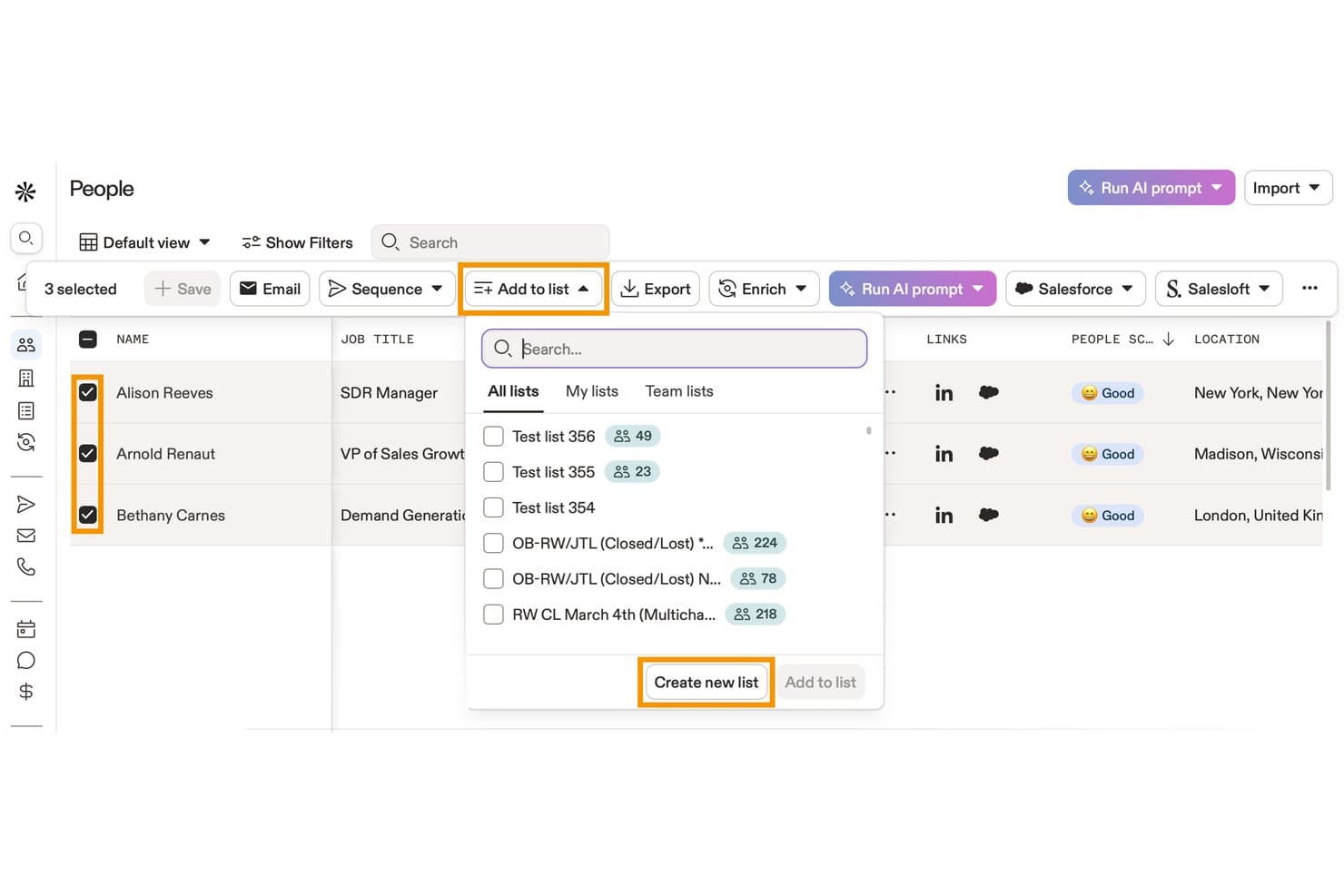
Apollo.io offers an 'Add to list' dropdown feature that lets users add selected contacts to existing lists or create a new list directly from the People view. Apollo.io is a B2B sales intelligence and engagement platform that combines a 210M+ contact database with list building, data enrichment, email sequencing, and CRM sync tools.
Who Is Apollo.io Best For?
Apollo.io suits outbound-focused revenue teams at SMBs and mid-market companies that need to build, enrich, and action prospect lists without juggling multiple tools.
Why I Picked Apollo.io
Apollo.io earns its spot on my shortlist because the enrichment filters go far deeper than most list tools offer. With 65+ attributes spanning job title, technographics, company headcount, funding stage, and topic-level buying intent, I can define an ICP and immediately surface a matching contact list. I also use the saved personas feature to lock those filter combinations in place, so my team builds from the same criteria every time rather than recreating searches from scratch.
Apollo.io Key Features
- Real-time CRM sync: Instantly updates and reflects changes between Apollo and connected CRMs like Salesforce or HubSpot.
- Bulk list import with field mapping: Supports uploading large contact lists and mapping custom fields for accurate data alignment.
- Automated email sequences: Enables users to schedule and send multi-step outreach campaigns to segmented lists.
- Engagement analytics dashboard: Tracks opens, clicks, replies, and unsubscribes at the individual contact level for each campaign.
Apollo.io Integrations
Apollo.io offers native integrations with Salesforce, HubSpot, Pipedrive, Marketo, Outreach, SalesLoft, and SendGrid. It connects with Zapier and provides an API for custom integrations.
Pros and Cons
Pros:
- Saved personas lock in repeatable ICP searches
- Built-in intent signals flag high-priority accounts
- 65+ data filters for precise list segmentation
Cons:
- Email sending limits cap high-volume outreach
- Contact data accuracy inconsistent outside North America
Learn more about Apollo.io: Best for real-time email verification
- Free trial available
- from $4.9 for 2000 email credits
Visit WebsiteCustomer Rating:4.4/5
MillionVerifier identifies invalid addresses in real-time to protect your sender score. MillionVerifier is a specialized deliverability platform built for high-growth marketing teams that need to stop email bounce issues before they start. While many tools focus on cleaning existing databases, this solution prioritizes the point of entry, ensuring only high-value, authentic leads enter your marketing funnel. By providing a secure infrastructure for real-time validation, MillionVerifier addresses the critical need for maintaining a pristine sender reputation across industries where inbox placement is a primary driver of revenue.
Why I Picked MillionVerifier
I selected MillionVerifier as the best for real-time email verification because of its exceptionally low-latency validation engine. While bulk cleaning is common, MillionVerifier excels at "live" verification, allowing you to catch typos, invalid domains, and risky addresses the moment a user hits "submit" on your signup form. This proactive approach not only keeps your database clean but also prevents the damage to sender authority that occurs when sending "welcome" sequences to non-existent accounts.
MillionVerifier Key Features
In addition to its live validation capabilities, MillionVerifier provides several technical tools to maintain long-term list hygiene:
- EverClean Automation: An automated maintenance system that connects directly to your ESP to identify and remove decaying email addresses on a daily basis without manual file uploads.
- Bulk Verifier Pro: A high-speed engine designed to process millions of records at once, providing detailed "safe-to-send" reports for legacy databases or purchased leads.
- Disposable Email Detection: Sophisticated detection logic that identifies and filters out "burnable" or temporary email addresses often used to bypass gated content.
- Global Data Privacy Compliance: Built with a security-first approach, the platform ensures all verification processes fully adhere to GDPR and international data protection standards.
MillionVerifier Integrations
Integrations include Mailchimp, Mailgun, Mailjet, Elastic Email, Campaign Monitor, Active Campaign, Zoho CRM, and Reply.
Pros and Cons
Pros:
- Automated workflows improve list management efficiency
- Flexible with various spreadsheet formats for ease of use
- High accuracy in verifying standard email types
- Automated workflows improve list management efficiency
- Flexible with various spreadsheet formats for ease of use
- High accuracy in verifying standard email types
Cons:
- Absence of an affiliate program noted by users
- Lacks features for email finding or data enrichment
- Absence of an affiliate program noted by users
- Lacks features for email finding or data enrichment
Learn more about MillionVerifier: Best for email validation
- Free demo available
- From $15/2,000 credits
Visit WebsiteCustomer Rating:4.7/5
ZeroBounce validates emails, removes invalids, detects spam traps, and enhances data. ZeroBounce is an email validation tool aimed at marketers and businesses needing to maintain clean and accurate mailing lists. It helps in verifying email addresses to improve deliverability and engagement rates.
Why I picked ZeroBounce: ZeroBounce’s main function is to validate and clean email lists, ensuring your messages reach the right people. The tool removes invalid emails and identifies spam traps and abuse emails. It also provides real-time email validation, which is vital for those who frequently update their lists. Along with these top features, ZeroBounce’s email appending feature adds missing information to your contacts, enhancing data quality.
Standout features & integrations:
Features include an email scoring system that ranks emails based on their quality and engagement potential, a data appending service that enriches contacts with missing data such as names and location, and an API integration that allows for real-time validation directly from your platform.
Integrations include HubSpot, Mailchimp, SendGrid, ActiveCampaign, Mailgun, Campaign Monitor, AWeber, Constant Contact, Salesforce, and Zapier.
Pros and Cons
Pros:
- Detects spam traps effectively
- Data appending for contacts
- Accurate email validation
Cons:
- Occasional false positives
- No manual list review
Learn more about ZeroBounce: Best for beginners with templates
- 30-day free trial
- From $7/month (billed annually)
Visit WebsiteCustomer Rating:4.7/5
Moosend is beginner-friendly with easy templates and a drag-drop editor. Moosend is an email marketing tool designed for businesses of all sizes. It helps users create professional email campaigns, manage contacts, and automate marketing processes efficiently.
Why I picked Moosend: Moosend offers a straightforward platform ideal for beginners, thanks to its easy-to-use templates. The drag-and-drop email editor simplifies creating visually appealing campaigns without needing technical skills. It also includes segmentation and personalization features to target your audience effectively, and provides a 30-day free trial, so you can explore its features risk-free.
Standout features & integrations:
Features include a drag-and-drop email newsletter editor, A/B testing for content, and AI subject line optimization. The software also offers countdown timers and list segmentation to further enhance your campaigns.
Integrations include WordPress, Zapier, Magento, WooCommerce, Salesforce, HubSpot, PrestaShop, Mailchimp, and Shopify.
Pros and Cons
Pros:
- Real-time behavioral analytics
- Built-in landing page and form builders
- Advanced AI-powered personalization
Cons:
- Limited reporting customization
- Some advanced features need add-ons
Learn more about Moosend: 5Best for sharing curated product lists
Kit
- 14-day free trial available
- From $33/month (billed annually)
Visit WebsiteCustomer Rating:4.5/5
Kit organizes products visually with affiliate links, themed kits, and mobile support. Kit is a platform for creating and sharing curated product collections, primarily used by content creators, influencers, and enthusiasts. It helps users organize their favorite products into lists, making it easy to share recommendations with their audience.
Why I picked Kit: Kit offers a user-friendly interface that streamlines email marketing campaigns, enabling businesses to effectively manage subscriber lists and target audiences. Its AI-powered automation simplifies tasks like segmentation, personalized messaging, and performance tracking, making it an efficient tool for growing and nurturing email lists. Additionally, it allows users to create and showcase personalized recommendations for specific needs or niches, making it ideal for influencers, creators, and professionals.
Standout features & integrations:
Features include customizable product kits, mobile optimization for easy access, and the ability to embed lists directly on your platforms. It also offers simple tools for adding affiliate links, helping you monetize your recommendations effortlessly.
Integrations include Amazon, YouTube, Instagram, Twitter, Facebook, Pinterest, Shopify, WordPress, Squarespace, and Tumblr.
Pros and Cons
Pros:
- Monetization through affiliate links
- Mobile-friendly interface for easy use
- Ideal for content creators and influencers
Cons:
- Lacks advanced analytics for insights
- Limited customization for list designs
Learn more about Kit: Best for developers managing email at scale
- Free plan + free demo + 30-day free trial available
- From $15/month
Visit WebsiteCustomer Rating:4.4/5
Mailgun offers APIs, email validation, analytics, and bulk email support for developers. Mailgun is an email automation platform primarily used by developers for sending, receiving, and tracking emails. It offers high deliverability and advanced email validation to ensure messages reach the intended inboxes.
Why I picked Mailgun: Mailgun caters specifically to developers, providing powerful APIs for easy integration with various applications. Its email validation services enhance deliverability by verifying addresses before sending. The software’s detailed analytics also give insights into email performance, helping you tweak campaigns effectively, while its flexible infrastructure supports bulk email sending, making it suitable for businesses with large mailing lists.
Standout features & integrations:
Features include a strong API that allows you to send and receive welcome emails with ease. The platform also offers email validation services that help maintain a clean email list and detailed analytics and logs for tracking email performance and engagement.
Integrations include WordPress, Zapier, Slack, Magento, Shopify, Salesforce, HubSpot, WooCommerce, Heroku, and Microsoft Azure.
Pros and Cons
Pros:
- Detailed email analytics
- Flexible API integration
- High email deliverability rates
Cons:
- Can be slow for very large datasets
- Occasional email deliverability issues
Learn more about Mailgun: 7Best for personalized ecommerce marketing
Drip
- 14-day free trial
- From $39/month
Visit WebsiteCustomer Rating:4.4/5
Drip offers tailored ecommerce tools with segmentation, automation, and analytics. Drip is an email marketing automation tool designed for ecommerce businesses aiming to boost customer engagement and sales. It focuses on creating personalized customer journeys and automating marketing workflows.
Why I picked Drip: Drip excels in providing tailored marketing solutions for ecommerce businesses. The platform offers advanced segmentation and personalization to target specific customer groups effectively, while its visual workflow builder simplifies the process of setting up automated campaigns. Additionally, the software provides strong analytics to track performance and optimize your marketing strategy.
Standout features & integrations:
Features include advanced segmentation, allowing for precise targeting based on customer behavior, a visual workflow builder to help you create complex automation sequences with ease, and comprehensive analytics to measure the effectiveness of your campaigns and make data-driven decisions.
Integrations include Shopify, WooCommerce, Magento, BigCommerce, Zapier, Facebook, Instagram, PayPal, Stripe, and OptinMonster.
Pros and Cons
Pros:
- Detailed analytics capabilities
- Intuitive workflow builder
- Effective segmentation features
Cons:
- Occasional delays in email delivery
- Limited design options for email templates
Learn more about Drip: Best for all-in-one marketing automation
- 14-day free trial + free demo available
- From $15.58/month (billed annually)
Visit WebsiteCustomer Rating:4.2/5
GetResponse simplifies campaigns with automation, drag-drop editor, and analytics. GetResponse is a versatile marketing platform designed for businesses of all sizes, focusing on email marketing, lead generation, and campaign automation. It helps users create, manage, and analyze their marketing efforts through an intuitive and flexible interface.
Why I picked GetResponse: GetResponse combines email marketing with automation tools to simplify campaign management and enhance engagement. Its drag-and-drop email editor allows you to quickly design emails that look great on any device. You can also set up automated workflows to nurture leads or follow up with customers based on their behavior, while its built-in analytics help you monitor performance and make data-driven decisions.
Standout features & integrations:
Features include a landing page builder that helps you capture leads effectively, webinar hosting for engaging with your audience directly, and an autoresponder for automated follow-ups. You can also create advanced segmentation for targeting specific audience groups and use the conversion funnel feature for managing the entire customer journey.
Integrations include Shopify, WordPress, PayPal, WooCommerce, Salesforce, Magento, Zapier, Stripe, Facebook, and Google Analytics.
Pros and Cons
Pros:
- A/B testing for optimizing email content
- Conversion funnel to track user journeys
- Built-in webinar hosting for engagement
Cons:
- Occasional lag in reporting updates
- Limited advanced customization
Learn more about GetResponse: Best for managing growing contact lists
- Free plan available
- From $19/month
Visit WebsiteCustomer Rating:4.2/5
Elastic Email's dashboard gives quick access to contacts, campaigns, and reports Elastic Email helps marketing teams and small businesses organize contacts, segment audiences, and automate campaigns from one place. I like that it also combines email marketing with transactional email tools, which is useful if you need to manage subscriber lists and send different types of emails at scale.
Who Is Elastic Email Best For?
Agencies, marketers, and businesses that need to manage large email lists and send high-volume campaigns across multiple brands or clients.
Why I Picked Elastic Email
I picked Elastic Email because it works well for managing growing contact lists with audience segmentation, custom fields, and contact management tools in one place. You can group subscribers based on their data and campaign activity, which helps your team send more relevant emails to different audience segments. I also like that it supports automation, so your lists and campaigns can keep working as your subscriber base grows. This makes it a practical option for teams that need to organize contacts and run targeted email campaigns at scale.
Elastic Email Key Features
Some other features in Elastic Email help your team create, send, and track email campaigns more effectively:
- Contact import tools: Upload contacts through CSV files to add subscribers and keep your lists up to date.
- Email template editor: Create and customize marketing emails with a visual editor for faster campaign setup.
- Signup forms: Build forms to collect new subscribers and grow your contact lists directly from your website.
- Campaign reports: Review delivery, open, and click data to measure campaign performance and adjust future sends.
Elastic Email Integrations
Integrations include HubSpot, ClickUp, PayPal, WooCommerce, WordPress Sender, Integromat, Mautic, and Shopify.
Pros and Cons
Pros:
- Includes automation workflows for triggered and scheduled campaigns
- Offers API and SMTP options for flexible email integrations
- Supports high-volume email sending at a lower starting cost
Cons:
- Template editor offers limited design flexibility for custom emails
- Reporting tools lack the depth needed for advanced analysis
Learn more about Elastic Email: Best for small business email tools
- 14-day free trial + free demo available
- From $12/month
Visit WebsiteCustomer Rating:4.2/5
Constant Contact is intuitive and versatile, offering advanced email tools, templates, and analytics. Constant Contact is an email marketing tool geared towards small businesses and entrepreneurs. It focuses on simplifying email campaign management and customer engagement.
Why I picked Constant Contact: Constant Contact offers an intuitive interface that's perfect for small businesses with limited technical resources. Its email marketing features include customizable templates and an easy drag-and-drop editor. The software also provides tools for managing events and social media campaigns, while offering real-time tracking and analytics to help you understand campaign performance.
Standout features & integrations:
Features include event management tools that simplify organizing and promoting events, social media marketing features to help you manage your online presence effectively, and email automation capabilities that allow for personalized follow-ups with your audience.
Integrations include Shopify, WooCommerce, QuickBooks, Eventbrite, Salesforce, WordPress, Outlook, Google Analytics, Facebook, and Instagram.
Pros and Cons
Pros:
- AI content generator
- Event management tools
- High deliverability rates
Cons:
- Basic reporting capabilities
- Limited design customization
Learn more about Constant Contact:
Annen programvare for håndtering av e-postlister
Her er noen andre alternativer for programvare for håndtering av e-postlister som ikke kom med på kortlisten min, men som likevel er verdt å se nærmere på:
- 11BrevoBest for seamless ecommerce integrations
- 12EmailOctopusBest for cost-effective email marketing
- 13BrazeBest for cross-channel engagement
- 14BloomreachBest for personalized campaigns
- 15YotpoBest for enhancing ecommerce loyalty programs
- 16MailchimpBest for all-in-one marketing for SMBs
- 17FrontBest for team collaboration
How I Evaluate Email List Management Software
I evaluate tools in two layers: the baseline capabilities a tool must have—like segmentation, data hygiene, and CRM sync—and the differentiators that set one platform apart for RevOps.
Core Functionality (Table Stakes For This List)
When I'm selecting tools for my list, I rank each one on a scale from 0 (does not offer the functionality) to 5 (excels in this area) for each core functionality listed below. Then, I calculate the tool's total score into a percentage. Each tool needs to achieve a minimum total score of 65% to be considered for inclusion.
- List Segmentation: I look for dynamic segment builders that let you filter contacts by lifecycle stage, deal status, or engagement recency—not just static tags.
- Data Hygiene & Validation: Good tools catch duplicates and verify addresses before they tank your sender reputation, so I check for automated hygiene workflows.
- Subscription & Compliance Management: I evaluate how each platform handles opt-ins, suppression lists, and consent tracking across GDPR, CAN-SPAM, and CCPA.
- CRM & Data Sync: Real-time bidirectional sync with platforms like Salesforce or HubSpot matters here, especially for keeping lifecycle stage and owner data aligned.
- List Import & Enrichment: I check whether you can map custom fields during bulk imports and enrich records with firmographic data from native or partner sources.
- Engagement Tracking: Subscriber-level metrics like opens, clicks, and unsubscribes should feed back into list health dashboards, not just sit in campaign reports.
Once I have a list of tools that meet this criteria, I consider what sets each platform apart.
Differentiating Factors (What Sets Vendors Apart)
Here's how I compare and contrast different vendors:
Standout Features
Account-based segmentation is a big differentiator for RevOps teams running ABM motions—I look for tools that group contacts by target account and buying committee role. Deliverability monitoring also matters here, since inbox placement tests and sender reputation scoring protect the lists you've worked hard to build. I check for predictive lead scoring that surfaces high-intent subscribers for sales handoff based on engagement patterns rather than manual tagging.
Beyond Features
Integration depth is one of the first things I evaluate—a tool needs native connectors to your CRM, MAP, and sales engagement platforms, plus API access for custom workflows. Pricing transparency matters just as much for RevOps teams managing budgets across quarters, so I look at whether costs scale predictably with contact volume or send limits. I also check for reporting that ties list engagement back to pipeline metrics, since that's how you justify the tool's value to leadership.
Slik velger du programvare for håndtering av e-postlister
Det er lett å gå seg vill i lange funksjonslister og komplekse prismodeller. For å hjelpe deg med å holde fokus mens du går gjennom den unike prosessen med å velge programvare, får du her en sjekkliste over faktorer du bør ha i tankene:
| Faktor | Hva du bør vurdere |
| Skalerbarhet | Kontroller at programvaren kan vokse sammen med teamet ditt. Sjekk om den kan håndtere et økende antall abonnenter uten at ytelsen svekkes. |
| Integrasjoner | Se etter verktøy som kan integreres med det eksisterende CRM-systemet, markedsføringsplattformene og andre forretningsverktøyene dine for en sømløs arbeidsflyt. |
| Tilpasningsmuligheter | Vurder hvor mye du kan tilpasse programvaren til dine spesifikke behov, for eksempel egendefinerte felt eller personlige e-postmaler. |
| Brukervennlighet | Velg et brukervennlig grensesnitt som ikke krever omfattende opplæring, slik at teamet raskt kan tilpasse seg og bruke verktøyet effektivt. |
| Budsjett | Vurder kostnadene opp mot budsjettet ditt. Ta hensyn til både innledende og løpende utgifter, inkludert potensielle skjulte kostnader. |
| Sikkerhetstiltak | Prioriter verktøy med sterke tiltak for databeskyttelse, særlig hvis du håndterer sensitiv kundeinformasjon, for å opprettholde tillit og etterlevelse. |
| Kundestøtte | Se etter responsive og lett tilgjengelige støttealternativer som kan hjelpe deg når du støter på problemer eller trenger veiledning. |
| Rapporteringsverktøy | Se etter avansert analyse for å følge med på resultater og ta datadrevne beslutninger. |
Trender innen programvare for håndtering av e-postlister
I undersøkelsen min hentet jeg inn utallige produktoppdateringer, pressemeldinger og utgivelseslogger fra ulike leverandører av programvare for håndtering av e-postlister. Her er noen av de fremvoksende trendene jeg følger med på:
- AI-drevet personalisering: Flere verktøy bruker AI til å tilpasse e-postinnhold basert på brukeratferd og preferanser. Dette hjelper virksomheter med å øke engasjementet ved å levere mer relevante meldinger.
- Forbedret personvern: Etter hvert som personvernreglene blir strengere, retter leverandørene oppmerksomheten mot å tilby avanserte personvernfunksjoner. Denne trenden sikrer samsvar med lover som GDPR, noe som gir brukerne trygghet.
- Interaktive e-poster: Leverandører introduserer interaktive elementer som avstemninger og spørreundersøkelser direkte i e-poster. Denne trenden øker engasjementet ved å la mottakerne samhandle uten å forlate innboksen.
- Sanntidsanalyse: Det er en økende etterspørsel etter innsikt i sanntid for å optimalisere e-postkampanjer umiddelbart. Som et resultat forbedrer leverandørene analyseverktøyene sine for å levere handlingsrettede data om brukerinteraksjoner.
- Omnikanal-kommunikasjon: Verktøy for administrasjon av e-postlister utvides for å støtte kommunikasjon på tvers av flere kanaler. Denne trenden hjelper virksomheter med å levere et konsekvent budskap via e-post, SMS og sosiale medier.
Hva er programvare for administrasjon av e-postlister?
Programvare for administrasjon av e-postlister er et verktøy som hjelper deg med å organisere, segmentere og håndtere e-postkontaktene dine for markedsføringskampanjer. Markedsførere, eiere av små bedrifter og folk innen netthandel bruker det til å holde e-postlistene ryddige, sende de riktige meldingene til de riktige personene og se hva som fungerer. Det gjør det enkelt å administrere abonnenter, lar deg tilpasse e-postene dine og hjelper deg med å måle resultater, slik at du kan komme bedre i kontakt med målgruppen din.
Funksjoner i programvare for administrasjon av e-postlister
Når du velger programvare for administrasjon av e-postlister, bør du se etter følgende viktige funksjoner:
- Segmentering: Lar deg kategorisere kontaktene dine i bestemte grupper for målrettet markedsføring, noe som forbedrer engasjementsratene.
- Personalisering: Gjør det mulig å tilpasse e-poster med informasjon som er spesifikk for mottakeren, slik at meldingene blir mer relevante og effektive.
- Analyse: Gir innsikt i kampanjeresultater og hjelper deg med å analysere åpningsrater, klikkfrekvenser og generell effektivitet.
- Automatisering: Effektiviserer utsendingen av planlagte e-poster og oppfølgingssekvenser, sparer tid og sikrer konsekvent kommunikasjon.
- A/B-testing: Lar deg teste ulike e-postvarianter for å finne ut hvilken som fungerer best, slik at kampanjene dine kan optimaliseres.
- E-postbekreftelse: Holder kontaktlisten ren ved å identifisere og fjerne ugyldige e-postadresser, noe som forbedrer leveringsevnen.
- Interaktivt innhold: Inkluderer elementer som avstemninger og spørreundersøkelser i e-poster for å øke mottakernes engasjement.
- Verktøy for samsvar: Sikrer at markedsføringspraksisen din følger regler som GDPR, beskytter brukerdata og opprettholder tilliten.
- Omnikanalstøtte: Tilbyr kommunikasjon på tvers av flere kanaler, noe som legger til rette for en enhetlig markedsføringstilnærming.
- Oppdateringer i sanntid: Gir umiddelbar innsikt og dataoppdateringer, slik at du raskt kan justere markedsføringsstrategiene for e-post.
Fordeler med programvare for administrasjon av e-postlister
Implementering av programvare for administrasjon av e-postlister gir flere fordeler for teamet og virksomheten din. Her er noen av fordelene du kan se frem til:
- Forbedret målretting: Segmenteringsfunksjoner hjelper deg med å sende riktig budskap til riktig målgruppe, noe som øker engasjements- og konverteringsratene.
- Tidsbesparelser: Automatiseringsfunksjoner reduserer manuelle oppgaver, slik at teamet ditt kan fokusere på strategi og kreativt innhold.
- Forbedret personalisering: Personaliseringsverktøy gjør e-postene dine mer relevante, noe som fører til høyere åpnings- og klikkfrekvenser.
- Bedre beslutningstaking: Analyse gir innsikt i kampanjeresultater og hjelper deg med å ta velinformerte markedsføringsbeslutninger.
- Økt leveringsevne: E-postbekreftelse holder listen ren og sikrer at meldingene dine når de tiltenkte innboksene.
- Sikret samsvar: Verktøy for samsvar hjelper teamet ditt med å følge personvernregler, beskytte virksomheten og opprettholde kundenes tillit.
- Konsistent kommunikasjon på tvers av kanaler: Omnikanalstøtte gjør det mulig å levere et helhetlig budskap på tvers av ulike kommunikasjonsplattformer.
Kostnader og priser for programvare for administrasjon av e-postlister
Valg av programvare for administrasjon av e-postlister krever en forståelse av de ulike prismodellene og abonnementene som er tilgjengelige. Kostnadene varierer basert på funksjoner, teamstørrelse, tillegg og mer. Tabellen nedenfor oppsummerer vanlige abonnementer, gjennomsnittsprisene deres og typiske funksjoner som er inkludert i programvareløsninger for administrasjon av e-postlister:
Sammenligningstabell for programvare for håndtering av e-postlister
| Plantype | Gjennomsnittspris | Vanlige funksjoner |
| Gratisplan | $0 | Grunnleggende e-postkampanjer, begrenset automatisering og enkel analyse. |
| Personlig plan | $10-$30/bruker/måned | Tilpassbare maler, grunnleggende segmentering og planlagte e-poster. |
| Bedriftsplan | $30-$100/bruker/måned | Avansert automatisering, grundig analyse og funksjoner for A/B-testing. |
| Storbedriftsplan | $100+/bruker/måned | Personlig kundestøtte, avansert segmentering, støtte for flere kanaler og verktøy for etterlevelse. |
Vanlige spørsmål om programvare for håndtering av e-postlister
Her er noen svar på vanlige spørsmål om programvare for håndtering av e-postlister:
Hvordan håndterer jeg en e-postliste?
Håndtering av en e-postliste innebærer flere anbefalte fremgangsmåter, som å konfigurere en dobbel bekreftelsesprosess og bruke kontakttagger til segmentering. Rydd jevnlig opp i abonnentlisten for å fjerne inaktive abonnenter og legge til nye abonnenter. Personlig tilpasset e-postinnhold og kampanjer for å engasjere abonnenter på nytt bidrar også til å holde målgruppen engasjert.
Hvordan fungerer rensing av e-postlister?
Rensing av e-postlister gir listen din en ny start ved å fjerne falske eller ugyldige e-postadresser. Denne prosessen beskytter kampanjene dine mot problemer med levering og sikrer at meldingene når frem til de riktige personene. Regelmessig rensing av listen bidrar til å opprettholde en sunn abonnentbase.
Hva er fordelene med listehåndtering i e-postmarkedsføring?
Effektiv listehåndtering fører til bedre levering og høyere engasjementsrater. Det forbedrer kunderelasjonene og kan redusere kostnadene for e-postmarkedsføring ved å fokusere innsatsen på aktive abonnenter. Riktig listehåndtering støtter også målrettede markedsføringsstrategier.
Hvorfor er segmentering viktig i håndtering av e-postlister?
Segmentering lar deg kategorisere målgruppen basert på atferd eller demografi, slik at du kan gjennomføre målrettet markedsføring. Dette fører til mer personlig tilpassede meldinger, noe som forbedrer engasjements- og konverteringsratene. Segmentering bidrar til å sikre at e-postene dine er relevante for hver mottaker, og øker dermed den generelle effektiviteten til markedsføringskampanjene.