

Programvare for automatisering av salgs-e-post er en verdifull ressurs for alle bedrifter. Med riktig programvare kan team øke effektiviteten og produktiviteten betydelig, samt øke salget. Men det kan være utfordrende å finne riktig programvare for automatisering av salgs-e-post, særlig når det finnes så mange alternativer.
Med utgangspunkt i min erfaring med programvare for inntektsoperasjoner testet og sammenlignet jeg flere av de beste tilgjengelige løsningene for automatisering av salgs-e-post. Deretter samlet jeg resultatene i grundige vurderinger for å hjelpe deg med å finne den beste programvaren for dine unike behov. Jeg er sikker på at du vil finne din neste programvare for automatisering av salgs-e-post i listen nedenfor.
Hvorfor du kan stole på våre programvareanbefalinger
6,700+
Reviews
20
Industry experts
16+
Evaluation factors
14
Years
Anmeldelsene våre bygger på vår uavhengige vurdering, ikke på salgsargumenter. Les hvordan vi sørger for åpenhet.
I denne guiden har vi vurdert verktøyene gjennom praktisk testing og uavhengig research og gitt dem poeng ut fra våre utvelgelseskriterier.
Anmeldelsene våre bygger på vår egen redaksjonelle vurdering. De er ikke et salgsargument.
Sammenligningstabell for programvare for automatisering av salgs-e-post
Denne sammenligningstabellen oppsummerer prisdetaljene for mine beste utvalgte løsninger for automatisering av salgs-e-post:
| Tool | Best For | Trial Info | Price | ||
|---|---|---|---|---|---|
| 1 | Best for integrated B2B data enrichment | Free plan + 14-day free trial + free demo available | From $49/user/month (billed annually) | Website | |
| 2 | Best for drag-and-drop automations | 14-day free trial + free demo available | From $10.80/month | Website | |
| 3 | Best for native webinar engagement | 14-day free trial + free demo available | From $15.58/month (billed annually) | Website | |
| 4 | Best for email and SMS marketing | 14-day free trial + free demo available | From $20/month | Website | |
| 5 | Best for fully automated lead routing | Free trial available | From $47/month | Website | |
| 6 | Best for data-driven customer engagement | Free plan available | From $20/month | Website | |
| 7 | Best for CRM-aligned workflows | Free plan available | From $20/user/month | Website | |
| 8 | Best for time-saving marketing automation | 14-day free trial + free demo available | From $15/month (billed annually) | Website | |
| 9 | Best for personalized loyalty programs | Free plan available | From $9/month | Website | |
| 10 | Best for multichannel prospecting | 14-day free trial available | From $55/user/month (billed annually) | Website |


Vurderinger av den beste programvaren for automatisering av salgs-e-post
Nedenfor finner du mine detaljerte sammendrag av den beste programvaren for automatisering av salgs-e-post som kom med på kortlisten min. Vurderingene mine gir et detaljert innblikk i de viktigste funksjonene, fordelene & ulempene, integrasjonene og ideelle bruksområdene for hvert verktøy, slik at du kan finne det som passer best for deg.
 Best for integrated B2B data enrichment
- Free plan + 14-day free trial + free demo available
- From $49/user/month (billed annually)
Visit WebsiteCustomer Rating:4.5/5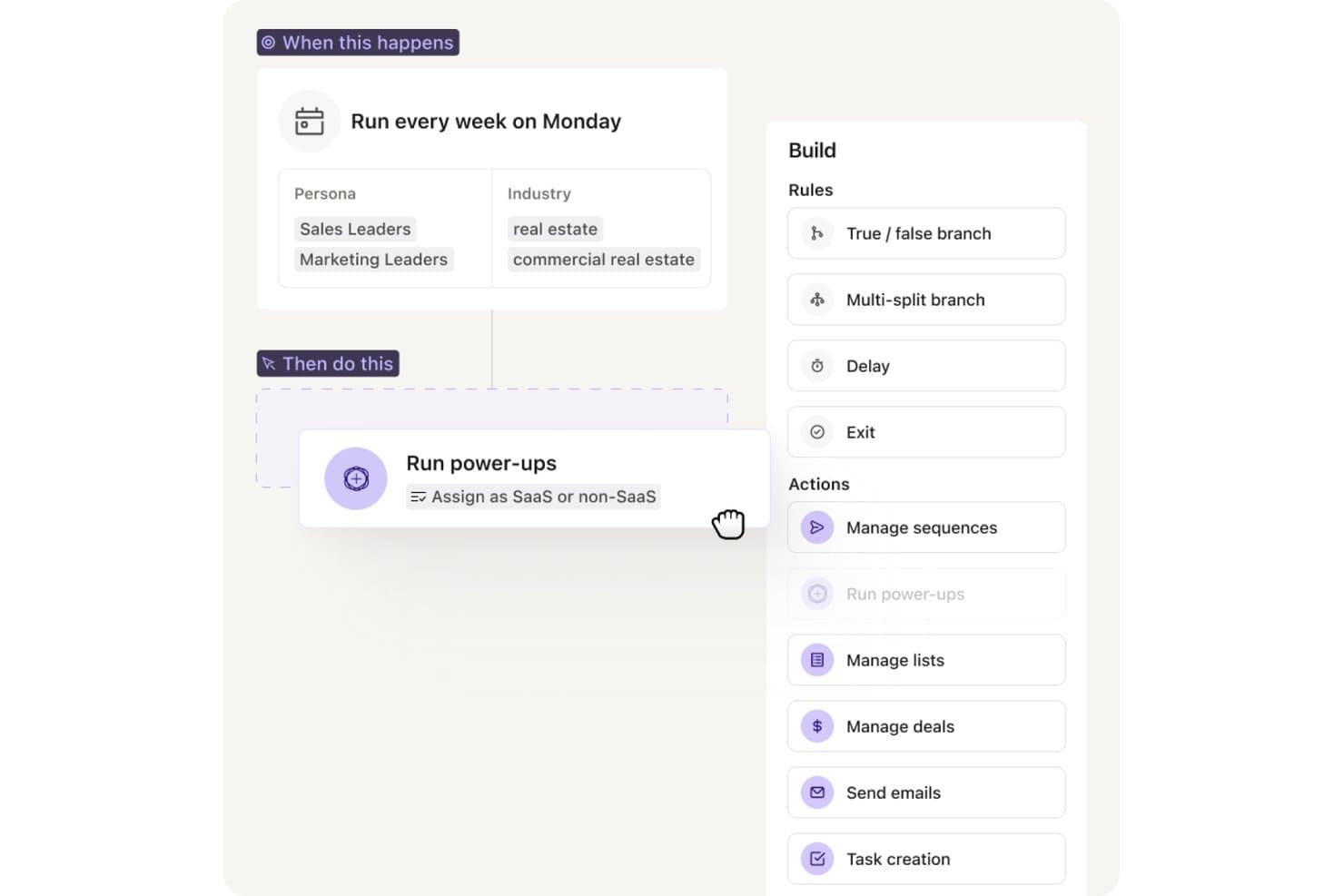
Apollo.io offers a workflow automation builder that runs weekly sequences, assigns leads as SaaS or non-SaaS, and supports actions like managing sequences, sending emails, and task creation. Apollo.io is an all-in-one outbound sales platform that combines email sequencing, multi-channel automation, and a built-in B2B contact database to support prospecting, outreach, and pipeline management in a single tool.
Who Is Apollo.io Best For?
Apollo.io suits B2B sales teams that run high-volume outbound motions and want prospecting data and email sequencing managed in one platform rather than across separate tools.
Why I Picked Apollo.io
I picked Apollo.io as one of the best because it's the only sequencing tool where the prospecting database and email automation share the same data layer. When I build a sequence, Apollo auto-enriches each contact with verified emails and firmographics from its 210M+ contact database before the first send. The waterfall enrichment model pulls from multiple providers, so gaps from one source get filled by another, keeping contact data cleaner than any single-source setup.
Apollo.io Key Features
- AI copywriting assistant: Generates and rewrites outbound emails based on each prospect’s data and role.
- Unified inbox and reply management: Centralizes all replies, auto-categorizes response sentiment, and routes leads.
- Multi-channel sequence steps: Lets you mix LinkedIn, phone, and email actions in the same outreach workflow.
- Deliverability infrastructure: Provides inbox rotation, warm-up pools, SPF/DKIM/DMARC setup, and real-time spam scoring.
Apollo.io Integrations
Apollo.io offers native integrations with Salesforce, HubSpot, Outreach, Salesloft, Pipedrive, Zoho CRM, and Slack, and it connects with Zapier. An API is available for custom integrations.
Pros and Cons
Pros:
- AI drafts email copy from prospect data
- Waterfall enrichment keeps contact data accurate
- Built-in database eliminates separate prospecting tools
Cons:
- Shared IP pools limit deliverability control
- Sequence reporting lacks deep attribution analytics
Learn more about Apollo.io: Best for drag-and-drop automations
- 14-day free trial + free demo available
- From $10.80/month
Visit WebsiteCustomer Rating:4.7/5
MailerLite offers drag-and-drop email templates and content blocks. MailerLite is an email marketing automation platform with a visual workflow builder, trigger-based sequences, A/B testing, pre-built automation templates, and subscriber segmentation tools.
Who Is MailerLite Best For?
MailerLite is a natural fit for small businesses and solo operators who need to build and automate email workflows without relying on a developer.
Why I Picked MailerLite
MailerLite earns its spot on my shortlist because its drag-and-drop workflow builder makes building multi-step email sequences genuinely visual, with conditional branches, time delays, and action-based triggers all placed on a shared canvas. I also use the pre-built automation templates to spin up sequences like welcome series or post-demo follow-ups without building from scratch. Being able to see the full flow at once makes it much easier to catch logic gaps before the sequence goes live.
MailerLite Key Features
- Subscriber segmentation: Group contacts by engagement level, custom fields, or past campaign activity to target specific audiences.
- A/B split testing: Test two versions of a subject line or email body to identify which drives higher open or click rates.
- Click maps: See exactly which links inside an email are getting clicked to refine content placement in future sends.
- Campaign performance reporting: Track open rates, click rates, and unsubscribes across all active campaigns from a single dashboard.
MailerLite Integrations
MailerLite integrates with over 100 apps, including native integrations with Shopify, WooCommerce, Stripe, WordPress, Squarespace, Wix, BigCommerce, Canva, Facebook Audiences, and PrestaShop.
Pros and Cons
Pros:
- Time zone delivery and auto UTM tagging
- Free plan includes A/B testing
- Offers visual workflow builder
Cons:
- Reporting lacks depth
- No built-in CRM for sales pipelines
Learn more about MailerLite: Best for native webinar engagement
- 14-day free trial + free demo available
- From $15.58/month (billed annually)
Visit WebsiteCustomer Rating:4.2/5
GetResponse offers webinar CTAs to drive attendee engagement. GetResponse is an email marketing and automation platform that combines email campaign building, list segmentation, marketing automation workflows, landing pages, and built-in webinar hosting in a single tool.
Who Is GetResponse Best For?
GetResponse is a strong fit for small to mid-sized marketing teams that run email campaigns alongside webinars, lead generation, or online course delivery.
Why I Picked GetResponse
GetResponse earns its spot on my shortlist because it's the only major email marketing platform that hosts webinars natively. That means my team can build the full funnel, registration page, automated reminder emails, live webinar, and post-event follow-up sequences, inside one platform with no Zapier connections. What I find most useful is the attendance-based segmentation: GetResponse automatically splits attendees into segments (attended, registered but no-showed, left early) and fires different email sequences to each group based on that behavior.
GetResponse Key Features
- Visual automation builder: Design multi-step email workflows triggered by user actions like clicks, purchases, or form submissions.
- A/B testing: Test subject lines, email content, and send times across campaign variants to identify top performers.
- Conversion funnel builder: Build lead generation funnels that connect landing pages, opt-in forms, and email sequences in one flow.
- AI email generator: Draft email copy and subject lines using a built-in AI writing tool directly inside the campaign editor.
GetResponse Integrations
GetResponse offers 170+ integrations through its integrations directory, including native connections with Shopify, WooCommerce, Salesforce, HubSpot, Pipedrive, Google Analytics, WordPress, PayPal, and Facebook.
Pros and Cons
Pros:
- Pairs landing pages with sequences
- Mails at each contact's peak
- Built-in webinar hosting
Cons:
- Duplicate contacts get billed twice
- Starter plan caps at one automation workflow
Learn more about GetResponse: Best for email and SMS marketing
- 14-day free trial + free demo available
- From $20/month
Visit WebsiteCustomer Rating:4.3/5
Mailchimp helps SMBs manage email, social media, and digital marketing campaigns. Mailchimp is a marketing automation tool for small businesses to manage their email marketing, social media marketing, and other digital marketing efforts. It allows users to create marketing campaigns, manage customer lists, and track performance through analytics.
Why I picked Mailchimp: Mailchimp offers a wide array of customizable templates and a user-friendly interface that makes it easy for your team to design email campaigns. The platform’s audience management tools help you efficiently segment and target your customers. Its marketing automation features enable you to set up workflows that save time and increase engagement. Moreover, Mailchimp provides detailed analytics that helps you understand the effectiveness of your campaigns.
Standout features & integrations:
Features include customizable email templates, audience segmentation, notifications, marketing automation, social media management, and detailed analytics. You can design and send campaigns easily, manage your audience efficiently, and track your campaign's performance right from the dashboard.
Integrations include Shopify, WooCommerce, WordPress, Salesforce, HubSpot, Zapier, Slack, Google Analytics, QuickBooks, and Stripe.
Pros and Cons
Pros:
- Automated A/B testing
- Real-time campaign analytics
- AI-powered content optimization
Cons:
- Occasional deliverability issues
- Limited automation features
Learn more about Mailchimp:

Instantly.ai offers filtered lead lists for automated outreach. Instantly.ai is a cold email outreach platform built for high-volume sending, with inbox rotation across unlimited sending accounts, AI-driven sequence building, and a built-in CRM for managing leads and replies.
Who Is Instantly.ai Best For?
Instantly.ai is a strong fit for outbound lead generation agencies and growth teams that run cold email at high volume across multiple client accounts or sending domains.
Why I Picked Instantly.ai
I picked Instantly.ai as one of the best because its Automations feature handles lead routing without any manual intervention. When a lead replies, visits your pricing page, or books a meeting, Instantly automatically routes them, updates their CRM stage, and triggers the right follow-up campaign based on that signal. My team uses the trigger-based workflow builder to fire specific sequences based on real buying intent, not just static time delays, which is something most cold email tools can't do natively.
Instantly.ai Key Features
- Email warm-up: Gradually increases sending volume on new accounts to build domain reputation before launching campaigns.
- Unibox: Centralizes all replies from every connected inbox into a single view for managing responses at scale.
- AI email writer: Generates and personalizes outreach copy directly inside the sequence builder using AI.
- B2B lead finder: Searches and exports verified prospect contact data from a built-in database without leaving the platform.
Instantly.ai Integrations
Instantly.ai offers 50+ integrations through its marketplace, including native connections with HubSpot, Salesforce, and Pipedrive, as well as Slack, Clay, Trigify, and RB2B.
Pros and Cons
Pros:
- Triggers behavior-based follow-ups
- AI books meetings automatically
- Unlimited sending accounts
Cons:
- A/B testing limited to two variants
- Add-on pricing climbs fast at scale
Learn more about Instantly.ai: Best for data-driven customer engagement
- Free plan available
- From $20/month
Visit WebsiteCustomer Rating:4.6/5
Klaviyo enhances digital marketing with email, SMS, and customer data tools. Klaviyo is a marketing automation platform for email marketing, SMS, and customer data management. Its primary user base includes businesses looking to enhance digital marketing efforts through personalized customer interactions.
Why I picked Klaviyo: Klaviyo excels in segmentation and automated flows, which precisely target your audience. With its advanced reporting tools, you can track the performance of your marketing campaigns in real time. The platform supports over 350 integrations, making connecting with other tools you already use easy. Additionally, Klaviyo provides resources for onboarding and professional support, so your team can hit the ground running.
Standout features & integrations:
Features include advanced segmentation, automated flows, and reporting tools. Klaviyo also offers resources for onboarding and professional support.
Integrations include Shopify, WooCommerce, BigCommerce, Magento, Salesforce, Stripe, Zendesk, Eventbrite, Facebook, and Google Ads.
Pros and Cons
Pros:
- Custom predictive models
- Real-time revenue insights
- Advanced client lifecycle tracking
Cons:
- Limited non-retail support
- Basic CRM features
Learn more about Klaviyo: Best for CRM-aligned workflows
- Free plan available
- From $20/user/month
Visit WebsiteCustomer Rating:4.4/5
HubSpot offers CRM workflows that automate marketing and sales. HubSpot's Sales Hub is a sales automation platform that lets your team build timed email sequences, automate lead rotation, run A/B tests on outreach, and trigger workflow actions directly from its native CRM.
Who Is HubSpot Best For?
HubSpot Sales Hub is a strong fit for mid-market B2B sales teams that need email automation tightly connected to their CRM data.
Why I Picked HubSpot
I've included HubSpot in my top picks because its email sequences and CRM data work as one unified system, not two tools you have to sync. What I really like is how sequences can auto-enroll contacts based on intent signals pulled directly from the CRM, so reps aren't manually triaging who to follow up with. I also use the deal outcome reports tied to A/B-tested sequences to see which email variants actually generate revenue, not just opens.
HubSpot Key Features
- Email sequence enrollment from Gmail or Outlook: Enroll contacts directly from your Gmail or Outlook inbox without switching to a separate tool.
- Workflow-triggered task creation: Set up workflows to automatically create tasks and alert reps when a contact takes meaningful action.
- Predictive lead scoring: Automatically score and prioritize leads based on behavioral patterns to surface the accounts most likely to close.
- AI email writer: Generate and edit sales email copy using HubSpot's built-in AI writing tool directly within the platform.
HubSpot Integrations
HubSpot offers 1,500+ marketplace integrations, including tools like Salesforce, Gmail, Google Workspace, Outlook, Microsoft 365, Slack, LinkedIn Sales Navigator, Zoom, and Stripe. It also connects with Zapier and provides an API for custom integrations.
Pros and Cons
Pros:
- Built-in A/B testing on sequences
- Email and CRM share one database
- Sequences auto-adapt based on engagement
Cons:
- Advanced automation requires upgrade
- Starter plan caps email sends at 2,000/month
Learn more about HubSpot: Best for time-saving marketing automation
- 14-day free trial + free demo available
- From $15/month (billed annually)
Visit WebsiteCustomer Rating:4.4/5
ActiveCampaign enhances customer experience via marketing automation and CRM tools. ActiveCampaign is an all-in-one marketing automation software designed for businesses across various industries, including ecommerce, healthcare, and education. It enhances customer experiences through email marketing, CRM tools, audience segmentation, and dynamic content personalization.
Why I picked ActiveCampaign: ActiveCampaign excels in time-saving marketing automation due to its robust automation workflows that streamline tasks like email segmentation, lead generation scoring, and personalized customer journeys. Its easy-to-use drag-and-drop automation builder allows businesses to automate repetitive tasks efficiently, reducing manual efforts while improving customer engagement.
Standout features & integrations:
Features include customizable email templates, multi-channel outreach (email, SMS, ads), sales process automation, and CRM tools. The platform supports omnichannel marketing, making it easier for you and your team to engage with customers.
Integrations include Shopify, WooCommerce, WordPress, Salesforce, Facebook, Slack, Zapier, Google Analytics, Zendesk, and Mailchimp.
Pros and Cons
Pros:
- Audience segmentation
- Custom lead scoring
- Adaptive dynamic content
Cons:
- Limited native integrations
- No SMS A/B testing
Learn more about ActiveCampaign:

Brevo offers multi-channel marketing, sales, and scalable communication tools. Brevo is an email marketing automation tool that provides tools for email marketing, SMS, WhatsApp, and automation to improve customer engagement. It features a sales automation platform, multi-channel customer service, a customer data platform, and a messaging API for scalable communication.
Why I picked Brevo: Brevo offers advanced segmentation, enabling businesses to tailor campaigns based on customer behaviors, preferences, and past interactions. Its automation tools allow the creation of dynamic, personalized communication flows, ensuring targeted and engaging loyalty campaigns that strengthen customer relationships. Additionally, the platform supports up to 300 free emails per day with no required credit card.
Standout features & integrations:
Features include email marketing, SMS marketing, marketing automation, CRM integration, advanced segmentation, A/B testing, landing page builder, transactional emails, real-time reporting, contact management, multichannel campaigns, and personalized content.
Integrations include Shopify, WooCommerce, Magento, WordPress, Salesforce, HubSpot, Pipedrive, Zoho CRM, PrestaShop, and Drupal.
Pros and Cons
Pros:
- Ready-made workflows
- Advanced segmentation
- High deliverability rate
Cons:
- Limited transactional reporting
- Complex automation setup
Learn more about Brevo: 10Best for multichannel prospecting
Lemlist
- 14-day free trial available
- From $55/user/month (billed annually)

lemlist lets teams manage multichannel prospecting campaigns. lemlist is a sales engagement platform that combines cold email automation, LinkedIn outreach, and phone calling into multichannel prospecting sequences with built-in lead generation and personalization tools.
Who Is lemlist Best For?
lemlist is a strong fit for B2B sales reps and SDR teams that run outbound prospecting across email, LinkedIn, and phone from a single platform.
Why I Picked lemlist
lemlist earns its spot on my shortlist because it lets me build prospecting sequences that combine cold email, LinkedIn connection requests, and call steps in a single workflow. I particularly like the LinkedIn automation steps, where I can trigger a profile visit, a connection request, and a direct message as part of the same sequence without switching tools. The image personalization feature also lets me embed a prospect's name or company logo directly into email visuals, which my team uses to lift reply rates on cold outreach.
lemlist Key Features
- Email warm-up: Automatically warm up sending accounts through lemwarm to protect deliverability before launching cold outreach campaigns.
- Lead database: Search and import verified B2B contacts directly from lemlist's built-in lead finder without leaving the platform.
- Inbox rotation: Distribute outgoing emails across multiple sender accounts to reduce spam risk on high-volume sequences.
- A/B testing: Test multiple versions of email steps within a sequence to identify which copy drives the most replies.
lemlist Integrations
lemlist offers native integrations with HubSpot, Salesforce, Pipedrive, Attio, Zoho CRM, Aircall, Slack, Google Sheets, and Clay, among others.
Pros and Cons
Pros:
- LinkedIn automation runs inside email sequences
- Custom images embedded in emails
- Built-in email warm-up
Cons:
- Lacks attribution analytics
- Credits deplete quickly at scale
Learn more about Lemlist:
Annen programvare for automatisering av salgs-e-post
Her er noen flere alternativer for programvare for automatisering av salgs-e-post som ikke kom med på kortlisten min, men som likevel er verdt å undersøke:
- 11Creatio CRMBest for no-code email automation
- 12OmnisendBest for ecommerce focus
- 13ReplyBest for automated reply detection
- 14Constant ContactBest for automated event follow-ups
- 15Zoho CampaignsBest for integrated email marketing
- 16BloomreachBest for AI-driven ecommerce personalization
- 17PipedriveBest for visual sales pipeline management
- 18Adobe Marketo EngageBest for complex lead nurturing
- 19Apollo.ioBest for data-backed prospecting
- 20Salesforce Marketing Cloud Account Engagement (Pardot) Best for automated prospect segmentation
How I Evaluate Sales Email Automation Software
I split my evaluation into two layers: the baseline every tool must hit—automated sequences, CRM sync, deliverability—and the differentiators that separate the best options for outbound RevOps teams.
Core Functionality (Table Stakes For This List)
When I'm selecting tools for my list, I rank each one on a scale from 0 (does not offer the functionality) to 5 (excels in this area) for each core functionality listed below. Then, I calculate the tool's total score into a percentage. Each tool needs to achieve a minimum total score of 65% to be considered for inclusion.
- Automated Email Sequences: I evaluate whether the tool supports multi-step drip sequences with reply-based stop conditions, conditional branching, and time delays between touches.
- Personalization at Scale: Dynamic merge tags and custom fields are table stakes, but I also check for conditional content blocks and enrichment-driven personalization across large lists.
- CRM & Inbox Integration: I look for native two-way sync with major CRMs like Salesforce and HubSpot, plus direct Gmail and Outlook connections that log activity without manual entry.
- Deliverability Controls: Warm-up tools, inbox rotation, sending limits, and bounce handling all factor in here—especially for teams running high-volume outbound across multiple domains.
- Engagement Tracking & Analytics: Beyond open and click tracking, I check whether the platform reports on replies, meetings booked, and sequence-level conversion metrics.
- A/B Testing: The ability to split-test subject lines and email body variants within live sequences matters, particularly for teams iterating on messaging across segments.
Once I have a list of tools that meet this criteria, I consider what sets each platform apart.
Differentiating Factors (What Sets Vendors Apart)
Here's how I compare and contrast different vendors:
Standout Features
Multi-channel orchestration is a big differentiator. I look for tools that let you weave LinkedIn, call, and SMS steps directly into email sequences rather than managing separate workflows. Intent-based triggers also matter—platforms that auto-enroll prospects based on job changes or funding events save SDRs from manually monitoring signals. A unified inbox that auto-categorizes replies by sentiment helps reps prioritize hot leads without sifting through every response.
Beyond Features
Pricing structure matters a lot here. I check whether a platform charges per seat, per inbox, or per contact, since that directly affects how costs scale when you grow from a small SDR pod to a full outbound org. Compliance tooling is another factor I evaluate—suppression list management and opt-out automation help teams stay aligned with GDPR and CAN-SPAM requirements. I also look at RevOps reporting depth, especially pipeline attribution tied to specific sequences and reps, plus native connectors to tools like Snowflake or Looker.
Slik velger du programvare for automatisering av salgs-e-post
Det er lett å gå seg vill i lange funksjonslister og komplekse prisstrukturer. For å hjelpe deg med å holde fokus mens du arbeider deg gjennom din unike prosess for valg av programvare, får du her en sjekkliste over faktorer du bør ha i mente:
| Faktor | Hva du bør vurdere |
| Skalerbarhet | Vil programvaren vokse i takt med bedriftens behov? |
| Integrasjoner | Kan den integreres med verktøyene du allerede bruker? |
| Tilpasningsmuligheter | Kan programvaren tilpasses prosessene dine? |
| Brukervennlighet | Er programvaren brukervennlig for teamet ditt? |
| Budsjett | Passer programvaren innenfor budsjettet ditt? |
| Sikkerhetstiltak | Er det innført strenge sikkerhetstiltak? |
Bruk denne sjekklisten for å holde prosessen med valg av programvare organisert og målrettet.
Trender innen programvare for automatisering av salgs-e-post
I undersøkelsen min hentet jeg inn utallige produktoppdateringer, pressemeldinger og lanseringslogger fra ulike leverandører av programvare for automatisering av salgs-e-post. Her er noen av de nye trendene jeg følger med på:
- AI-drevet personalisering: AI brukes til å lage svært personlig tilpasset e-postinnhold basert på brukeratferd og preferanser. Verktøy bruker AI til å tilpasse e-postinnhold dynamisk, slik at hver mottaker får en unik melding som samsvarer med interessene deres.
- Interaktive e-poster: Det blir stadig mer populært å bygge inn interaktive elementer som spørreundersøkelser, avstemninger og videoer direkte i e-poster. Noen leverandører inkluderer disse funksjonene for å øke engasjementsgraden og samle inn tilbakemeldinger i sanntid fra mottakerne.
- Prediktiv analyse: Plattformer for automatisering av salgs-e-post integrerer prediktiv analyse for å forutsi kundeatferd og optimalisere e-postkampanjer. Denne funksjonen foreslår de beste tidspunktene for å sende e-poster og hvilken type innhold som vil fungere best.
- Atferdsutløste e-poster: Det blir stadig mer utbredt å automatisere e-postsekvenser basert på bestemte brukerhandlinger, som nettleserhistorikk eller tidligere kjøp. Noen verktøy fremhever hvor effektive e-poster ved forlatt nettlesing og forlatt handlekurv er for å engasjere potensielle kunder på nytt og hente tilbake tapte salg.
- Hypersegmentering: Avanserte segmenteringsteknikker brukes til å opprette mer målrettede e-postlister, noe som hjelper team med å avslutte avtaler. Plattformene forbedrer segmenteringsmulighetene sine og lar markedsførere dele målgruppen inn i mindre og mer presise grupper basert på en rekke kriterier, noe som fører til høyere engasjement og konverteringsfrekvens.
Hva er programvare for automatisering av salgs-e-post?
Programvare for automatisering av salgs-e-post automatiserer prosessen med å sende salgsrelaterte e-poster, slik at salgsteam kan spare tid og jobbe mer effektivt. Salgsmedarbeidere, som salgsrepresentanter og kundeansvarlige, bruker slike verktøy til å administrere og utvikle potensielle kunder. Disse verktøyene bidrar til å automatisere repetitive oppgaver, slik at medarbeiderne kan fokusere på mer strategiske aktiviteter.
Funksjoner som automatiserte oppfølginger, personlig tilpassede e-postmaler og integrasjon med CRM-systemer gjør det enklere å håndtere store mengder e-post, holde orden og følge med på e-postytelsen. De gir betydelig verdi ved å øke produktiviteten og sikre konsekvent kommunikasjon med potensielle og eksisterende kunder.
Funksjoner i programvare for automatisering av salgs-e-post
Når du velger programvare for automatisering av salgs-e-post, bør du se etter følgende viktige funksjoner:
- Planlegging av e-post: Gjør det mulig å planlegge utsending av e-poster på optimale tidspunkter, slik at meldingene når mottakerne når de mest sannsynlig vil engasjere seg.
- Personlig tilpasning: Gjør det mulig å tilpasse e-poster med mottakerspesifikke detaljer som navn og bedriftsinformasjon, noe som øker engasjementet og svarprosenten.
- A/B-testing: Gir mulighet til å teste ulike e-postversjoner for å finne ut hvilken som gir best resultater, slik at e-poststrategiene kan forbedres.
- Analyse og rapportering: Gir detaljert innsikt i resultatmål for e-post, som åpningsfrekvens, klikkfrekvens og konverteringer, og legger til rette for datadrevne beslutninger.
- CRM-integrasjon: Kobler seg sømløst til systemer for håndtering av kunderelasjoner, slik at e-postkampanjene er samordnet med salgs- og kundedata.
- Dryppkampanjer: Automatiserer utsendingen av en serie e-poster over tid basert på brukerhandlinger eller forhåndsbestemte tidsplaner, og utvikler potensielle kunder gjennom salgstrakten.
- Poengsetting av potensielle kunder: Tildeler poeng til potensielle kunder basert på samhandlingen deres med e-poster, slik at oppfølginger kan prioriteres og fokuset rettes mot prospekter med høyt potensial.
- Malbibliotek: Gir tilgang til en samling forhåndsutformede e-postmaler som kan tilpasses, noe som sparer tid og sikrer e-poster med et profesjonelt utseende.
- Automatiske svar: Sender automatisk forhåndsdefinerte svar på innkommende e-poster, slik at svarene kommer raskt og engasjementet med potensielle kunder opprettholdes.
- Atferdsutløsere: Starter e-posthandlinger basert på mottakerens atferd, som å åpne en e-post eller klikke på en lenke, slik at oppfølgingene blir relevante og kommer til riktig tid.
Fordeler med programvare for automatisering av salgs-e-post
Implementering av programvare for automatisering av salgs-e-post gir flere fordeler for teamet og virksomheten din. Her er noen av fordelene du kan se frem til:
- Tidsbesparelser: Automatiserer repetitive oppgaver som å sende oppfølginger, slik at teamet ditt kan fokusere på mer strategiske aktiviteter.
- Konsekvent kommunikasjon: Sørger for rettidig og regelmessig kommunikasjon med potensielle kunder og kunder gjennom planlagte e-poster.
- Personalisering: Bruker kundedata til å sende tilpassede meldinger, noe som øker engasjementet og svarprosenten.
- Bearbeiding av potensielle kunder: Sender automatisk relevant innhold til potensielle kunder basert på atferden deres, og hjelper dem videre gjennom salgstrakten.
- Resultatsporing: Gir analyser av e-postkampanjer, slik at du kan forstå hva som fungerer og hvor det er rom for forbedring.
- Skalerbarhet: Håndterer store mengder e-poster uten problemer og støtter virksomhetens vekst uten behov for ekstra ressurser.
- Forbedret nøyaktighet: Reduserer menneskelige feil ved utsendelse av e-poster og sikrer profesjonell og feilfri kommunikasjon.
Kostnader og priser for programvare for automatisering av salgs-e-post
Når du velger programvare for automatisering av salgs-e-post, må du forstå de ulike prismodellene og abonnementene som er tilgjengelige. Kostnadene varierer basert på funksjoner, teamstørrelse, tillegg og mer. Tabellen nedenfor oppsummerer vanlige abonnementer, gjennomsnittsprisene deres og typiske funksjoner som er inkludert i programvareløsninger for automatisering av salgs-e-post:
Sammenligningstabell for programvare for automatisering av salgs-e-post
| Abonnementstype | Gjennomsnittspris | Vanlige funksjoner |
| Gratisabonnement | $0 | Grunnleggende e-postmaler, begrenset antall e-poster, grunnleggende rapportering og begrensede automatiseringsregler. |
| Personlig abonnement | $9-$20/bruker/måned | Avanserte e-postmaler, høyere antall e-poster, grunnleggende segmentering og grunnleggende A/B-testing. |
| Bedriftsabonnement | $25-$50/bruker/måned | Tilpassede e-postmaler, ubegrenset antall e-poster, avansert segmentering og detaljerte analyser. |
| Virksomhetsabonnement | $100+/bruker/måned | Personlig støtte, dedikert IP-adresse, avanserte integrasjoner, funksjoner for teamsamarbeid og tilpasset rapportering. |
En oversikt over abonnementstypene for programvare for automatisering av salgs-e-post, samt kostnadene og funksjonene deres.
Vanlige spørsmål om programvare for automatisering av salgs-e-post
Her er noen svar på vanlige spørsmål om programvare for automatisering av salgs-e-post:
Hvor mye tid sparer automatisering av e-post?
Automatisering av e-post kan spare betydelig med tid. Det kan for eksempel ta rundt 25 minutter å håndtere forespørsler om vanlige spørsmål manuelt, mens automatisering kan redusere dette til omtrent 5 minutter. Koordinering mellom flere interessenter, som vanligvis tar 40 minutter, kan reduseres til 10–15 minutter med automatisering.
Hvordan optimaliserer jeg automatisering av e-post?
For å optimalisere automatisering av e-post bør du tilpasse emnelinjene og utnytte forhåndsoverskriften best mulig. Lag verdifullt innhold for målgruppen din, og inkluder iøynefallende bilder i e-postene. Bruk tydelige og handlingsorienterte CTA-er, og optimaliser tidspunktet for utsendelse av e-postene dine.
Hvis du er usikker på datakvaliteten, kan du bruke en \u003ca href=\u0022https://croclub.com/tools/best-email-verification-software/\u0022\u003eprogramvare for e-postverifisering\u003c/a\u003e for å luke ut feilaktig kontaktinformasjon før du begynner å sende e-post til folk.
Hva er forskjellen mellom automatisering av e-post og en autosvarer?
En autosvarer er et sett med automatiserte e-poster som utløses av en bestemt hendelse, for eksempel når en kunde abonnerer på et nyhetsbrev. Automatisering viser derimot til enhver automatisert oppgave, som å sende ukentlige e-poster til kunder eller oppdatere informasjonen i en kundekonto.
Hvordan kan jeg måle hvor vellykkede automatiserte e-postkampanjer er?
Mål hvor vellykkede automatiserte e-postkampanjer er ved å følge med på viktige måltall som åpningsfrekvens, klikkfrekvens og konverteringsfrekvens. Følg i tillegg med på måltall som avvisningsfrekvens og avmeldingsfrekvens for å forstå hvordan målgruppen din samhandler med innholdet. Regelmessig analyse av disse måltallene kan hjelpe deg med å gjøre nødvendige justeringer for å forbedre resultatene.