

Programvare for ordre-til-kontant-prosesser hjelper virksomheten med å håndtere alle trinn fra registrering av et salg til innbetaling ved å koble sammen fakturering, innkreving og kundefordringer i ett system. Når prosessene er trege eller fragmenterte, blir inntektsrapporteringen mindre pålitelig, og kontantstrømmen svekkes.
Denne veiledningen hjelper deg med å skille støyen fra nyttig informasjon og sammenligne ledende verktøy som er utviklet for å automatisere, spore og optimalisere hele ordre-til-kontant-syklusen. Du får se hvilke plattformer som passer med teknologistakken din, støtter veksten din og løser arbeidsflytproblemene som belaster teamet ditt.
Why Trust Our Software Recommendations
6,700+
Reviews
20
Industry experts
16+
Evaluation factors
14
Years
Our reviews reflect our independent judgment—not a sales pitch. Learn how we stay transparent.
For this guide, we evaluated tools using hands-on testing and independent research, scoring tools using our selection criteria.
Our reviews reflect our human editorial judgment, not a sales pitch.
Sammenligningstabell: Programvare for ordre-til-kontant-prosesser
Sammenlign priser og spesifikasjoner side om side for programvaren for ordre-til-kontant-prosesser som kom med på kortlisten min.
| Tool | Best For | Trial Info | Price | ||
|---|---|---|---|---|---|
| 1 | Best for flexible recurring billing management | Free plan available | Pricing upon request | Website | |
| 2 | Best for integrated financial and order workflows | Free demo available | Pricing upon request | Website | |
| 3 | Best for subscription and usage-based billing | Free demo available | Pricing upon request | Website | |
| 4 | Best for unified communications in AR processes | Free demo available | Pricing upon request | Website | |
| 5 | Best for AR and collections for small teams | Free trial available | From £545/user/month | Website | |
| 6 | Best for enterprise-grade cash application | Free demo available | Pricing upon request | Website | |
| 7 | Best for modular automation across finance teams | Free demo available | Pricing upon request | Website | |
| 8 | Best for integrated payment and invoicing | Free demo available | Pricing upon request | Website | |
| 9 | Best for AI-powered receivables automation | Free demo available | Pricing upon request | Website | |
| 10 | Best for contract-to-cash process automation | Free demo available | Pricing upon request | Website |


Anmeldelser av den beste programvaren for ordre-til-kontant-prosesser
Nedenfor finner du mine detaljerte sammendrag av den beste programvaren for ordre-til-kontant-prosesser som kom med på kortlisten min. Anmeldelsene mine gir en grundig gjennomgang av funksjonene, integrasjonene og de beste bruksområdene for hver plattform, slik at du kan finne den som passer best for deg.
 Best for flexible recurring billing management
- Free plan available
- Pricing upon request
Visit WebsiteCustomer Rating:4.4/5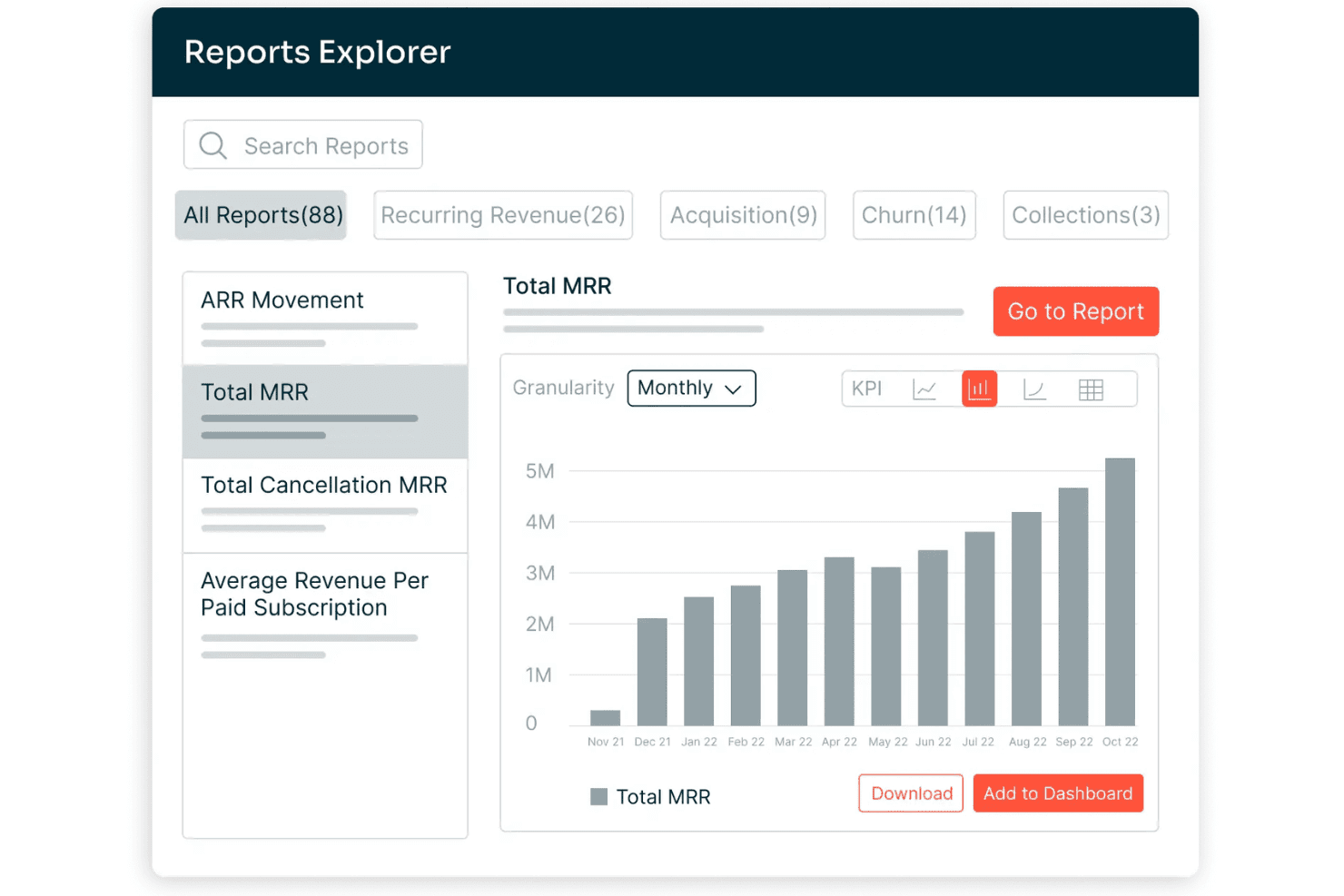
Chargebee offers a Reports Explorer with 88 prebuilt reports, including a Total MRR bar chart showing monthly revenue growth from Nov 2021 to Oct 2022. Chargebee is a billing and monetization platform covering subscription management, usage-based billing, invoicing, payment processing, revenue recognition, and accounts receivable automation across the quote-to-cash cycle.
Who Is Chargebee Best For?
Chargebee is a strong fit for SaaS and digital subscription businesses that run complex, hybrid pricing models combining recurring fees with usage-based charges.
Why I Picked Chargebee
I picked Chargebee as one of the best because its billing engine handles subscription, usage-based, and hybrid pricing models within a single product catalog, which most O2C platforms force you to manage separately. I particularly like how Smart Dunning uses ML to time payment retries based on customer behavior, not a fixed schedule. The Receivables module layers AI-powered collections on top, covering the full billing-to-cash leg.
Chargebee Key Features
- Multi-entity support: Manage billing, invoicing, and reporting for multiple brands, regions, or business units under one account.
- Product catalog management: Configure plans, add-ons, pricing rules, and billing frequencies centrally for all products.
- Compliance with global tax laws: Automate calculations for US Sales Tax, EU-VAT, and other international tax regimes.
- Native ERP and CRM integrations: Connect directly to Salesforce, NetSuite, Xero, and QuickBooks Online for real-time data sync.
Chargebee Integrations
Chargebee offers native integrations with Salesforce, HubSpot, NetSuite, Sage Intacct, Xero, QuickBooks Online, Stripe, Braintree, PayPal, Amazon Payments, Shopify, and Squarespace. An API is available for custom integrations.
Pros and Cons
Pros:
- Smart dunning reduces failed payment churn
- Revenue recognition is ASC 606 compliant
- Handles complex hybrid billing models natively
Cons:
- Cash application limited to gateway-captured payments
- No native credit risk management tools
Learn more about Chargebee: Best for integrated financial and order workflows
- Free demo available
- Pricing upon request
Visit WebsiteCustomer Rating:4.1/5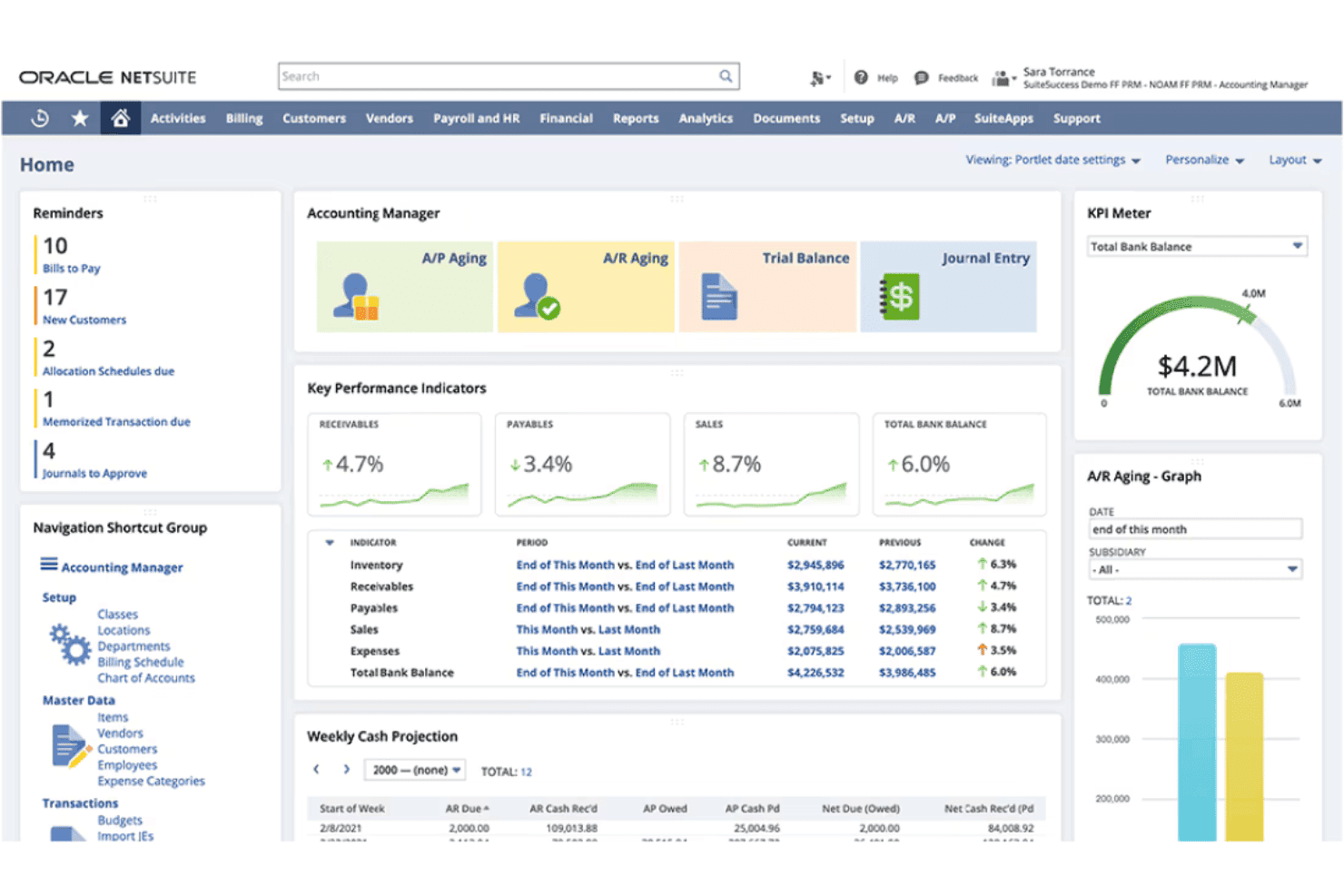
NetSuite ERP offers an Accounting Manager dashboard with KPIs, A/P and A/R aging, weekly cash projections, and a total bank balance KPI meter. NetSuite ERP is a cloud-based enterprise resource planning platform that combines order management, invoicing, accounts receivable, revenue recognition, and financial management in a single unified system.
Who Is NetSuite ERP Best For?
Mid-market companies with multi-entity structures, inventory complexity, or high order volumes that need finance and operations on one platform.
Why I Picked NetSuite ERP
I've included NetSuite ERP in my top picks because the order-to-cash workflow lives entirely within one database. When an order ships, the GL updates, the invoice generates, and AR aging reflects it instantly. I like that Advanced Order Management handles order promising, allocation, and orchestration natively, so my team isn't manually resolving fulfillment exceptions. SuiteBilling layered on top supports transaction, subscription, usage-based, and hybrid billing without a separate tool.
NetSuite ERP Key Features
- SuiteApps marketplace: Access hundreds of certified third-party apps to extend order to cash workflows.
- Native CRM module: Manage customer records, sales pipeline, and order history within the same system as financials.
- Multi-entity and currency management: Handle transactions, reporting, and compliance across subsidiaries and international operations.
- Pre-built ecommerce and POS integrations: Connect online stores and retail locations for unified order processing and fulfillment.
NetSuite ERP Integrations
NetSuite ERP offers native integrations with Salesforce, Shopify, Amazon, HubSpot, Outlook, and a range of POS and 3PL platforms through NetSuite Connector. The SuiteApps marketplace includes hundreds of certified third-party apps, and an API is available for custom integrations.
Pros and Cons
Pros:
- Real-time revenue recognition
- Handles subscription, usage, and hybrid billing
- Single database for orders, billing, and financials
Cons:
- Premium support requires paid add-on package
- Core features split across expensive modules
Learn more about NetSuite ERP: Best for subscription and usage-based billing
- Free demo available
- Pricing upon request
Visit WebsiteCustomer Rating:3.8/5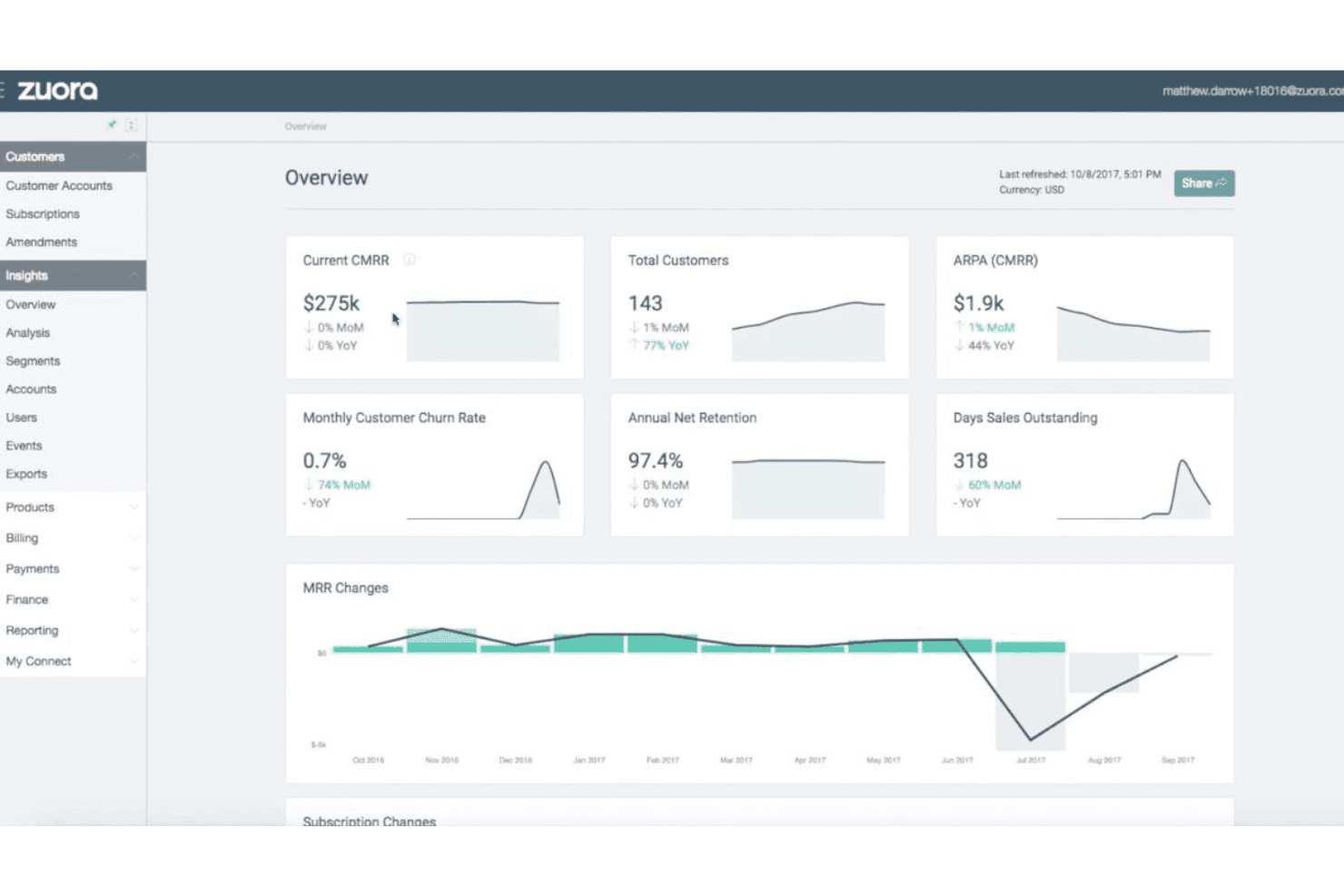
Zuora offers an insights overview dashboard displaying key subscription metrics like CMRR, customer count, churn rate, and MRR changes over time. Zuora is a quote-to-cash platform built around subscription and usage-based monetization, covering CPQ, billing, collections, cash application, and automated revenue recognition in a single system.
Who Is Zuora Best For?
Zuora is a strong fit for mid-market and enterprise companies running recurring revenue models, particularly in SaaS, media, and IoT.
Why I Picked Zuora
Zuora earns its spot as one of the best on my shortlist because no other platform handles the full complexity of usage-based billing at scale quite like this. The Usage Engine tracks real-time consumption and supports tiered, prepaid, overage, and high-water mark models in a single billing run. I also like that hybrid pricing, combining a flat subscription fee with metered usage charges, works natively without custom workarounds.
Zuora Key Features
- Multi-channel order capture: Accepts orders from sales reps, customer self-service portals, APIs, and partner channels with unified validation.
- Automated invoicing engine: Generates invoices for any combination of one-time, recurring, and milestone charges with flexible schedule settings.
- AI-driven collections workflows: Automates payment reminders, dunning schedules, and prioritization for outstanding receivables.
- Native ERP/CRM integrations: Offers real-time, bidirectional sync with platforms like Salesforce, NetSuite, SAP, and Workday.
Zuora Integrations
Zuora offers native integrations with Salesforce, NetSuite, SAP, Workday, HubSpot, and Snowflake, along with over 60 pre-built connectors. An API is available for custom integrations.
Pros and Cons
Pros:
- AI-driven collections with smart dunning routing
- Automated revenue recognition built in (ASC 606/IFRS 15)
- Handles complex usage-based billing models natively
Cons:
- Credit management relies on third-party data sources
- Rigid catalog structure for physical inventory
Learn more about Zuora: Best for unified communications in AR processes
- Free demo available
- Pricing upon request
Visit WebsiteCustomer Rating:2.3/5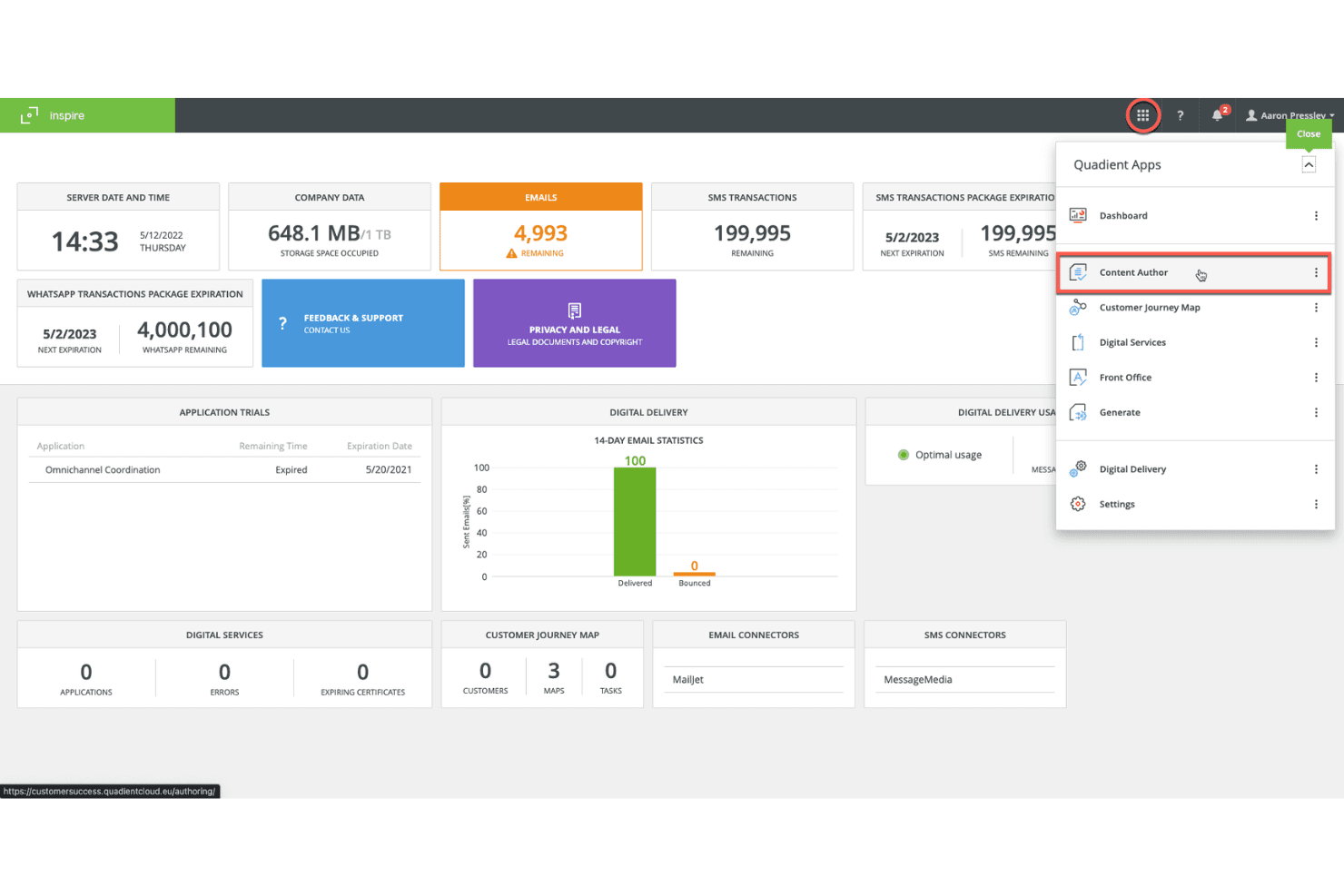
Quadient's Inspire platform displays a centralized dashboard with email, SMS, and WhatsApp transaction metrics alongside a Quadient Apps navigation panel. Quadient is an accounts receivable automation platform covering credit management, invoice delivery, collections workflows, dispute management, cash application, and self-service customer payments.
Who Is Quadient Best For?
Quadient is a good fit for mid-market and enterprise B2B finance teams managing high-volume invoicing, collections, and cash application across complex customer account portfolios.
Why I Picked Quadient
I've included Quadient in my top picks because it centralizes every AR communication touchpoint, from automated collection sequences and dispute tracking to self-service payment portals, in one connected workflow. I particularly like the AI-driven collections prioritization, which tells my team which customers to contact, through which channel, and exactly when. The self-service portal is a practical touch too, letting customers view invoices and submit payments without routing every query through my team.
Quadient Key Features
- Integrated deductions management: Automates categorization, routing, and resolution of disputes and short payments.
- Embedded payment portal: Lets customers view invoices and pay via ACH, card, or virtual card.
- ERP and CRM integration: Connects natively to NetSuite, SAP, Microsoft Dynamics, Salesforce, QuickBooks, and more.
- Cash flow forecasting dashboards: Provides real-time, AI-driven visibility into collections and DSO trends.
Quadient Integrations
Quadient AR offers native integrations with NetSuite, Acumatica, Sage (300, X3, Intacct), Microsoft Dynamics, SAP, SAP Business One, QuickBooks, Xero, Salesforce, and Zuora. An API is available for custom integrations.
Pros and Cons
Pros:
- Dedicated deductions management
- High auto-match rates in cash application
- AI-driven collections prioritization
Cons:
- Implementation timelines can run several months
- Limited order management capabilities
Learn more about Quadient: Best for AR and collections for small teams
- Free trial available
- From £545/user/month
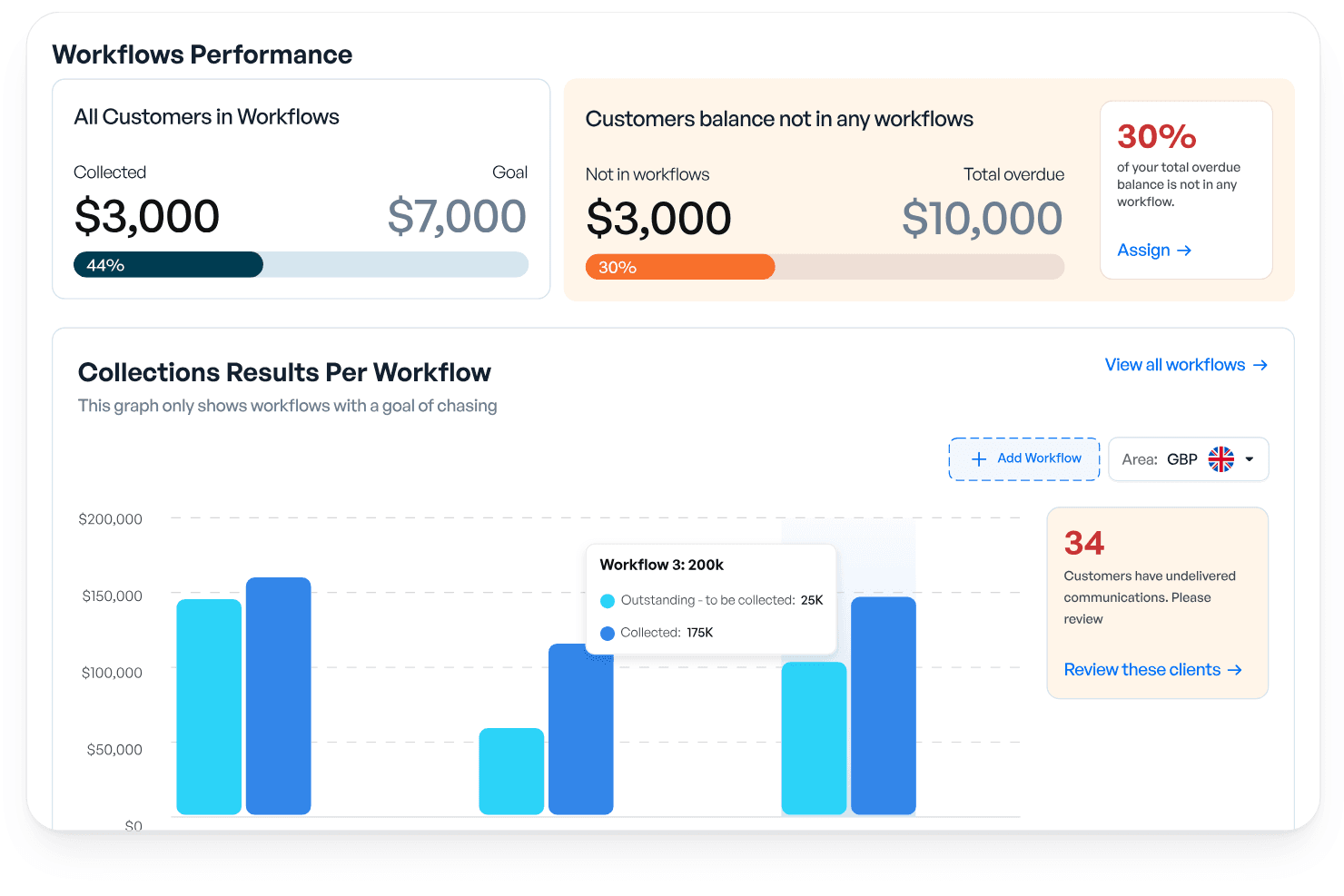
Kolleno offers a Workflows Performance dashboard that tracks collections, overdue balances, and per-workflow results with visual progress indicators. Kolleno is an AI-powered AR and order-to-cash platform covering collections automation, cash application, payments, disputes management, credit risk monitoring, and cash flow forecasting.
Who Is Kolleno Best For?
Kolleno is a strong fit for credit controllers and AR managers at SMBs who need to automate collections without growing their finance team headcount.
Why I Picked Kolleno
I've included Kolleno in my top picks because its AI Agents genuinely change what a small AR team can cover. I can configure each agent's autonomy level, from drafting follow-up emails for my review to firing off multi-channel dunning sequences entirely on its own. I also like that the cash application module uses pattern learning to handle complex matching scenarios, keeping my team out of exception queues.
Kolleno Key Features
- Embedded payment portal: Customers can pay, view invoice status, and resolve disputes directly in a branded online portal.
- Real-time dashboards: Access up-to-date AR analytics and cash flow forecasting from a central workspace.
- Disputes management: Track, categorize, and resolve invoice disputes within an integrated workflow.
- Native ERP and CRM integrations: Connect with systems like NetSuite, Xero, QuickBooks, and Salesforce for synchronized data across platforms.
Kolleno Integrations
Kolleno offers native integrations with NetSuite, Xero, QuickBooks, SAP S/4HANA, Sage Intacct, Microsoft Dynamics 365 Business Central, Salesforce, Clio, Stripe, Adyen, and GoCardless. An API is available for custom integrations.
Pros and Cons
Pros:
- Rapid setup for SMB teams without complex onboarding
- Dispute management is built into the AR workflow
- Prioritizes at-risk accounts before they go overdue
Cons:
- Reporting customization is limited
- Per-seat pricing limits cross-team AR visibility
Learn more about Kolleno: Best for enterprise-grade cash application
- Free demo available
- Pricing upon request
Visit WebsiteCustomer Rating:4.5/5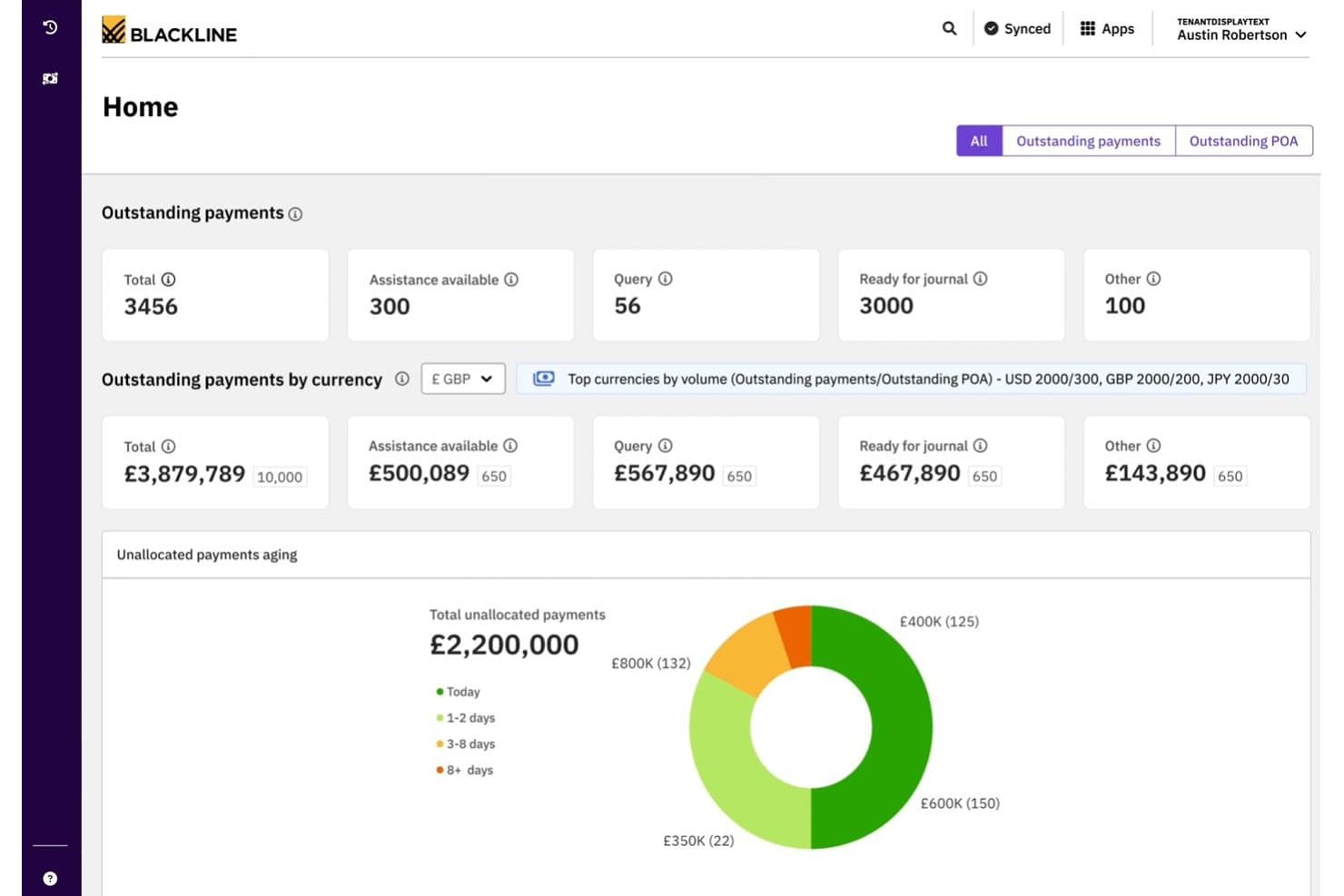
BlackLine offers a cash application dashboard displaying outstanding payments, currency breakdowns, and unallocated payments aging analytics. BlackLine Invoice-to-Cash is an AR automation platform covering cash application, collections management, eInvoicing, credit and risk management, dispute handling, and AI-driven payment matching.
Who Is BlackLine Best For?
BlackLine is a strong fit for enterprise finance teams managing high transaction volumes across multiple ERPs, banks, and regions.
Why I Picked BlackLine
BlackLine earns its spot on my shortlist because its Verity AI cash application consistently delivers match rates that bring unapplied cash close to zero. I particularly like the multi-format remittance ingestion, which handles everything from EDI to scanned documents without manual intervention. The automated deduction coding with reason codes and straight-through journal entries to the GL mean my team spends far less time reconciling exceptions at month-end.
BlackLine Key Features
- Integrated deductions management: Automatically logs, categorizes, and routes short payments and invoice disputes for resolution.
- Embedded payment portal: Provides customers with a self-service portal to view invoices, make payments, and submit inquiries.
- Cash flow forecasting: Includes AI-driven dashboards that forecast collections and predict DSO across segments.
- ERP-certified connectors: Offers native, bidirectional integrations with major ERP systems like SAP, Oracle, and NetSuite.
BlackLine Integrations
BlackLine offers native integrations with SAP, NetSuite, Oracle, Microsoft Dynamics, Acumatica, and Sage, plus native CRM integration for dispute management. An API is also available for custom integrations.
Pros and Cons
Pros:
- Real-time credit risk scoring across customer portfolio
- Automated deduction coding with root-cause analytics
- AI cash application achieves near-zero unapplied cash
Cons:
- Batch processing prevents real-time transaction updates
- High subscription cost for lower transaction volumes
Learn more about BlackLine: Best for modular automation across finance teams
- Free demo available
- Pricing upon request
Visit WebsiteCustomer Rating:4.5/5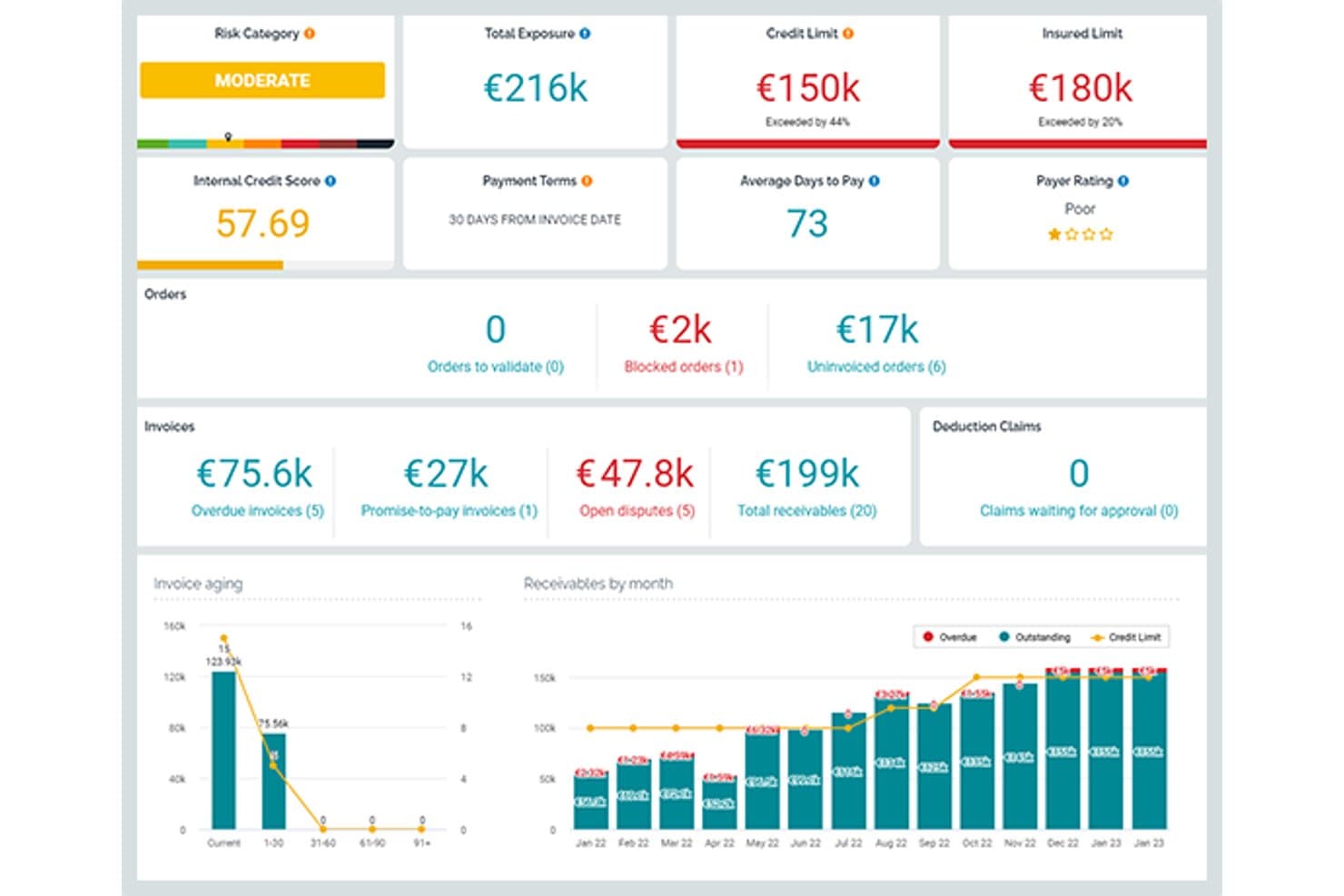
Esker offers a comprehensive order-to-cash dashboard displaying risk categories, credit limits, invoice aging, and receivables by month for streamlined AR management. Esker is a cloud-based order-to-cash platform with modular, AI-powered solutions spanning order management, credit management, invoice delivery, cash application, collections, and deductions management.
Who Is Esker Best For?
Esker is a strong fit for mid-to-large enterprises running SAP or other major ERPs that need modular O2C automation across AR and finance teams.
Why I Picked Esker
Esker earns its spot on my shortlist because its modular architecture lets finance teams activate only the O2C components they need. I like that Credit Management, Cash Application, and Collections can each be deployed standalone or as a full suite, which matters when phasing a rollout across a large finance org. Esker Synergy AI is what really sets the cash application module apart: it uses ML to extract remittance data and auto-match payments, cutting unapplied cash by up to 95%.
Esker Key Features
- Omnichannel order capture: Collects and digitizes B2B orders from email, EDI, customer portals, and fax with real-time tracking.
- Integrated deductions management: Categorizes and routes short-pay and chargeback disputes for fast resolution.
- Embedded payment portal: Allows customers to view, dispute, and pay invoices by ACH, card, or virtual card.
- Cash flow forecasting dashboard: Provides real-time DSO and collections forecasts with segmentation by customer or geography.
Esker Integrations
Esker offers native integrations with SAP, Oracle, Microsoft Dynamics, and NetSuite for bidirectional data sync. An API is available for custom integrations.
Pros and Cons
Pros:
- Strong deductions management with root-cause analytics
- AI cash application cuts unapplied cash significantly
- Modular deployment across individual O2C functions
Cons:
- Data gaps can appear between individual modules
- Implementation timelines can run several months
Learn more about Esker: Best for integrated payment and invoicing
- Free demo available
- Pricing upon request
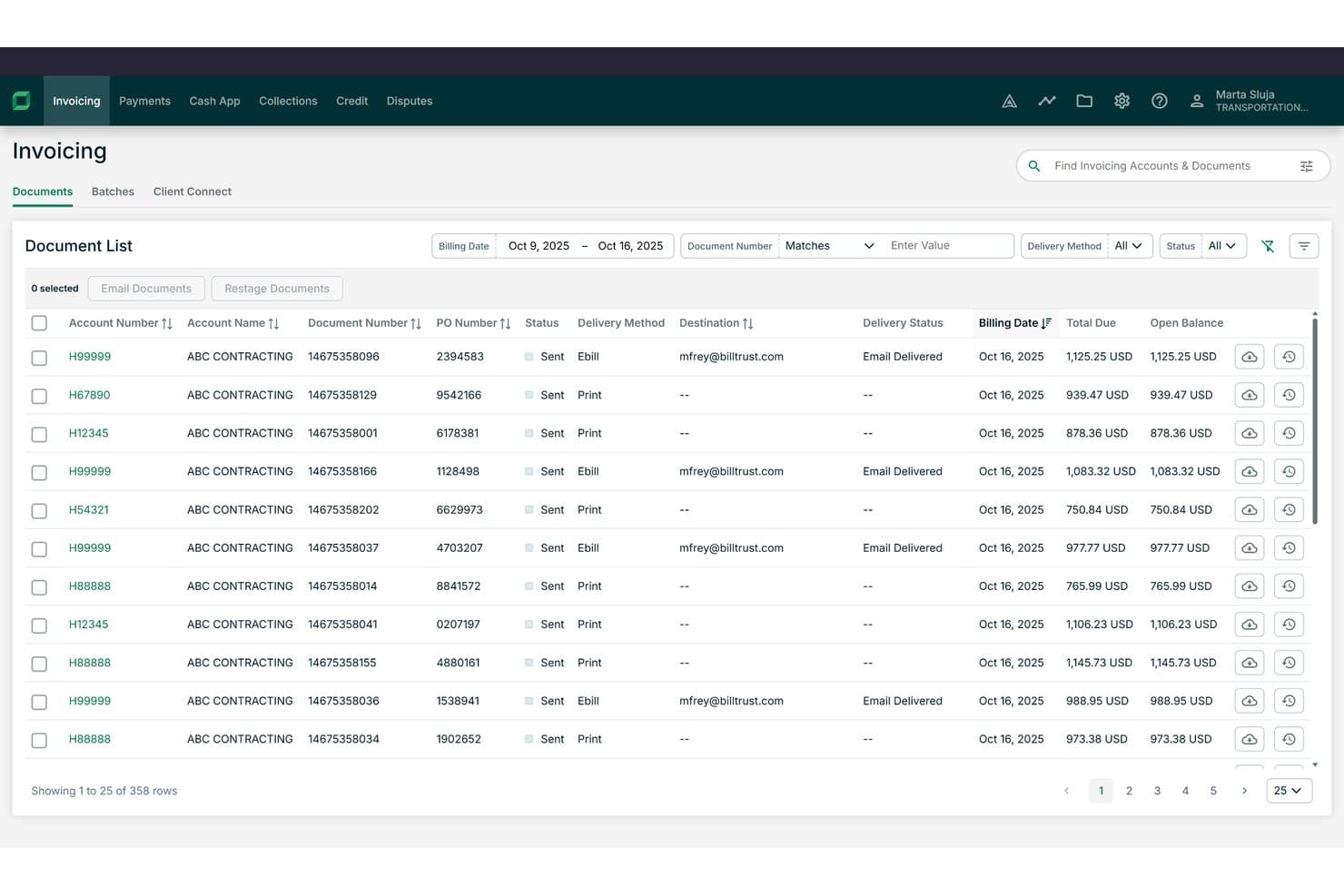
Billtrust offers a detailed invoicing document list with filtering, delivery method tracking, and open balance visibility across hundreds of records. Billtrust is a B2B order-to-cash platform built around invoicing, payments, collections, cash application, and credit management for mid-to-enterprise suppliers.
Who Is Billtrust Best For?
It's a strong fit for AR managers and finance leaders at B2B companies in manufacturing, distribution, or business services with high invoice volumes.
Why I Picked Billtrust
I picked Billtrust as one of the best because its invoicing and payments run as a single platform rather than separate modules. I like that the Digital Lockbox automatically processes emailed virtual cards without manual handling, and the 260+ AP portal connections push invoices directly into buyers' systems like Ariba and Coupa. The ML-based cash application consistently hits 95%+ straight-through processing rates.
Billtrust Key Features
- Agentic credit management: Automatically underwrites and monitors customer credit using real-time bureau data and behavioral signals.
- Collections workflow automation: Prioritizes delinquent accounts and generates agentic outreach through email and VoIP auto-transcription.
- Global e-invoicing compliance: Supports multi-country e-invoicing mandates, covering B2B and government requirements.
- ERP and AP portal integrations: Connects natively with 200+ ERPs, banks, and over 260 AP portals for invoicing and payment workflows.
Billtrust Integrations
Billtrust offers over 200 native integrations, including SAP, NetSuite, Microsoft Dynamics, Oracle, Ariba, Coupa, Basware, OB10, and more than 260 AP portals. An API is available for custom integrations.
Pros and Cons
Pros:
- Covers invoicing, credit, and collections in one platform
- Agentic AI handles collections outreach automatically
- Cash application achieves 95%+ auto-match rates
Cons:
- Implementation typically requires several months
- No order capture or management functionality
Learn more about Billtrust: Best for AI-powered receivables automation
- Free demo available
- Pricing upon request
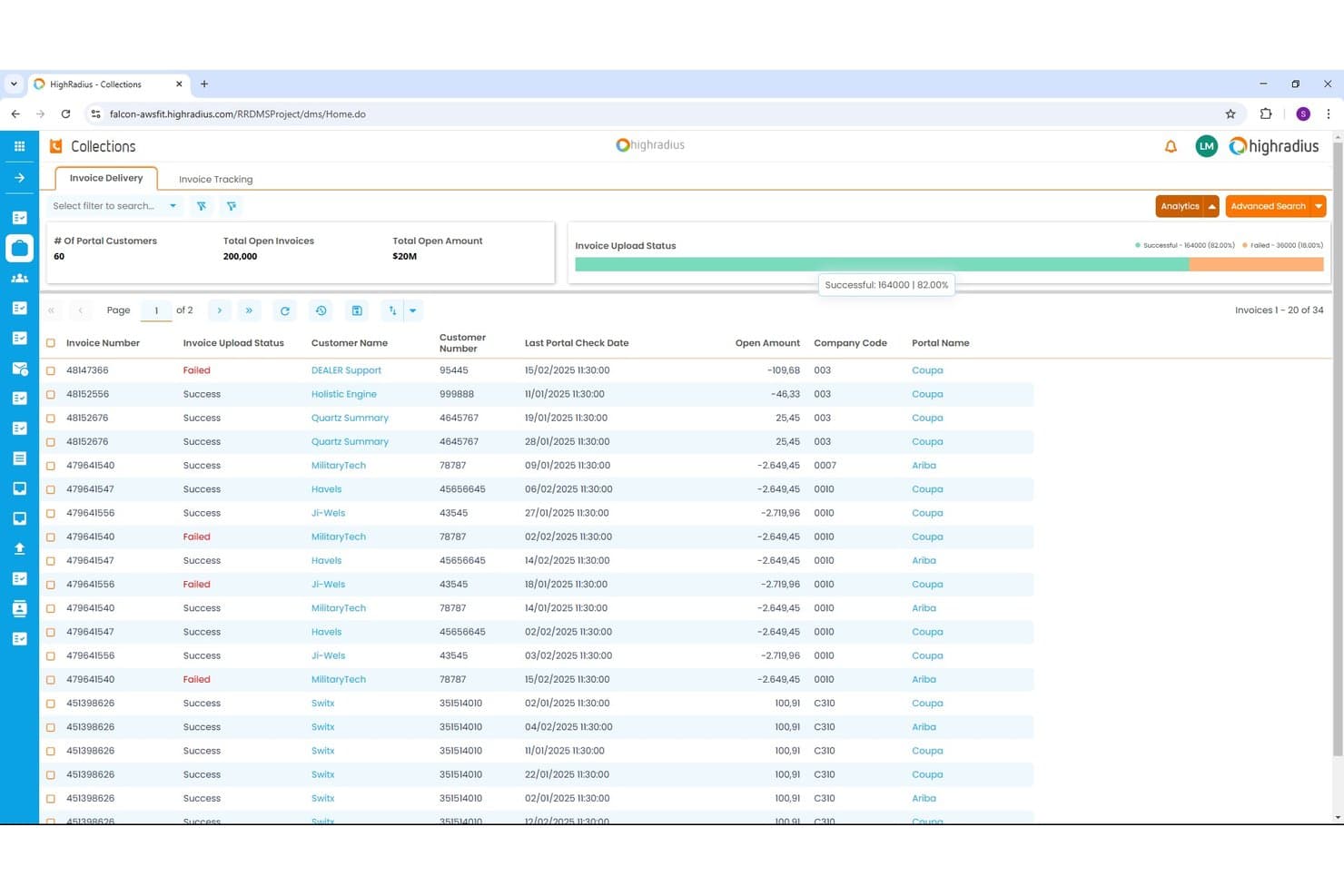
HighRadius offers an Invoice Delivery dashboard within its Collections module, displaying invoice upload status, open amounts, and portal tracking across multiple customers. HighRadius is an AI-powered order-to-cash platform covering collections, cash application, credit management, deductions, and e-invoicing for enterprise finance teams.
Who Is HighRadius Best For?
HighRadius is a strong fit for large enterprises running high-volume receivables across multiple ERPs, business units, or geographies.
Why I Picked HighRadius
HighRadius earns its spot on my shortlist because the Cash Application Cloud achieves 95% no-touch posting rates for checks, ACH, and wires by extracting remittance data from emails and AP portals automatically. I also like the AI Worklist in Collections Cloud, which prioritizes accounts dynamically so my team targets the highest-risk balances first. The Deductions Cloud aggregates portal and email claims into a single queue, so my team isn't chasing backup documents across systems.
HighRadius Key Features
- Predictive credit scoring: Uses real-time bureau data and payment patterns to automate credit risk decisions.
- Integrated deductions management: Centralizes short-pay claim capture and automates backup aggregation from portals and emails.
- Embedded payment portal: Lets customers view invoices and pay online using ACH or credit card.
- ERP-native connectors: Provides prebuilt integrations for SAP, Oracle, NetSuite, and Microsoft Dynamics for bidirectional invoice and payment data sync.
HighRadius Integrations
HighRadius offers native integrations with SAP, Oracle, NetSuite, and Microsoft Dynamics, plus connections to over 100 banks and 40 credit agencies. An API is available for custom integrations.
Pros and Cons
Pros:
- Credit scoring pulls live bureau data
- Centralizes short-pay claims automatically
- Cash posting hits 95% no-touch rates
Cons:
- Go-live takes three to six months
- Batch-based ERP sync delays data updates
Learn more about HighRadius:
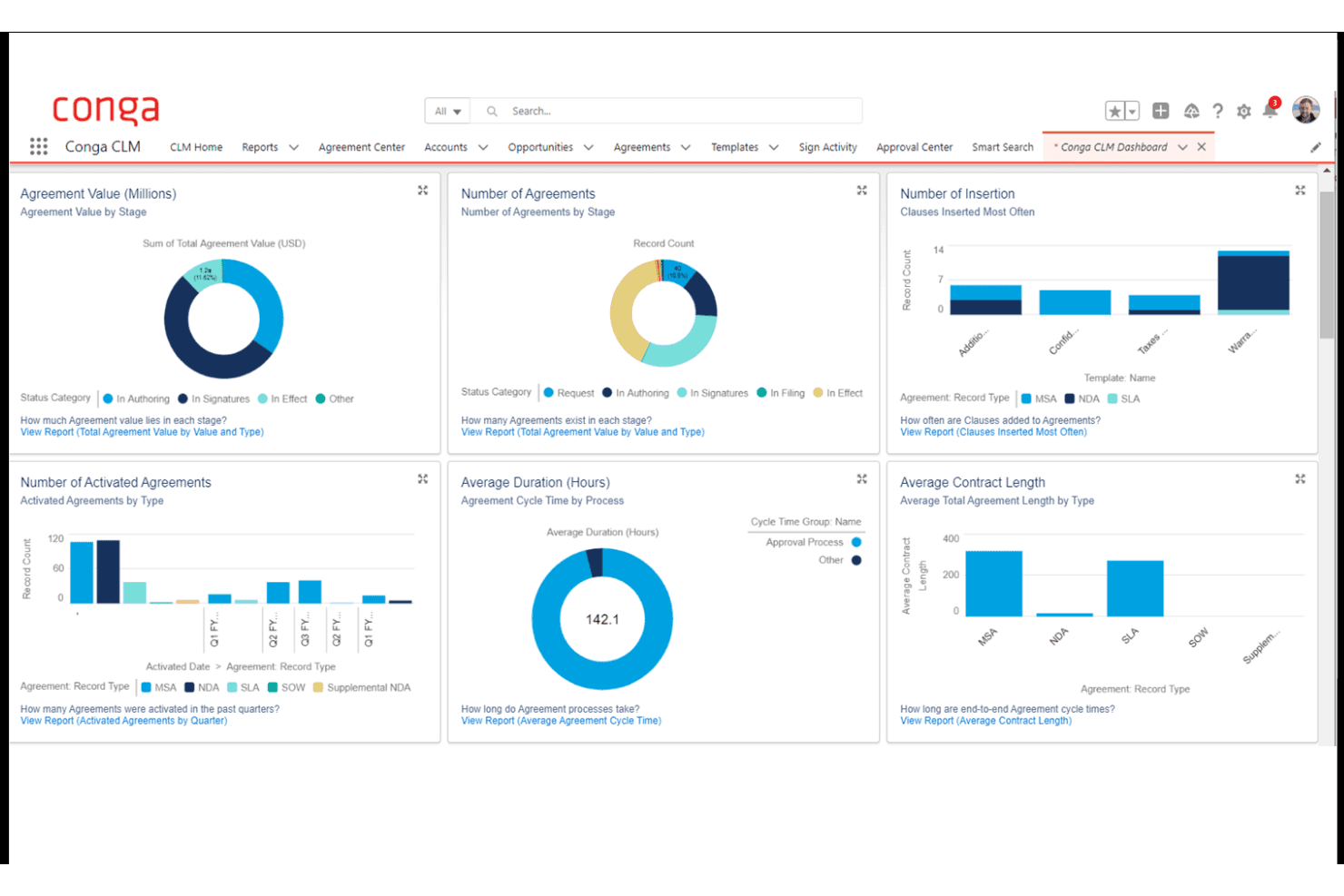
Conga CLM offers a comprehensive dashboard with visual analytics covering agreement value, number of agreements, insertion clauses, activated agreements, cycle time, and contract length by type. Conga is a revenue lifecycle platform that unifies CPQ, contract lifecycle management, billing, and subscription management across the contract-to-cash process.
Who Is Conga Best For?
Conga is a strong fit for enterprise B2B teams running complex, high-volume sales cycles on Salesforce who need CPQ, contracts, and billing managed in one connected system.
Why I Picked Conga
I picked Conga as one of the best because of how tightly it connects CPQ, contract management, and billing in a single data model. Where most O2C tools start at the order stage, Conga starts at the quote, meaning contract terms and pricing rules flow directly into invoices without manual re-entry. I particularly like its Billing module's mixed-order invoicing, where one customer invoice can consolidate subscription, usage, and one-time charges simultaneously.
Conga Key Features
- Salesforce-native integration: Leverages deep, bidirectional sync for product, quote, and contract data between Salesforce and Conga.
- Automated dunning workflows: Supports scheduled reminders and escalations for outstanding invoices and overdue accounts.
- Unified data model: Connects CPQ, contracts, billing, and revenue recognition under one data architecture for central audit trails.
- API and SDK extensibility: Offers APIs and SDKs to embed CPQ and billing processes in customer portals, internal tools, or partner platforms.
Conga Integrations
Conga offers native integrations with Salesforce, Workday, Oracle, HubSpot, Pipedrive, and Microsoft Dynamics 365. An API and SDK are available for building custom integrations and embedding processes in portals or internal systems.
Pros and Cons
Pros:
- Strong Salesforce-native architecture for revenue teams
- Handles complex subscription billing model changes
- Unifies CPQ, contracts, and billing natively
Cons:
- Weak credit management and risk scoring tools
- No native cash application or matching tools
Learn more about Conga:
Annen programvare for ordre-til-kontant-prosesser
Her er noen flere alternativer for programvare for ordre-til-kontant-prosesser som ikke kom med på kortlisten min, men som likevel er verdt å undersøke:
- 11Agentforce Revenue ManagementBest for CRM-driven revenue lifecycle management
- 12VersapayBest for collaborative AR with customer portal
- 13MaxioBest for SaaS billing complexity management
- 14DealHub AIBest for CPQ-integrated revenue processes
- 15TesorioBest for predictive cash flow insights
- 16UpflowBest for real-time collections analytics
- 17InvoicedBest for automated AR process control
- 18SerralaBest for global multi-ERP cash automation
- 19Paystand Best for blockchain-enabled B2B payments
- 20GavitiBest for collector workflow optimization
How I Evaluate Order-to-Cash Software
I split my evaluation into baseline criteria every tool must hit—like automated cash application and ERP connectivity—and differentiators that separate the best platforms from the rest.
Core Functionality (Table Stakes for This List)
When I'm selecting tools for my list, I rank each one on a scale from 0 (does not offer the functionality) to 5 (excels in this area) for each core functionality listed below. Then, I calculate the tool's total score into a percentage. Each tool needs to achieve a minimum total score of 75% to be considered for inclusion.
- Order Management: I evaluate how each platform captures and orchestrates orders across channels like web portals, EDI, and email, including whether it handles validation rules and exception routing before hitting fulfillment.
- Invoicing & Billing: The billing engine needs to support more than just one-time invoices. I look for platforms that handle recurring, usage-based, and milestone billing models within the same workflow.
- AR Automation: I check whether the tool offers configurable dunning sequences with multi-channel outreach, since teams juggling hundreds of open invoices need prioritized, automated follow-ups rather than manual email chasing.
- Cash Application: Matching payments to invoices manually is where AR teams lose the most time. I look for AI-assisted matching that can parse remittance data from lockbox files, emails, and EDI formats.
- Credit Management: I evaluate whether the platform can pull credit data from third-party bureaus, enforce dynamic credit limits, and flag high-risk accounts before orders ship rather than after invoices age out.
- ERP/CRM Integration: Bidirectional connectors to systems like SAP, NetSuite, and Salesforce matter here. I look for native integrations that sync invoice status, GL postings, and customer master data in real time.
Once I have a list of tools that meet the criteria, I consider what sets each platform apart.
Differentiating Factors (What Sets Vendors Apart)
Here's how I compare and contrast different vendors:
Standout Features
Integrated deductions management is a big differentiator I look for. When customers short-pay invoices, you need automated dispute workflows that categorize and route chargebacks rather than letting them pile up in spreadsheets. Cash flow forecasting also matters—AI-driven DSO predictions by customer or segment give finance leaders rolling visibility for accurate revenue planning. An embedded payment portal where customers can view invoices, raise disputes, and pay via multiple methods is another separator worth evaluating.
Beyond Features
Modularity is a key factor I evaluate—some teams only need a collections module, while others want the full order-to-cash suite. Buying more than you need slows adoption. I also check for global readiness, including multi-currency, multi-entity support, and compliance with regional e-invoicing mandates. Pricing structure matters too. Transaction-based models can balloon costs at high invoice volumes, so I compare those against flat subscription pricing to understand total cost of ownership.
Slik velger du programvare for ordre-til-kontant-prosesser
Det er lett å gå seg vill i lange funksjonslister og kompliserte prismodeller. For å hjelpe deg med å holde fokus mens du går gjennom den unike prosessen din for valg av programvare, får du her en sjekkliste over faktorer du bør ha i tankene:
| Faktor | Hva du bør vurdere |
| Skalerbarhet | Vil programvaren holde tritt når transaksjonsvolumet og teamstørrelsen øker? Spør om håndtering av flere juridiske enheter og ekspansjon til nye markeder. |
| Integrasjoner | Kobler den seg direkte til ERP-, CRM- og betalingsplattformene dine? Vurder direkte integrasjon kontra integrasjon via mellomvare, både med tanke på dagens og fremtidens systembehov. |
| Tilpasningsmuligheter | Kan du konfigurere arbeidsflyter, regler og rapportering uten omfattende involvering fra IT? Fleksible plattformer gjør det raskere å gjennomføre endringer etter hvert som virksomheten utvikler seg. |
| Brukervennlighet | Hvor bratt er læringskurven for økonomi- og driftsteamene? Praktiske prøveperioder gjør det lettere å oppdage verktøy med forvirrende navigasjon eller innstillinger som er vanskelige å finne. |
| Implementering og oppstart | Hvor lang tid tar det vanligvis å sette løsningen i drift? Spør om støtte ved migrering, API-dokumentasjon og om du trenger en partner for å bygge bro over mangler i de eksisterende prosessene dine. |
| Kostnad | Forstå de totale eierkostnadene, inkludert betalingsbehandling, integrasjoner, ekstra moduler eller brukerplasser – ikke bare lisens- eller abonnementsprisen. |
| Sikkerhetstiltak | Tilbys etterlevelse av SOC 2, ISO 27001 og GDPR? Se etter beste praksis for datakryptering, brukertillatelser og revisjonsspor. |
| Etterlevelseskrav | Vil plattformen hjelpe deg med å overholde krav til elektronisk fakturering og bransjestandarder? Vurder behovene knyttet til MVA-rapportering, innsending til offentlige myndigheter eller fremtidige regelendringer. |
Hva er programvare for ordre-til-kontant-prosesser?
Programvare for ordre-til-betaling er en plattform som gjør det mulig for virksomheter å automatisere og administrere hele inntektsprosessen, fra registrering av salgsordrer til fakturering, innkreving av betalinger og bokføring av innbetalinger. Disse systemene sentraliserer ordrebehandling, fakturering, kundefordringer og kredittfunksjoner for å hjelpe team med å øke nøyaktigheten, fremskynde kontantstrømmen og opprettholde oversikt over hvert trinn i inntektssyklusen.
Funksjoner i programvare for ordre-til-betaling
Når du velger programvare for ordre-til-betaling, bør du se etter følgende nøkkelfunksjoner:
- Ordrebehandling: Sentraliserer registrering av ordrer på tvers av alle salgskanaler, validerer data og sporer ordrestatus fra registrering til levering.
- Fakturering: Automatiserer oppretting av fakturaer og støtter flere faktureringsmodeller – inkludert engangs-, løpende og milepælsbasert fakturering – og effektiviserer hele faktureringsprosessen.
- Automatisering av kundefordringer: Sender betalingspåminnelser, administrerer arbeidsflyter for innkreving og sporer utestående fordringer for å redusere manuell oppfølging.
- Bokføring av innbetalinger: Kobler innbetalinger til åpne fakturaer ved hjelp av betalingsinformasjon, noe som fremskynder avstemmingen og forbedrer nøyaktigheten.
- Kredittstyring: Vurderer kunders kredittverdighet, sporer kredittgrenser og håndhever sperringer eller godkjenninger før ordrer sendes, for å håndtere risiko.
- Integrasjon med ERP og CRM: Kobler seg direkte til systemer som ERP, CRM og betalingsplattformer for å synkronisere data og holde oppføringer oppdatert.
- Håndtering av fradrag: Identifiserer og behandler underbetalinger eller tilbakeføringer, automatiserer tvisteløsning og avdekker problemer som fører til fradrag.
- Betalingsportal for kunder: Gir kundene et sikkert nettområde der de kan se fakturaer, foreta betalinger, laste ned kontoutskrifter og håndtere tvister.
- Støtte for flere valutaer: Håndterer transaksjoner i ulike valutaer, slik at team kan operere globalt samtidig som de opprettholder nøyaktige oppføringer og rapporter.
- Verktøy for revisjon og rapportering: Leverer omfattende logger og finansielle rapporter som støtter revisjoner, krav til etterlevelse og ledelsesoppfølging.
Vanlige AI-funksjoner i programvare for ordre-til-betaling
I tillegg til standardfunksjonene i programvare for ordre-til-betaling som er listet opp ovenfor, integrerer mange av disse løsningene AI med funksjoner som:
- Prediktiv prognostisering av kontantstrøm: Bruker historiske betalingsdata og kundetrender til å beregne fremtidige kontantinnbetalinger, slik at økonomiteam kan forutse underskudd eller overskudd.
- Automatisk matching av betalinger: Utnytter maskinlæring til automatisk å koble betalinger til fakturaer på tvers av flere formater, og reduserer behovet for manuell avstemming og håndtering av avvik.
- Dynamisk kredittscoring: Analyserer kontinuerlig kundeadferd, betalingshistorikk og eksterne data for å oppdatere profiler for kredittrisiko og anbefale justeringer av kredittgrenser.
- Prioritering av innkreving: Bruker AI til å segmentere kontoer og prioritere oppfølging basert på sannsynlighet for betaling, fakturaens alder og kundens risiko, noe som øker innkrevernes produktivitet.
- Ruting av tvisteløsning: Bruker naturlig språkbehandling til å kategorisere og rute tvister eller fradrag til riktig team, noe som fremskynder løsningen og reduserer etterslepet.
Fordeler med programvare for ordre-til-betaling
Implementering av programvare for ordre-til-betaling gir flere fordeler for teamet og virksomheten din. Her er noen av fordelene du kan se frem til:
- Raskere kontantstrøm: Automatisert fakturering, innkreving og matching av betalinger bidrar til å redusere antall utestående salgsdager og fremskynde innkrevingen av betalinger.
- Forbedret nøyaktighet: Sømløse integrasjoner og automatisert avstemming reduserer menneskelige feil i ordre-, fakturerings- og fordringsprosessene.
- Bedre oversikt: Sentraliserte instrumentpaneler og rapportering i sanntid gir tydelig innsikt i ordrestatus, utestående fakturaer og forventede kontantinnbetalinger.
- Redusert manuelt arbeid: Automatiserte arbeidsflyter for registrering av ordrer, kredittvurderinger og tvisteløsning frigjør tid for teamet til arbeid med høyere verdi.
- Lavere risiko: AI-drevet kredittstyring og funksjoner for etterlevelse hjelper deg med å håndtere eksponering og oppfylle regulatoriske krav på tvers av globale operasjoner.
- Forbedret kundeopplevelse: Selvbetjente betalingsportaler og raskere svar på tvister gjør det enklere for kundene å betale og løse problemer.
Kostnader og priser for programvare for ordre-til-betaling
Ved valg av programvare for ordre-til-betaling er det nødvendig å forstå de ulike prismodellene og tilgjengelige abonnementene. Kostnadene varierer basert på funksjoner, teamstørrelse, tillegg og mer. Tabellen nedenfor oppsummerer vanlige abonnementer, gjennomsnittsprisene deres og typiske funksjoner som er inkludert i løsninger for programvare for ordre-til-betaling:
Sammenligningstabell for ordre-til-betaling-programvare
| Plantype | Gjennomsnittlig pris | Vanlige funksjoner |
| Gratisplan | $0 | Grunnleggende ordreinntasting, standardfakturering, begrenset rapportering og manuell betalingssporing. |
| Privatplan | $20-$50/bruker/måned | Fakturering, automatisering av kundefordringer, enkel kredittstyring, grunnleggende dashbord og kundeportal for betaling. |
| Forretningsplan | $75-$150/bruker/måned | Automatisert registrering av innbetalinger, tilpassbare arbeidsflyter, støtte for flere valutaer og innebygd ERP-integrasjon. |
| Virksomhetsplan | $200-$350/bruker/måned | Avanserte AI-funksjoner, globalt samsvar, avansert analyse, full modularitet og prioritert brukerstøtte. |
Vanlige spørsmål om ordre-til-betaling-programvare
Her er noen svar på vanlige spørsmål om ordre-til-betaling-programvare:
Hvordan integreres ordre-til-betaling-programvare med ERP-systemer?
Programvare for automatisering av ordre-til-betaling-prosessen, ofte kalt OTC-programvare, kobles vanligvis til ERP-systemer gjennom innebygde koblinger eller API-er. Dette synkroniserer ordrer, fakturabehandling, betalinger, lagerstyring, oppdateringer av hovedboken og kundedata, slik at ingenting faller mellom to stoler mellom plattformer eller team.
Hvilke typer virksomheter har størst nytte av ordre-til-betaling-programvare?
Virksomheter med høyt transaksjonsvolum, kompleks fakturering eller global tilstedeværelse får størst utbytte. Hvis økonomiteamet ditt bruker for mye tid på å gjennomføre kredittsjekker, administrere kunderegistrering, følge opp betalinger, sikre ordreoppfyllelse eller håndtere avvik under kontoavstemming, kan disse plattformene, som drives av kunstig intelligens, forvandle de daglige arbeidsflytene.
Støtter ordre-til-betaling-programvare transaksjoner i flere valutaer?
Ja, de fleste plattformer støtter flere valutaer. Dette betyr at du kan fakturere, kreve inn betalinger, beskytte arbeidskapitalen, overvåke viktige resultatindikatorer (KPI-er) og rapportere inntekter på tvers av ulike regioner, noe som er spesielt verdifullt for selskaper som opererer internasjonalt.
Hvor lang tid tar implementeringen vanligvis?
Implementeringen kan ta alt fra noen uker til flere måneder, avhengig av omfanget og integrasjonene. Det er viktig å avklare tidsplanen med leverandøren og sørge for at teamet ditt er forberedt på eventuelle nødvendige prosessendringer.
Hva bør jeg vite om sikkerhet og samsvar?
Se etter samsvar med SOC 2, ISO 27001 og GDPR – spesielt hvis du håndterer sensitive økonomiske data eller opererer internasjonalt. Spør leverandørene hvordan de beskytter dataene dine, blant annet gjennom kryptering, tillatelser og revisjonslogger.