

Et verktøy for AI-salgscoaching er et programvareverktøy som bruker kunstig intelligens til å analysere salgssamtaler, gi personlig tilpassede tilbakemeldinger og veilede selgere slik at de kan forbedre ferdighetene sine. Hvis du leter etter de beste verktøyene for salgscoaching, ønsker du sannsynligvis å styrke tradisjonell coaching, hjelpe teamet ditt med å øke vinnerprosenten og få handlingsrettet innsikt som kan forbedre konverteringsratene fra hver samtale.
Med så mange alternativer er det vanskelig å vite hvilken coachingplattform som passer til akkurat din salgsmetodikk, teknologistakk og opplæringsprogrammer. Denne veiledningen går gjennom de beste alternativene for AI-salgscoaching, slik at du kan sammenligne funksjoner, forstå hva som skiller dem fra hverandre og ta en trygg beslutning for inntektsteamet ditt.
Why Trust Our Software Recommendations
6,700+
Reviews
20
Industry experts
16+
Evaluation factors
14
Years
Our reviews reflect our independent judgment—not a sales pitch. Learn how we stay transparent.
For this guide, we evaluated tools using hands-on testing and independent research, scoring tools using our selection criteria.
Our reviews reflect our human editorial judgment, not a sales pitch.
Sammenligningstabell for verktøy for AI-salgscoaching
Denne sammenligningstabellen oppsummerer prisdetaljene for mine beste utvalgte programvareverktøy for AI-salgscoaching.
| Tool | Best For | Trial Info | Price | ||
|---|---|---|---|---|---|
| 1 | Best for contextual cues and objection handling in calls | Free demo available | Pricing upon request | Website | |
| 2 | Best for conversation analytics across sales teams | Free demo available | Pricing upon request | Website | |
| 3 | Best for real-time call guidance during live conversations | 14-day free trial + free demo available | Pricing upon request | Website | |
| 4 | Best for interactive role-play simulations with AI avatars | Free demo available | Pricing upon request | Website | |
| 5 | Best for skill gap analysis and targeted coaching | Free plan available | Pricing available upon request | Website | |
| 6 | Best for AI role-play coaching | Free demo available | Pricing upon request | Website | |
| 7 | Best for scenario-based practice with AI-driven simulations | Free demo available | Pricing upon request | Website | |
| 8 | Best for automated personalized sales training modules | Free demo available | Pricing upon request | Website | |
| 9 | Best for instant feedback on sales call performance | Free demo available | Pricing upon request | Website | |
| 10 | Best for AI-driven deal strategy recommendations | Not available | From $59.99/month | Website |


Anmeldelser av verktøy for AI-salgscoaching
Nedenfor finner du mine detaljerte sammendrag av de beste programvareverktøyene for AI-salgscoaching som kom med på kortlisten. Anmeldelsene mine gir en detaljert oversikt over funksjonene, de beste bruksområdene og integrasjonene til hver plattform, slik at du kan finne det beste alternativet for teamet ditt.
 Best for contextual cues and objection handling in calls
- Free demo available
- Pricing upon request
Visit WebsiteCustomer Rating:4.9/5
Salesken is an AI sales platform that gives reps real-time guidance to handle objections and stay on message during calls. Salesken is an AI-powered sales conversation platform designed for teams that want real-time guidance during customer calls. It’s especially useful for sales managers and reps in fast-paced B2B environments who need help navigating complex objections and staying on message. If you’re looking for a tool that actively supports reps while they’re on calls, Salesken offers targeted solutions.
Who Is Salesken Best For?
Salesken is a good fit for B2B sales teams and managers who want real-time AI guidance during live customer calls.
Why I Picked Salesken
What stands out about Salesken is its ability to deliver contextual cues and objection handling directly within live sales calls. The platform listens to conversations in real time and prompts reps with relevant talking points or responses when objections arise, which is especially valuable for coaching less experienced team members. I like that Salesken’s AI doesn’t just analyze calls after the fact—it actively supports reps in the moment, helping them stay aligned with messaging and sales playbooks. This makes it a strong choice for teams that want to improve call outcomes and consistency through real-time, in-call coaching.
Salesken Key Features
Some other features I found while reviewing Salesken include:
- Quality assurance AI: Evaluate 100% of sales conversations with AI-driven scoring and compliance monitoring.
- Salesken Notetaker: Automatically transcribe and summarize sales calls, capturing key discussion points and action items.
- Field sales analytics: Capture and analyze field sales conversations to generate performance insights.
- Auto CRM enrichment: Push call summaries and key customer data points directly into your CRM without manual entry.
Salesken Integrations
Integrations include Salesforce, HubSpot, Pipedrive, Zoom, and Microsoft Teams.
Pros and Cons
Pros:
- Solid CRM integrations
- Built-in call analytics
- Tracks rep pitch adherence
Cons:
- Takes time to tune alerts
- Call audio can be glitchy
Learn more about Salesken: 2Best for conversation analytics across sales teams
Gong
- Free demo available
- Pricing upon request
Visit WebsiteCustomer Rating:4.7/5
Gong uses AI to analyze sales calls and surface insights that help revenue teams coach reps and reduce deal risk. Gong uses AI to analyze sales conversations and surface actionable insights for revenue teams. It’s a strong choice for sales leaders and enablement professionals who want to understand what’s happening in calls, demos, and meetings at scale. Teams use Gong to identify coaching opportunities, spot deal risks, and drive consistent sales performance.
Who Is Gong Best For?
Gong is a good fit for sales and revenue leaders at mid-sized to large B2B organizations that want deep visibility into team conversations and deal progress.
Why I Picked Gong
What sets Gong apart for me is its ability to capture and analyze every sales conversation across calls, video meetings, and emails, giving leaders a complete view of team interactions. I picked Gong because its conversation analytics surface patterns in talk time, topics, and deal risks that are hard to spot manually. The platform’s AI-driven insights help managers pinpoint exactly where reps need coaching and track improvements over time. This makes Gong especially valuable for teams that want to drive consistent sales performance and scale coaching across large, distributed teams.
Gong Key Features
Some other features that caught my attention while reviewing Gong include:
- Peer sales coaching: Reps can review and learn from each other's calls by sharing recordings and feedback within the platform.
- Self-coaching tools: Individual reps can access their own call recordings and transcripts to identify areas for improvement.
- Call sharing functionality: Users can easily share specific calls or call segments with managers or peers for targeted feedback.
- Personalized coaching tips: Gong analyzes conversations and provides tailored suggestions to help each rep improve their sales approach.
Gong Key Integrations
Integrations include Salesforce, HubSpot, Zoom, Slack, and Microsoft Teams.
Pros and Cons
Pros:
- Excellent coaching metrics
- Integrates with all CRMs
- Tracks competitor mentions
Cons:
- Support is slow for SMBs
- Takes months to train AI
Learn more about Gong: Best for real-time call guidance during live conversations
- 14-day free trial + free demo available
- Pricing upon request
Visit WebsiteCustomer Rating:4.3/5
Dialpad’s AI Sales Coach helps sales teams improve call performance with real-time insights and AI-driven coaching. Dialpad’s AI Sales Coach is designed for sales teams that want to improve call performance with actionable insights. It uses AI to analyze conversations and surface coaching opportunities as reps talk to prospects. Sales leaders and enablement professionals can use it to identify skill gaps and standardize coaching across distributed teams.
Who Is Dialpad Best For?
Dialpad is a strong fit for sales teams in fast-paced environments that need real-time coaching and conversation analysis during live calls.
Why I Picked Dialpad
I picked Dialpad because its AI Sales Coach stands out for delivering real-time call guidance as conversations unfold. The platform uses AI to monitor live sales calls and provide instant prompts or suggestions, helping reps handle objections and stay on message without missing a beat. I appreciate how Dialpad’s real-time transcription and keyword tracking features allow managers to set up custom triggers for coaching moments. This makes it especially useful for teams that want to reinforce best practices and improve outcomes while calls are still in progress.
Dialpad Key Features
Some other features in Dialpad’s AI Sales Coach that stand out for sales teams include:
- Call recording and playback: Review past sales calls to identify coaching opportunities and track rep progress over time.
- AI-powered call summaries: Automatically generate concise summaries of each conversation for easy follow-up and documentation.
- Coaching playlists: Curate and share collections of top-performing calls or key learning moments for ongoing team development.
- Customizable scorecards: Build and apply scoring templates to evaluate rep performance and standardize feedback across the team.
Dialpad Integrations
Integrations include Salesforce, Zendesk, HubSpot, Microsoft 365, and Google Workspace.
Pros and Cons
Pros:
- Tracks rep talk time ratio
- Built-in VoIP phone system
- Instant objection handling
Cons:
- Relies on strong internet
- Expensive premium features
Learn more about Dialpad: Best for interactive role-play simulations with AI avatars
- Free demo available
- Pricing upon request

Second Nature provides AI-powered sales coaching with lifelike practice to build rep confidence and consistency. Second Nature offers AI-powered sales coaching designed for teams that want to practice real-world conversations in a risk-free environment. Sales leaders and enablement professionals use it to help reps build confidence and consistency before talking to customers. If you need a solution that brings interactive, lifelike practice to your sales training, Second Nature is worth considering.
Who Is Second Nature Best For?
Second Nature is a strong fit for sales enablement leaders and trainers at mid-sized to large organizations that want to scale interactive, AI-driven role-play coaching across their teams.
Why I Picked Second Nature
What stands out about Second Nature is its use of AI avatars for interactive role-play simulations, which brings sales coaching much closer to real-life scenarios. The platform lets reps practice conversations with virtual customers who respond dynamically, helping them refine messaging and objection handling in a safe environment. I appreciate that managers can review transcripts and scoring to pinpoint where reps need more support. This approach makes it easier to scale consistent, high-quality coaching across large or distributed sales teams.
Second Nature Key Features
Some other features that stood out to me while exploring Second Nature include:
- Automated feedback reports: The platform generates detailed feedback after each simulation, highlighting strengths and areas for improvement.
- Scenario customization tools: You can tailor role-play scenarios to match your specific sales processes, products, or buyer personas.
- Progress tracking dashboard: Managers and reps can monitor skill development and completion rates through a centralized dashboard.
- Integration with learning management systems (LMS): Second Nature connects with popular LMS platforms to streamline training assignments and reporting.
Second Nature Integrations
Integrations include Salesforce, Gong, Chorus, Seismic, and Highspot.
Pros and Cons
Pros:
- Scales global onboarding
- Gamified sales training
- Instant objective feedback
Cons:
- Voice AI mishears accents
- High enterprise pricing
Learn more about Second Nature AI: Best for skill gap analysis and targeted coaching
- Free plan available
- Pricing available upon request

Wonderway provides AI sales coaching that helps leaders improve rep performance with data-driven insights. Wonderway offers AI-powered coaching designed for sales leaders and enablement teams who want to improve rep performance with data-driven insights. The platform appeals to organizations looking to identify and address specific skill gaps within their sales teams. Its focus on personalized coaching and measurable outcomes helps teams build targeted development plans that drive real results.
Who Is Wonderway Best For?
Wonderway is a strong fit for sales enablement leaders and managers at mid-sized to large B2B organizations that want to identify and close skill gaps across their sales teams.
Why I Picked Wonderway
What stands out about Wonderway is its ability to pinpoint skill gaps and deliver targeted coaching based on real sales performance data. I picked this tool because it uses AI to analyze call recordings and sales activities, then maps those insights directly to personalized coaching plans for each rep. The platform’s automated skill assessments and tailored learning paths help managers focus their coaching where it will have the most impact. This approach makes Wonderway especially valuable for teams that want to move beyond generic training and address the specific development needs of their salespeople.
Wonderway Key Features
Some other features that make Wonderway useful for sales coaching teams include:
- Automated call scoring: The platform automatically evaluates sales calls against predefined criteria to highlight strengths and areas for improvement.
- Content library management: Store, organize, and share sales playbooks, scripts, and training materials within a centralized hub.
- Role-based access controls: Set permissions and access levels for different team members to ensure data security and relevant visibility.
- Performance benchmarking: Compare individual and team performance against industry standards or internal benchmarks to track progress over time.
Wonderway Integrations
Integrations include Salesforce, HubSpot, Salesloft, Outreach, and Slack.
Pros and Cons
Pros:
- Automated learning paths
- Great for sales managers
- Ties training to revenue
Cons:
- Can feel like micromanaging
- Takes time to see results
Learn more about Wonderway:
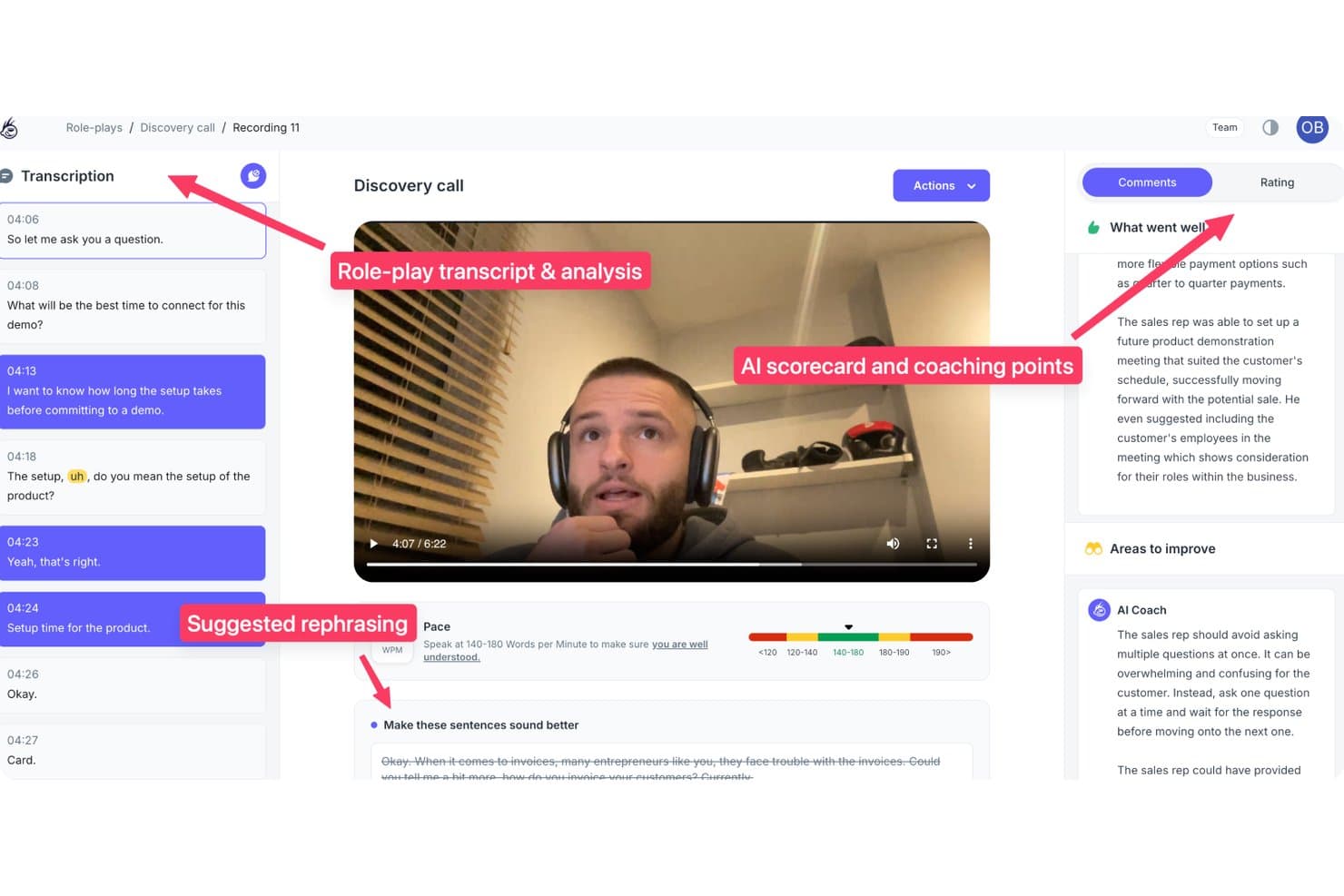
PitchMonster offers AI-powered sales role-play analysis with transcript review, AI scorecard coaching points, suggested rephrasing, and pace metrics. PitchMonster is an AI sales role-play and coaching platform that simulates buyer conversations, scores rep performance against custom playbooks, and delivers automated feedback across cold calls, discovery, objection handling, and demo scenarios.
Who Is PitchMonster Best For?
PitchMonster is a strong fit for mid-market and enterprise sales enablement teams managing structured onboarding programs for large or fast-growing rep cohorts.
Why I Picked PitchMonster
PitchMonster earns its spot on my shortlist because of how it closes the gap between onboarding training and real calls. I like that new reps can generate a buyer persona from a prospect's website URL in under two minutes, then immediately run a full objection-handling scenario against an AI avatar. The AI Coach debrief then prompts reps to self-diagnose what shifted in the conversation, which I think builds retention faster than passive, top-down feedback ever could.
PitchMonster Key Features
- Ready-made scenario library: Access a library of 48 AI-driven sales scenarios covering cold calls, discovery, demos, and objection handling.
- Manager analytics dashboard: View rep performance, skill gaps, and usage metrics in one central reporting dashboard.
- Custom scorecards and rubrics: Build scorecards tailored to your sales process and track rep practice quality at scale.
- CRM and Gong integration: Connect Salesforce, HubSpot, and Gong to import call data and personalize role-play exercises automatically.
PitchMonster Integrations
PitchMonster offers native integrations with Salesforce, HubSpot, and Gong. An API is available for custom integrations.
Pros and Cons
Pros:
- Playbooks and scoring rubrics are fully customizable
- Scenarios cover cold calls, discovery, and demos
- Role-play includes AI-generated prospect personas
Cons:
- Analytics dashboard requires manual CSV exports
- Conversation length is limited in some scenarios
Learn more about PitchMonster: Best for scenario-based practice with AI-driven simulations
- Free demo available
- Pricing upon request

Zenarate uses AI simulations to help sales teams practice real-world scenarios and improve performance. Zenarate uses AI-driven simulations to help sales teams practice real-world scenarios in a risk-free environment. It’s a strong fit for organizations that want to build confidence and consistency in their sales reps through hands-on, interactive training. The platform appeals to sales enablement leaders looking for scalable ways to coach teams on complex conversations and objection handling.
Who Is Zenarate Best For?
Zenarate is a good fit for sales enablement leaders and trainers at mid-sized to large organizations that need scalable, AI-powered scenario practice for their sales teams.
Why I Picked Zenarate
What drew me to Zenarate is its focus on scenario-based practice using AI-driven simulations, which is especially valuable for sales teams that need to master complex conversations. The platform lets you create realistic, role-play scenarios where reps interact with AI avatars that respond dynamically, mirroring real customer behaviors and objections. I appreciate how Zenarate provides instant feedback and detailed performance analytics after each simulation, so managers can pinpoint exactly where reps need more coaching. This approach makes it much easier to build confidence and consistency across large sales teams without relying on live role-play sessions.
Zenarate Key Features
In addition to its scenario-based practice capabilities, I also found these features worth noting:
- Speech analytics engine: The platform analyzes spoken responses for tone, clarity, and adherence to scripts during simulations.
- Role-specific learning paths: You can assign tailored training modules based on job roles or experience levels.
- Real-time coaching prompts: Zenarate provides instant, in-simulation guidance to help users adjust their approach on the fly.
- Performance benchmarking tools: Compare individual and team results against industry standards or internal benchmarks.
Zenarate Integrations
Integrations include Salesforce, Zendesk, Genesys, Avaya, and Cisco.
Pros and Cons
Pros:
- Good for call center reps
- Safe simulation environment
- Great for compliance prep
Cons:
- Audio responses can lag
- Not for field sales reps
Learn more about Zenarate AI Coach: Best for automated personalized sales training modules
- Free demo available
- Pricing upon request

Hyperbound uses AI to deliver personalized sales training and onboarding for modern revenue and sales enablement teams. Hyperbound uses AI to deliver tailored sales training modules for modern revenue teams. It’s designed for sales enablement leaders and managers who want to automate skill development and onboarding. If you need to personalize training at scale and keep reps engaged with up-to-date content, Hyperbound addresses those challenges directly.
Who Is Hyperbound Best For?
Hyperbound is a strong fit for sales enablement leaders and managers at growth-focused companies that want to automate and personalize sales training at scale.
Why I Picked Hyperbound
What drew me to Hyperbound is its focus on automating personalized sales training modules using AI. The platform analyzes each rep’s performance and learning needs, then delivers targeted training content that adapts over time. I like that Hyperbound can generate scenario-based exercises and quizzes tailored to individual skill gaps, making training more relevant and actionable. This approach helps sales leaders ensure every team member gets the right coaching without manual effort or generic content.
Hyperbound Key Features
In addition to its adaptive training modules, Hyperbound offers several other features that support sales coaching and enablement:
- Content authoring tools: Create and customize training materials directly within the platform to match your team’s processes and messaging.
- Progress tracking dashboards: Monitor individual and team learning progress with visual dashboards and detailed completion metrics.
- Role-based learning paths: Assign specific training tracks based on job function, seniority, or territory to ensure relevant skill development.
- Knowledge checks and assessments: Build quizzes and interactive assessments to reinforce learning and measure retention after each module.
Hyperbound Integrations
Integrations include Salesforce, HubSpot, Gong, Outreach, Salesloft, Orum, Google Meet, Zoom, Microsoft Teams, and Webex.
Pros and Cons
Pros:
- Good for cold call prep
- Automated scoring metrics
- Scales training instantly
Cons:
- Best for SDRs, not AEs
- Setup takes heavy effort
Learn more about Hyperbound: Best for instant feedback on sales call performance
- Free demo available
- Pricing upon request

Sales Closer AI analyzes sales calls and coaches reps to improve call quality and team performance. Sales Closer AI uses artificial intelligence to analyze sales calls and coach reps on their performance. It’s designed for sales managers and enablement teams who want to improve call quality and consistency across their organization. The platform appeals to teams looking for actionable insights and coaching that’s grounded in real sales conversations.
Who Is Sales Closer AI Best For?
Sales Closer AI is a strong fit for sales managers and enablement leaders at mid-sized to large organizations that want to deliver targeted, AI-driven coaching based on real sales call data.
Why I Picked Sales Closer AI
What drew me to Sales Closer AI is its focus on delivering instant, actionable feedback right after sales calls. The platform uses AI to analyze call recordings and provide specific coaching points, so reps know exactly what to improve on their next call. I like that it highlights key moments in conversations, such as objection handling and closing techniques, making the feedback highly relevant for sales teams. This approach helps managers scale coaching without waiting for manual reviews or delayed insights.
Sales Closer AI Key Features
In addition to instant feedback on sales calls, Sales Closer AI offers several other features that support ongoing sales coaching and performance improvement:
- Call transcript search: Users can search and filter through call transcripts to quickly find specific conversations or topics.
- Customizable scorecards: Managers can set up tailored evaluation criteria to align with their team’s sales process and goals.
- Coaching assignment workflows: Assign coaching tasks or follow-ups directly within the platform to streamline rep development.
- Performance trend analytics: Track individual and team progress over time with visual dashboards and reporting tools.
Sales Closer AI Integrations
Integrations include Zoom, Google Meet, Microsoft Teams, Salesforce, and HubSpot.
Pros and Cons
Pros:
- Quick setup for small orgs
- Focuses on closing skills
- Easy to review call tape
Cons:
- UI is not very polished
- Subjective AI scoring
Learn more about Sales Closer AI: Best for AI-driven deal strategy recommendations
- Not available
- From $59.99/month

Trellus.AI delivers real-time AI insights to help sales teams improve deal strategy and pipeline performance. Trellus.AI brings AI-powered insights to sales teams looking to improve deal outcomes and strategy. It’s designed for revenue leaders and account executives who want actionable recommendations based on real-time pipeline data. If you need a tool that goes beyond call analysis to help shape deal tactics, Trellus.AI is worth considering.
Who Is Trellus.AI Best For?
Trellus.AI is a good fit for sales and revenue leaders at B2B organizations who want AI-driven recommendations to improve deal strategy and pipeline management.
Why I Picked Trellus.AI
What drew me to Trellus.AI is its focus on delivering AI-driven deal strategy recommendations, which goes beyond just analyzing sales conversations. The platform reviews your pipeline data and provides tailored, actionable suggestions for each deal, helping teams prioritize next steps and identify risks. I appreciate how Trellus.AI surfaces strategic insights that sales managers and reps can use to adjust tactics in real time. This makes it especially valuable for organizations that want to move from reactive to proactive deal management with the help of AI.
Trellus.AI Key Features
Some other features that make Trellus.AI stand out for sales teams include:
- Deal health scoring: The platform assigns a health score to each deal based on multiple data points, helping teams quickly spot at-risk opportunities.
- Automated pipeline reviews: Trellus.AI regularly scans your pipeline and highlights deals that need attention, reducing manual review time.
- Rep performance analytics: Track individual and team performance metrics to identify coaching opportunities and skill gaps.
- Collaboration tools: Built-in commenting and sharing features let sales managers and reps discuss deals and strategies directly within the platform.
Trellus.AI Integrations
Integrations include Salesforce, HubSpot, Outreach, Salesloft, and Apollo.
Pros and Cons
Pros:
- Helps build fast rapport
- Works well for cold calling
- In-call script suggestions
Cons:
- Chrome extension is heavy
- Small tool ecosystem
Learn more about Trellus.AI:
Andre plattformer for AI-salgscoaching
Her er noen flere alternativer for AI-salgscoaching som ikke kom med på kortlisten min, men som likevel er verdt å undersøke:
How I Evaluate AI Sales Coach Solutions
I only include tools that use AI to do something a spreadsheet or a manager's gut can't—like auto-scoring calls against your methodology or generating rep-specific coaching without waiting on a 1:1. I split my evaluation into core functionality every tool needs to qualify and differentiating factors that separate the best fit from the rest.
Core Functionality (Table Stakes For This List)
When I'm selecting tools for my list, I rank each one on a scale from 0 (does not offer the functionality) to 5 (excels in this area) for each core functionality listed below. Then, I calculate the tool's total score into a percentage. Each tool needs to achieve a minimum total score of 65% to be considered for inclusion.
- Conversation Intelligence: I check whether the tool can ingest recorded calls and surface AI-driven insights like talk ratios, topic detection, and competitor mentions—not just basic transcription.
- AI-Generated Coaching Feedback: Each tool should deliver automated, rep-specific coaching recommendations after calls rather than leaving managers to review every recording manually.
- Skill & Methodology Scorecards: I look for AI-powered scoring against frameworks like MEDDIC or SPICED, with the flexibility to build custom competency models that match your sales motion.
- AI Role-Play & Simulation: Strong tools let reps practice discovery calls or objection handling with AI-generated buyer personas that adapt based on responses, not static scripts.
- Performance Tracking & Analytics: Dashboards should connect coaching activity to outcomes like ramp time or win rates, giving RevOps teams data they can bring to leadership.
- CRM & Communication Integration: The tool needs to sync with platforms like Salesforce, HubSpot, Zoom, and dialers so coaching insights live where reps and managers already work.
Once I have a list of tools that meet the criteria, I consider what sets each platform apart.
Differentiating Factors (What Sets Vendors Apart)
Here's how I compare and contrast different vendors:
Standout Features
Real-time call guidance is a major differentiator—I look for tools that surface battlecards and objection prompts mid-conversation, not just in a post-call summary. Deal-level coaching insights also carry weight. The strongest tools tie coaching to specific open opportunities, flagging risk signals a manager can act on before a deal slips. I also evaluate whether a platform can trigger automated coaching workflows when AI detects a skill gap, so reps get targeted practice without waiting for a scheduled review.
Beyond Features
Measurable revenue impact matters a lot here. I evaluate whether a platform can show a clear line between coaching activity and outcomes like quota attainment or ramp time—that's what RevOps leaders need to justify the investment. Ecosystem fit is another factor I weigh heavily, especially how well a tool connects with your existing CRM, dialer, and enablement stack without custom workarounds. I also consider scalability, including flexible licensing and multi-team hierarchies, since coaching tools that work for a 20-rep team often strain at 200.
Slik velger du en løsning for AI-salgscoaching
Det er lett å gå seg vill i lange funksjonslister og kompliserte prismodeller. For å hjelpe deg med å holde fokus mens du går gjennom den unike prosessen din for valg av programvare, får du her en sjekkliste over faktorer du bør ha i tankene:
| Faktor | Hva du bør vurdere |
| Skalerbarhet | Vil verktøyet støtte teamet ditt etter hvert som dere vokser? Sjekk brukerbegrensninger, prisnivåer og grenser for datalagring. |
| Integrasjoner | Kobler det seg direkte til CRM-systemet, ringesystemet og andre sentrale systemer? Bekreft kompatibiliteten før du setter det på kortlisten. |
| Tilpasningsmuligheter | Kan du tilpasse arbeidsflyter, coachinginstrukser eller rapportering til salgsprosessen din? Vær oppmerksom på rigide maler. |
| Brukervennlighet | Vil selgere og ledere ta det raskt i bruk? Se etter tydelig navigasjon, få manuelle trinn og intuitive oversikter. |
| Implementering og innføring | Hvor lang tid vil oppsettet ta, og hvilke ressurser kreves? Spør om støtte ved migrering, opplæring og tiden det tar før du får verdi. |
| Kostnad | Er priser og kontraktsvilkår tydelige? Ta med alle brukere, tilleggstjenester og eventuelle gebyrer ved overskridelse. Sammenlign de totale eierkostnadene. |
| Sikkerhetstiltak | Oppfyller verktøyet selskapets krav til personvern og datasikkerhet? Spør om kryptering, tilgangskontroller og samsvarssertifiseringer. |
| Tilgjengelig kundestøtte | Hvilke støttekanaler tilbys, og når er de tilgjengelige? Vurder om du trenger hjelp døgnet rundt eller en egen kundeansvarlig. |
Hva er en AI-salgscoach?
En AI-salgsveileder er et programvareverktøy som bruker kunstig intelligens til å analysere salgssamtaler, generere møtesammendrag og fremheve handlingsrettede veiledningsinnsikter for salgsteam. Disse plattformene registrerer automatisk samtaledata, identifiserer viktige øyeblikk og anbefaler neste steg, slik at ledere og salgsrepresentanter kan forbedre prestasjonene. AI-salgsveiledere er utviklet for å støtte kontinuerlig ferdighetsutvikling, ansvarlighet og datadrevet beslutningstaking gjennom hele salgsprosessen.
Funksjoner i en AI-salgsveilederløsning
Når du velger en AI-salgsveileder, bør du se etter følgende viktige funksjoner:
- Opptak og transkripsjon av samtaler: Registrerer og transkriberer salgssamtaler automatisk, slik at det blir enkelt å gjennomgå samtaler og finne frem til detaljer senere.
- AI-genererte møtesammendrag: Utarbeider konsise, strukturerte sammendrag av hvert møte og fremhever viktige diskusjonspunkter og beslutninger.
- Oppfølging av handlingspunkter: Identifiserer og organiserer oppfølginger, oppgaver og neste steg som blir diskutert under samtaler, slik at teamene kan holdes ansvarlige.
- CRM-integrasjon: Synkroniserer samtaledata, notater og innsikter direkte med CRM-systemet ditt, slik at all informasjon er samlet og tilgjengelig.
- Prestasjonsanalyse: Følger med på salgsrepresentantenes aktivitet, samtalekvalitet og resultater av veiledningen ved hjelp av dashbord og rapporter.
- Visualisering av salgsavtalens tidslinje: Kartlegger alle interaksjoner, notater og milepæler for hver salgsavtale, slik at ledere får en tydelig oversikt over avtalens utvikling.
- Automatiserte veiledningsforslag: Fremhever personaliserte veiledningsforslag basert på samtaleanalyse, slik at ledere kan gi målrettede tilbakemeldinger.
- Søkbart samtalearkiv: Gjør det mulig for brukere å søke i tidligere samtaler og møter etter nøkkelord, emne eller deltaker for rask tilgang til informasjon.
- Sikkerhets- og samsvarskontroller: Beskytter sensitive kundedata med kryptering, tilgangskontroller og samsvar med bransjestandarder.
- Tilpassbar rapportering: Lar team tilpasse rapporter og dashbord slik at de samsvarer med deres unike salgsprosesser og KPI-er.
Fordeler med AI-salgsveileder
Implementering av en AI-salgsveileder gir flere fordeler for teamet og virksomheten din. Her er noen av fordelene du kan se frem til:
- Jevn veiledningskvalitet: AI-drevne innsikter sikrer at alle salgsrepresentanter får handlingsrettede, datastøttede tilbakemeldinger etter hver samtale.
- Raskere opplæring av nye salgsrepresentanter: Automatiserte møtesammendrag og søkbare samtalearkiver hjelper nye teammedlemmer med å komme raskt i gang.
- Bedre ansvarlighet: Oppfølging av handlingspunkter og CRM-integrasjon gjør det enklere å følge opp forpliktelser og måle fremgang.
- Bedre oversikt over salgspipelinen: Visualisering av salgsavtalens tidslinje og prestasjonsanalyse gir ledere en tydelig oversikt over avtalestatus og teamets aktivitet.
- Mindre manuelt arbeid: Automatisert notatskriving, sammendrag og rapportering frigjør tid for salgsrepresentanter og ledere, slik at de kan fokusere på salg.
- Datadrevet beslutningstaking: Sentralisert analyse og tilpassbare rapporter støtter mer informert veiledning og justering av strategier.
- Forbedret datasikkerhet: Innebygde sikkerhets- og samsvarskontroller beskytter sensitive kunde- og avtaleopplysninger gjennom hele salgsprosessen.
Kostnader og priser for AI-salgsveileder
Valg av AI-salgsveileder krever en forståelse av de ulike prismodellene og abonnementene som er tilgjengelige. Kostnadene varierer basert på funksjoner, teamstørrelse, tillegg og mer. Tabellen nedenfor oppsummerer vanlige abonnementer, gjennomsnittsprisene deres og typiske funksjoner som inngår i AI-salgsveilederløsninger:
Sammenligningstabell for abonnementer for AI-salgsveileder
| Abonnementstype | Gjennomsnittspris | Vanlige funksjoner |
| Gratisabonnement | $0 | Grunnleggende samtaleopptak, begrensede møtesammendrag, begrenset lagring og brukerstøtte via e-post. |
| Personlig abonnement | $15-$49/bruker/måned | Ubegrensede transkripsjoner, AI-genererte sammendrag, oppfølging av handlingspunkter, CRM-integrasjon og analysedashbord. |
| Forretningsabonnement | $50-$99/bruker/måned | Analyse av teamets prestasjoner, visualisering av salgsavtalens tidslinje, avanserte integrasjoner, tilpassbar rapportering og prioritert brukerstøtte. |
| Enterprise-abonnement | $100-$250/bruker/måned | Tilpasset implementering, dedikert kundeansvarlig, forbedrede sikkerhetskontroller, samsvarsfunksjoner og API-tilgang. |
Vanlige spørsmål om AI-salgscoach
Her er noen svar på vanlige spørsmål om AI-salgscoach:
Hvordan analyserer en AI-salgscoach salgssamtaler?
En AI-salgscoach bruker talegjenkjenning og naturlig språkbehandling til å transkribere samtaler, identifisere viktige emner og markere viktige øyeblikk. Deretter bruker den algoritmer til å finne innsikter, handlingspunkter og muligheter for coaching basert på innholdet i samtalen.
Kan AI-salgscoachverktøy integreres med CRM-systemet jeg allerede bruker?
Ja, de fleste AI-salgscoachverktøy tilbyr integrasjoner med populære CRM-systemer som Salesforce og HubSpot. Dette gjør at samtaledata, notater og innsikter kan synkroniseres automatisk, slik at salgsregistrene holdes oppdatert og behovet for manuell dataregistrering reduseres.
Hvilke datasikkerhetstiltak tilbyr AI-salgscoachplattformer?
AI-salgscoachplattformer bruker vanligvis kryptering, tilgangskontroller og samsvarssertifiseringer for å beskytte sensitive data. Bekreft alltid at et verktøy oppfyller selskapets sikkerhetsstandarder og regulatoriske krav før implementering.
Fungerer AI-salgscoachløsninger for eksterne eller hybride salgsteam?
Ja, AI-salgscoachløsninger er utviklet for å støtte eksterne, hybride og kontorbaserte team. De registrerer og analyserer samtaler fra alle steder, noe som gjør det enkelt for ledere å coache og følge opp salgsrepresentanter uavhengig av hvor de jobber.
Hvor lang tid tar det å implementere et AI-salgscoachverktøy?
Implementeringstiden varierer, men de fleste plattformer tilbyr ressurser for introduksjon, som opplæringsvideoer, produktomvisninger og støtte, for å hjelpe team med å komme raskt i gang. For små team kan oppsettet ta noen dager, mens større organisasjoner kan trenge noen uker for full utrulling.