

Det kan være utfordrende å finne riktig CRM med integrasjon for sosiale medier. Du ønsker å håndtere kunderelasjoner og interaksjoner i sosiale medier bedre, men må finne ut hvilket verktøy som kan ta deg til neste nivå.
For å hjelpe team med å begrense søkealternativene brukte jeg erfaringen min innen inntektsoperasjoner og CRM-programvare til å teste og sammenligne flere av de beste løsningene. Ved hjelp av mine detaljerte anmeldelser kan du samle all viktig informasjon om de beste CRM-systemene med integrasjon for sosiale medier, slik at du kan ta en informert beslutning.
Hvorfor du kan stole på våre programvareanbefalinger
6,700+
Reviews
20
Industry experts
16+
Evaluation factors
14
Years
Anmeldelsene våre bygger på vår uavhengige vurdering, ikke på salgsargumenter. Les hvordan vi sørger for åpenhet.
I denne guiden har vi vurdert verktøyene gjennom praktisk testing og uavhengig research og gitt dem poeng ut fra våre utvelgelseskriterier.
Anmeldelsene våre bygger på vår egen redaksjonelle vurdering. De er ikke et salgsargument.
Sammenligningstabell for CRM-systemer med integrasjon for sosiale medier
| Tool | Best For | Trial Info | Price | ||
|---|---|---|---|---|---|
| 1 | Best for Facebook lead capture into sales pipelines | 15-day free trial | From $23/user/month (billed annually) | Website | |
| 2 | Best for AI-driven sales tools | 14-day free trial | From $14/user/month (billed annually) | Website | |
| 3 | Best for contextual insights and communication | 30-day free trial | From $79/user/month (billed annually) | Website | |
| 4 | Best for all-in-one social suite on a budget | Free plan available | From $8.99/user/month | Website | |
| 5 | Best for flat-rate social lead capture at scale | 15-day free trial + free demo available | From $49/month (billed annually) | Website | |
| 6 | Best for comprehensive marketing tool integration | Free plan available | From $7/user/month | Website | |
| 7 | Best for omnichannel sales management | 14-day free trial | From $25/user/month | Website | |
| 8 | Best for marketing automation and processing | 14-day free trial | From $99/month | Website | |
| 9 | Best for AI-driven multi-channel communication | Free demo available | Pricing upon request | Website | |
| 10 | Best for agency-focused features | 14-day free trial | From $97/month | Website |


Anmeldelser av de beste CRM-systemene med integrasjon for sosiale medier
Denne delen gir en grundig analyse og oversikt over hvert CRM-system med integrasjon for sosiale medier. Nedenfor går jeg gjennom fordeler og ulemper ved hvert verktøy, funksjonene deres og de beste bruksområdene.
 Best for Facebook lead capture into sales pipelines
- 15-day free trial
- From $23/user/month (billed annually)
Visit WebsiteCustomer Rating:4.7/5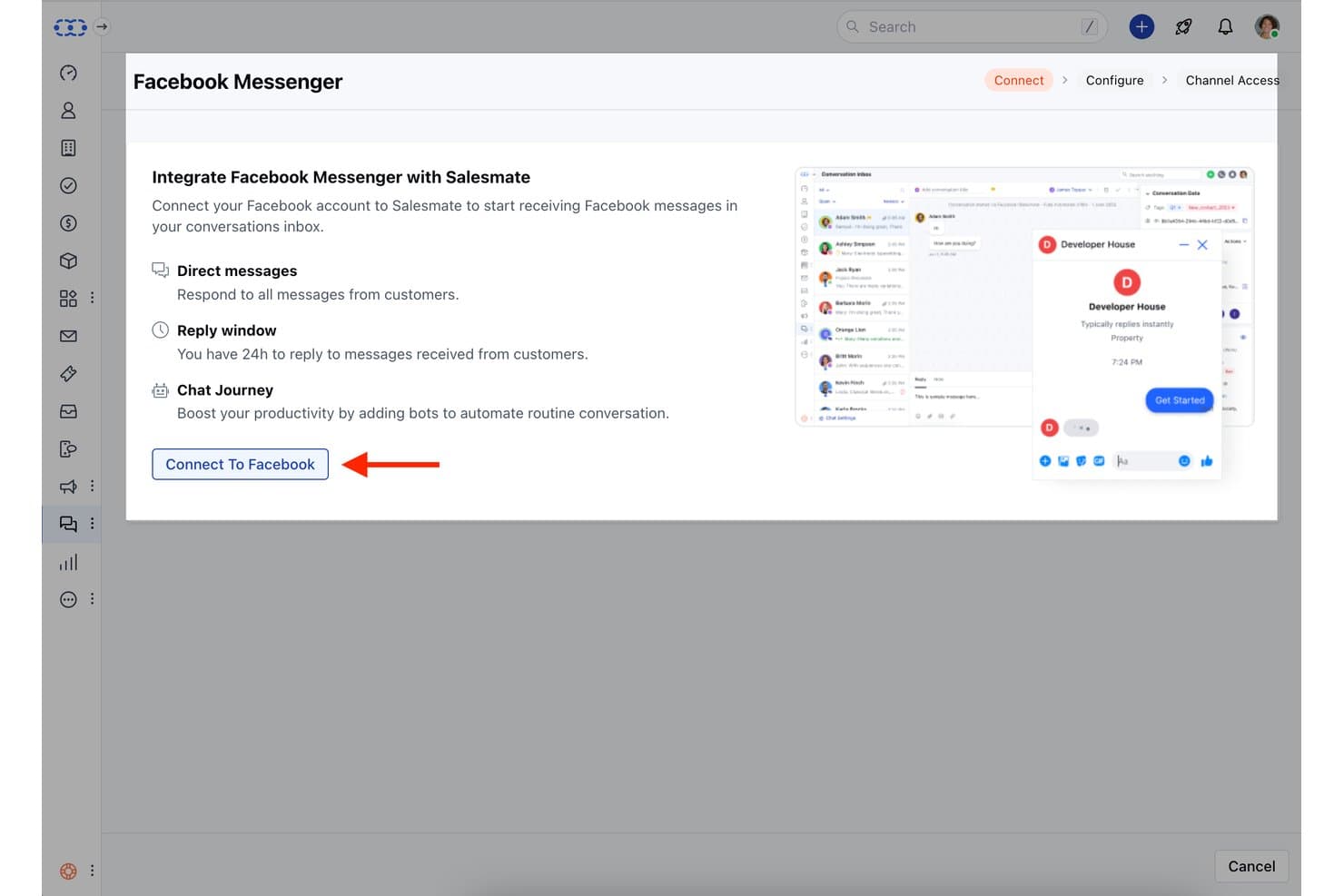
Salesmate integrates Facebook Messenger to manage customer chats in one inbox. Salesmate is a CRM platform with a built-in Unified Conversation Inbox that consolidates Facebook Messenger, Instagram DMs, and WhatsApp alongside pipeline management, lead capture automation, and revenue attribution reporting.
Who Is Salesmate Best For?
Salesmate is a strong fit for small business sales teams that run active Facebook lead generation campaigns and need those leads flowing directly into a managed pipeline.
Why I Picked Salesmate
I picked Salesmate as one of the best because its native Facebook Lead Form capture pulls leads directly into the CRM and fires Smart Flow follow-ups automatically, no Zapier required. I also like how the Unified Conversation Inbox ties Facebook Messenger and Instagram DMs to contact records, so every social touchpoint shows up on the same timeline as calls and emails. The Revenue Attribution feature then connects those interactions to closed deals, giving you a clear line from a Facebook campaign to won revenue.
Salesmate Key Features
- Facebook Audience Sync: Syncs your CRM contact lists directly with Facebook audiences for retargeting and lookalike campaign targeting.
- Smart Flows automation: Triggers automated follow-up sequences via email or chat the moment a new lead enters the CRM.
- Revenue attribution reporting: Links specific campaigns and contact interactions to closed deals across the full pipeline.
- Rules-based team inbox routing: Automatically assigns incoming conversations to the right rep or team based on configurable routing rules.
Salesmate Integrations
Salesmate offers native integrations with Facebook Messenger, Instagram, Facebook Lead Forms, Mailchimp, and ActiveCampaign, plus WhatsApp support through Twilio and Vonage. It provides a public REST API for custom integrations and supports Zapier.
Pros and Cons
Pros:
- AI-powered lead scoring for social-sourced leads
- Unified inbox merges Messenger, Instagram, WhatsApp
- Facebook lead forms captured directly into CRM
Cons:
- No social listening or publishing tools
- No native LinkedIn or X integrations
Learn more about Salesmate: Best for AI-driven sales tools
- 14-day free trial
- From $14/user/month (billed annually)
Visit WebsiteCustomer Rating:4.5/5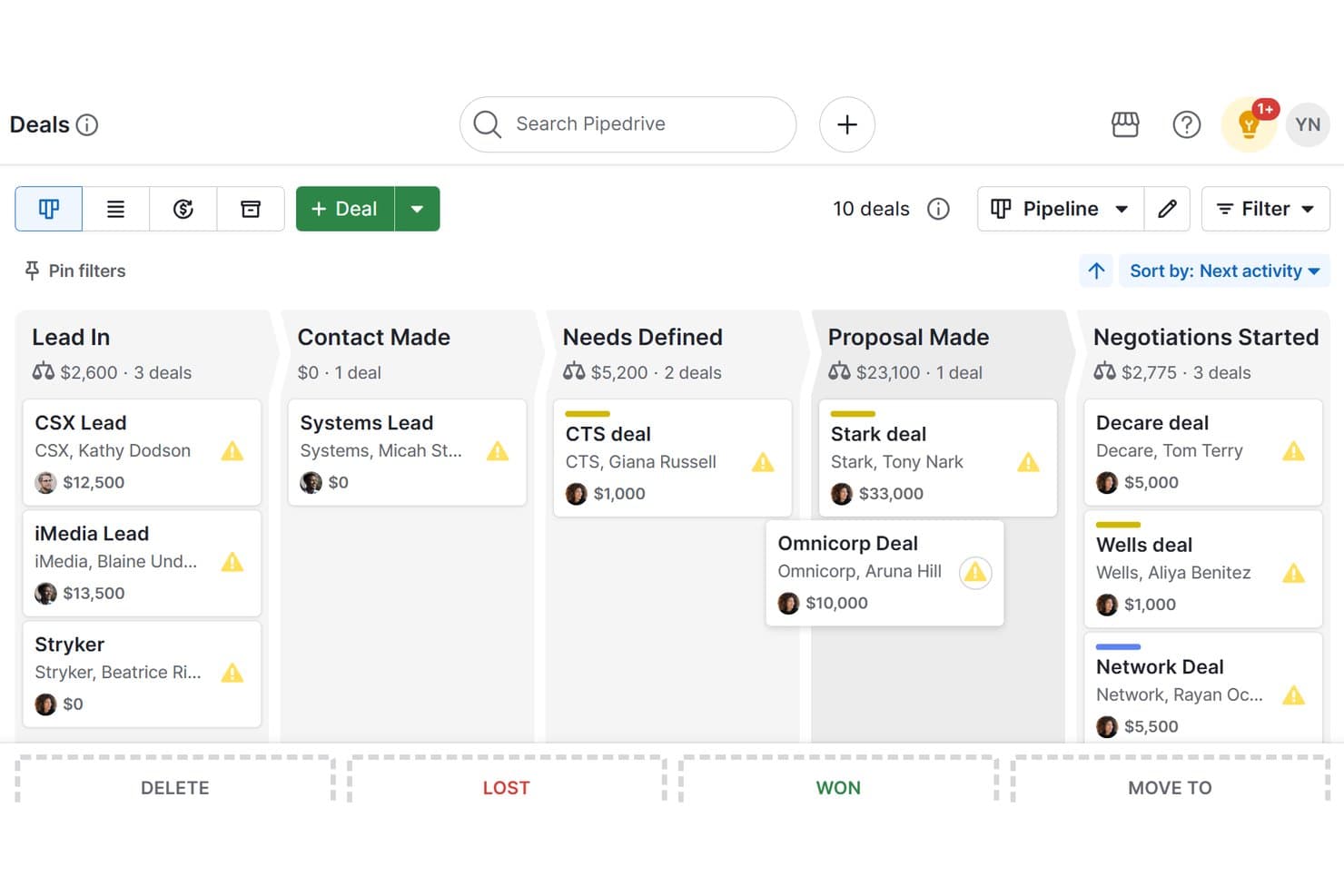
Pipedrive CRM organizes deals across a visual pipeline with custom stages. Pipedrive CRM is a sales-focused CRM platform that combines visual pipeline management, AI-driven deal intelligence, and messaging-channel integrations for WhatsApp, Facebook Messenger, and LinkedIn to manage social-sourced leads within a unified sales workflow.
Who Is Pipedrive CRM Best For?
Pipedrive CRM is a strong fit for sales teams that prioritize deal pipeline visibility and AI-driven sales intelligence over broad social media management.
Why I Picked Pipedrive CRM
Pipedrive CRM earns its spot on my shortlist because of how its AI Sales Assistant actively shapes deal decisions, not just tracks them. I'm talking about real-time win probability scoring, deal velocity signals, and next-best-action recommendations that help sales reps focus on the leads most likely to convert, including those sourced from WhatsApp and Facebook Messenger via the native Sales Inbox. The AI email writer also generates and summarizes outreach directly from the CRM, which cuts the back-and-forth when following up on social-sourced contacts.
Pipedrive CRM Key Features
- Sales Inbox: A unified messaging hub that consolidates WhatsApp Business and Facebook Messenger conversations alongside email, with direct linking to contact and deal records.
- Facebook Lead Ads sync: Connects to Facebook Lead Ads via Outfunnel to automatically create Pipedrive contacts and deals from ad form submissions in real time.
- LinkedIn contact import via Surfe: A marketplace Chrome extension that enables one-click contact imports from LinkedIn profiles and bulk exports from Sales Navigator directly into Pipedrive.
- Workflow automations: A trigger-action automation builder that routes and assigns new social-sourced leads to reps automatically based on capture events.
Pipedrive CRM Integrations
Pipedrive CRM offers native integrations with WhatsApp Business and Slack, plus marketplace integrations for Facebook Messenger, Facebook Lead Ads via Outfunnel, and LinkedIn via Surfe. Its marketplace includes 500+ apps, and its REST API and Zapier support custom connectivity.
Pros and Cons
Pros:
- Seamlessly syncs Facebook Lead Ads to CRM
- AI assistant prioritizes social-sourced deals
- Visual pipeline with real-time messaging integration
Cons:
- Lacks native Twitter/X and Instagram support
- No built-in social listening or publishing
Learn more about Pipedrive CRM: Best for contextual insights and communication
- 30-day free trial
- From $79/user/month (billed annually)
Visit WebsiteCustomer Rating:4.3/5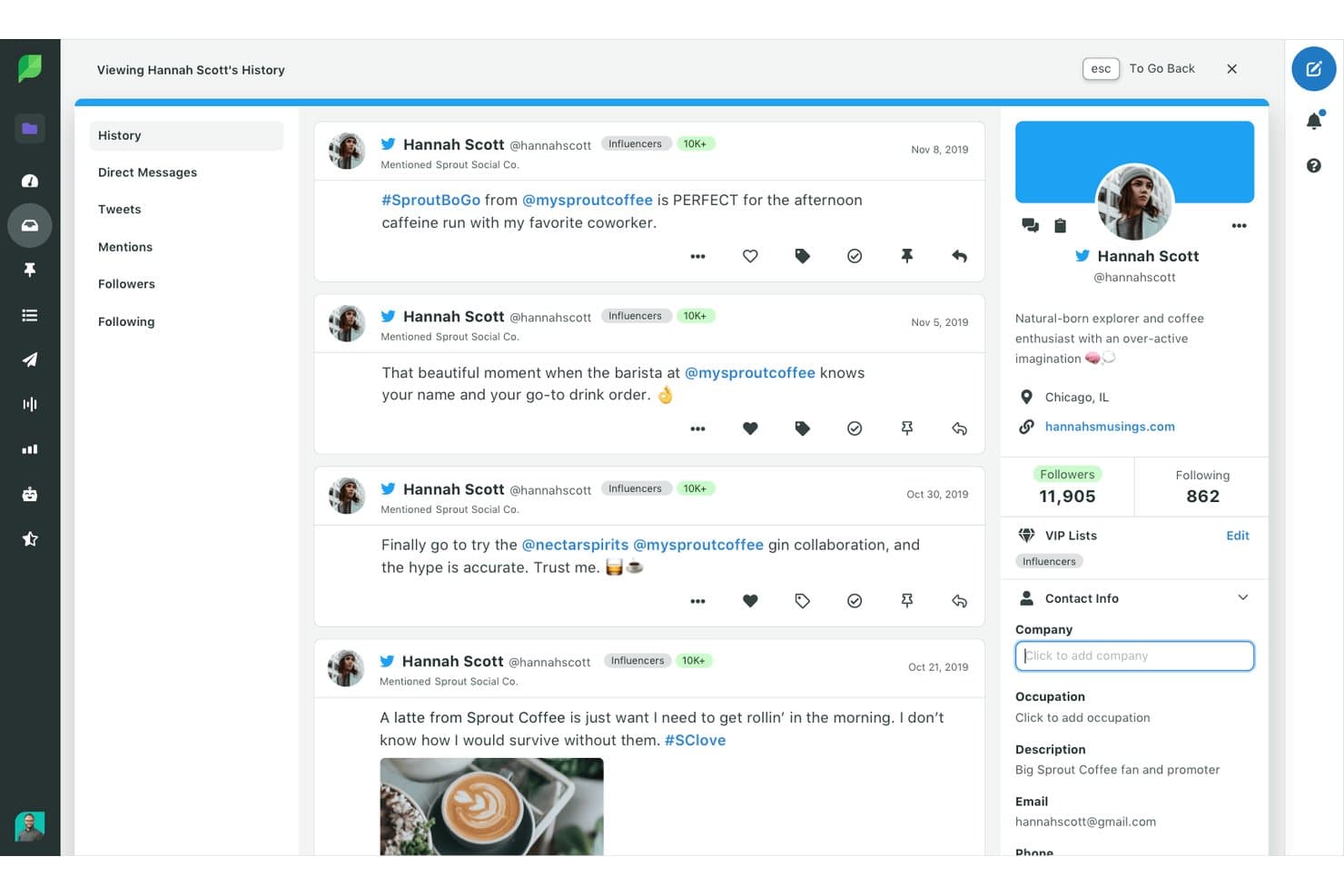
Sprout Social centralizes social history and CRM contact details in one view. Sprout Social is a social media management platform with CRM-adjacent features, combining a unified Smart Inbox, contact views, social listening, publishing tools, and bidirectional integrations with Salesforce, HubSpot, and Microsoft Dynamics 365.
Who Is Sprout Social Best For?
Sprout Social is a strong fit for marketing and social media teams at mid-size to enterprise companies that already use a CRM like Salesforce or HubSpot and need a dedicated social layer on top of it.
Why I Picked Sprout Social
I picked Sprout Social because its Smart Inbox genuinely changes how social conversations translate into CRM context. Every message, comment, and DM lands in one view, with full contact history surfaced the moment you open a thread. I especially like how Contact Views log cross-network interaction history and internal notes, so when a lead mentions your brand on X and later messages on Instagram, your team already knows the full story before they respond.
Sprout Social Key Features
- Smart Inbox: Consolidates messages, comments, DMs, and mentions from all connected social networks into a single, unified view for your team.
- ViralPost® scheduling: Analyzes your audience's engagement patterns to automatically publish content at the optimal send time per profile.
- CRM integrations: Bidirectional syncing with Salesforce, HubSpot, Microsoft Dynamics 365, and Marketo pushes social interactions directly into your existing pipeline.
- Social listening add-on: Monitors sentiment, Share of Voice, and trending topics across billions of public conversations using AI-powered analysis.
Sprout Social Integrations
Sprout Social offers native integrations across 13+ social networks, plus Salesforce, HubSpot, Microsoft Dynamics 365, Marketo, Zendesk, Google Analytics, Tableau, and Shopify. Its API supports custom integrations.
Pros and Cons
Pros:
- AI agent delivers instant contextual insights
- Best-in-class social engagement monitoring tools
- Unifies social messages across all networks
Cons:
- Advanced analytics and listening cost extra
- No native pipeline or deal tracking
Learn more about Sprout Social: Best for all-in-one social suite on a budget
- Free plan available
- From $8.99/user/month
Visit WebsiteCustomer Rating:4.3/5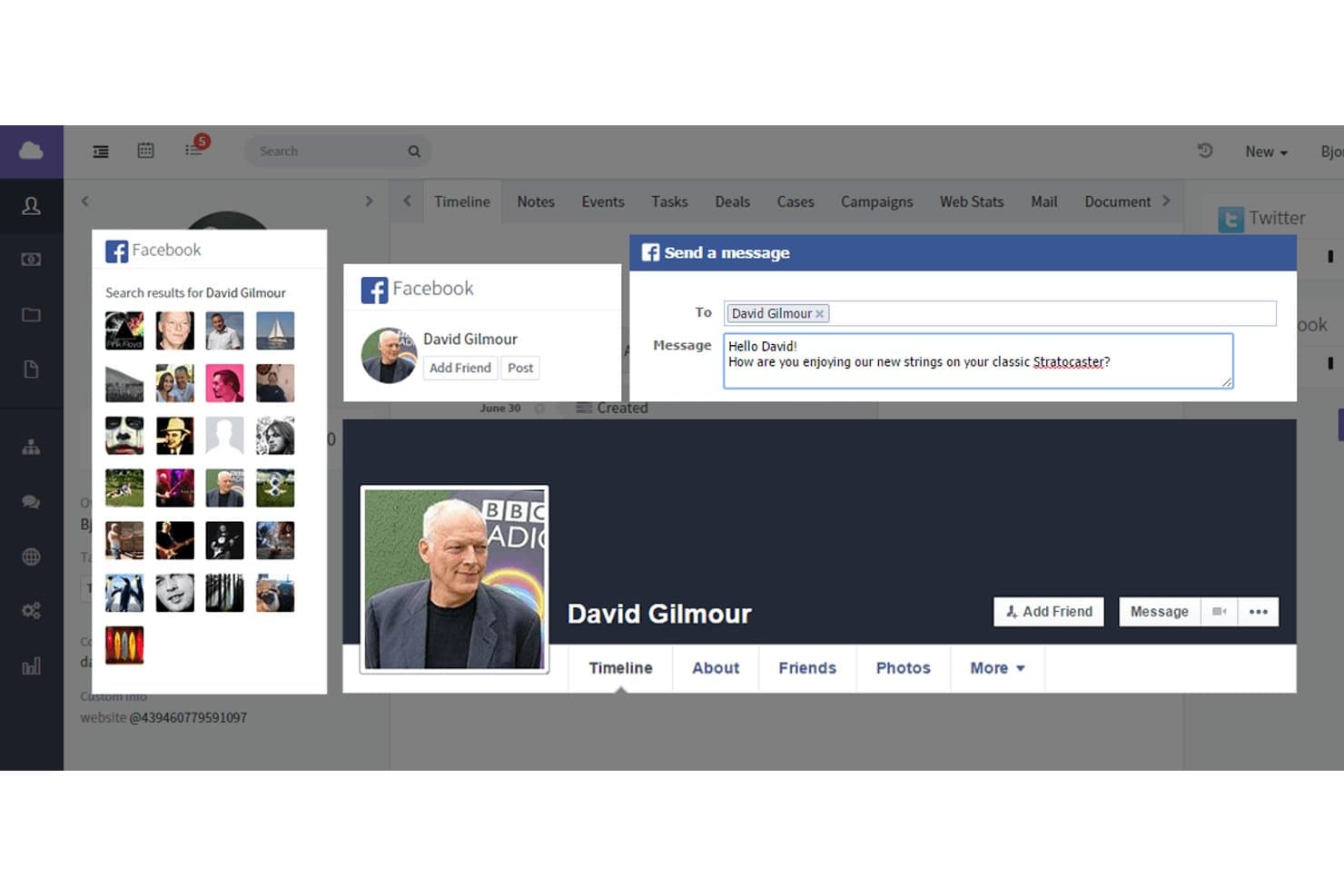
Agile CRM lets users search and message Facebook contacts directly. Agile CRM is an all-in-one CRM platform that combines contact management, pipeline tracking, marketing automation, and a native Social Suite with built-in social monitoring, publishing, and engagement tools across Twitter, Facebook, and LinkedIn.
Who Is Agile CRM Best For?
Agile CRM is a strong fit for small business owners and early-stage teams that need sales, marketing, and social engagement tools in one place without paying for multiple platforms.
Why I Picked Agile CRM
I picked Agile CRM as one of the best because it's one of the few platforms that bundles a genuinely native Social Suite into an affordable CRM, covering Twitter, Facebook, and LinkedIn without relying on third-party tools. I especially like the Twitter Node in the marketing automation builder, which lets you trigger personalized tweets as part of a multi-step campaign workflow. Social keyword streams also make it easy to monitor brand mentions and capture leads directly from social conversations into contact records.
Agile CRM Key Features
- Social keyword streams: Monitor brand mentions, hashtags, and competitor terms in real time across connected social channels.
- 360° contact view: Each contact record consolidates deal history, email threads, call logs, and social interactions into a single chronological timeline.
- Lead scoring with social signals: Automatically scores leads using behavioral triggers and social engagement data to help prioritize outreach.
- Drag-and-drop campaign builder: Build multi-step marketing automation workflows with email, SMS, and social actions using a visual no-code editor.
Agile CRM Integrations
Agile CRM offers 50+ integrations on Regular and Enterprise plans, including Twitter, Facebook, LinkedIn, Shopify, WooCommerce, WordPress, Gmail, Microsoft Outlook, and Zendesk. It also supports Zapier and a REST API for custom integrations.
Pros and Cons
Pros:
- Automated tweets built into campaign workflows
- Unified timeline shows all social interactions
- Native social monitoring covers multiple platforms
Cons:
- Social reporting features are very limited
- Lacks Instagram and TikTok integrations
Learn more about Agile CRM: Best for flat-rate social lead capture at scale
- 15-day free trial + free demo available
- From $49/month (billed annually)
Visit WebsiteCustomer Rating:4.2/5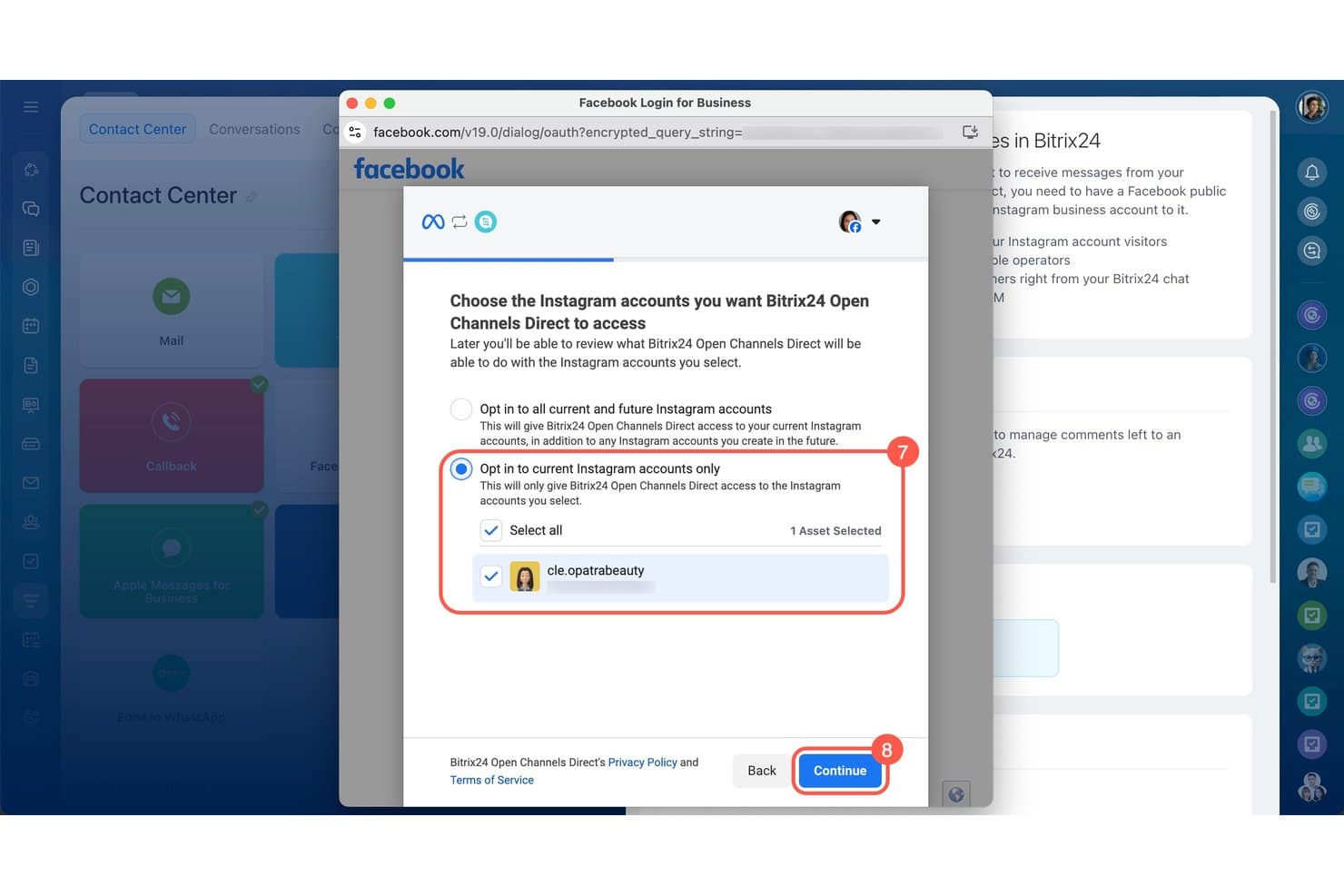
Bitrix24 lets users connect Instagram accounts via Facebook OAuth. Bitrix24 is an all-in-one CRM platform that combines pipeline management, omnichannel social lead capture, and a unified inbox for Facebook, Instagram, WhatsApp, Telegram, and Viber—all within a single flat-rate workspace.
Who Is Bitrix24 Best For?
Bitrix24 is a strong fit for small and mid-sized teams that need to manage social leads from multiple messaging platforms without paying per seat.
Why I Picked Bitrix24
Bitrix24 earns its spot on my shortlist because its flat-rate pricing model means you can add agents to your social inbox without watching your CRM bill climb. I love how Open Channels automatically creates a CRM lead the moment someone messages your Facebook Page or Instagram account, then routes that contact to the right rep using assignment rules you configure once. The unified inbox pulls Facebook, Instagram, WhatsApp, Telegram, and Viber into a single queue, so no conversation falls through the cracks when volume spikes.
Bitrix24 Key Features
- AI CoPilot: An AI assistant that transcribes calls, auto-fills CRM fields, generates chatbot responses, and summarizes conversations directly inside the platform.
- Facebook Lead Ads integration: Captures leads from Facebook ad forms in real time, routing them automatically into your CRM pipeline without manual data entry.
- Sales Intelligence module: Tracks sales funnel performance and agent activity, giving managers visibility into which channels and reps drive the most deals.
- Canned responses: Pre-written reply templates agents can deploy instantly across any connected social or messaging channel from within the Open Channels inbox.
Bitrix24 Integrations
Bitrix24 supports Open Channels connections for Facebook, Instagram, Telegram, Viber, and WhatsApp through Twilio, Edna.io, or Instant WhatsApp. Its 5,500+ app marketplace includes Meta Ads Connector, UMNICO, and Wazzup, with REST API and Zapier support.
Pros and Cons
Pros:
- AI CoPilot assists with social conversations
- Omnichannel inbox links social, email, calls
- Social lead capture auto-creates CRM records
Cons:
- Social listening requires third-party tools
- No native LinkedIn or X/Twitter integration
Learn more about Bitrix24: Best for comprehensive marketing tool integration
- Free plan available
- From $7/user/month
Visit WebsiteCustomer Rating:4.4/5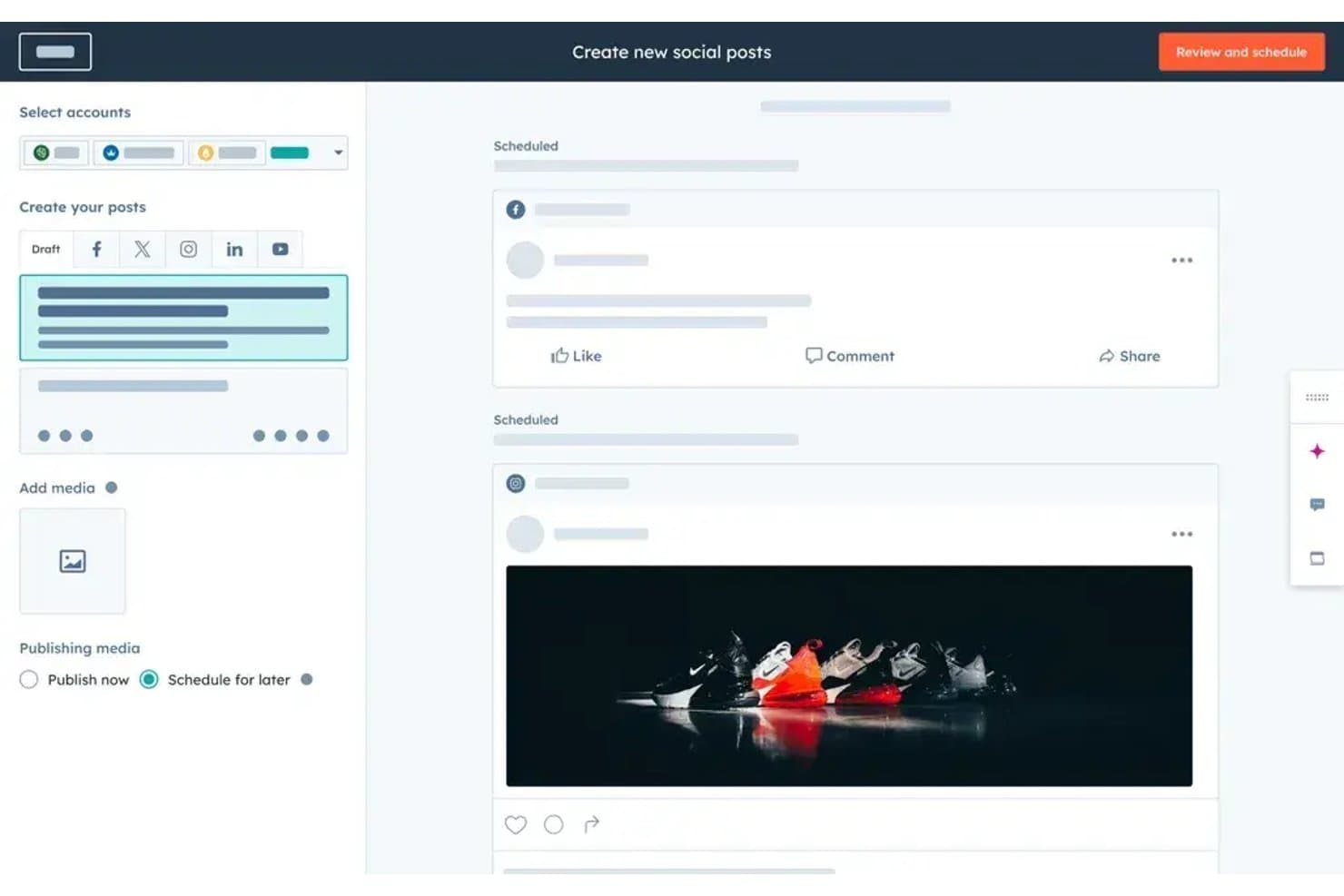
HubSpot CRM lets users create and schedule social posts across platforms. HubSpot CRM is a cloud-based CRM platform that combines contact and pipeline management with native social media publishing, monitoring, lead capture, and campaign attribution across LinkedIn, Facebook, Instagram, X, TikTok, Reddit, and YouTube.
Who Is HubSpot CRM Best For?
Marketing managers at mid-market companies will get the most from HubSpot CRM, especially if social media attribution and campaign ROI reporting are central to how your team measures pipeline impact.
Why I Picked HubSpot CRM
HubSpot CRM earns its spot on my shortlist because no other CRM ties social engagement data this tightly into the broader marketing stack. I particularly like how social posts can be tagged to campaigns, so attribution reports connect a LinkedIn comment or Facebook lead ad directly to pipeline and closed revenue. The keyword monitoring streams across X, Reddit, and LinkedIn also mean my team can surface prospect mentions and route them into contact records without switching tools.
HubSpot CRM Key Features
- Facebook Lead Ads sync: Automatically pulls lead ad form submissions into CRM contact records, including pre-filled data, without manual re-entry.
- Bulk social scheduling: Upload and schedule posts across multiple platforms at once using a CSV or Excel template.
- Lead scoring with social data: Score contacts based on social interaction type, network, frequency, and timeframe to help sales teams prioritize outreach.
- Unified social inbox: Manage mentions, comments, and replies across connected platforms in one centralized interface within the CRM.
HubSpot CRM Integrations
HubSpot CRM offers native integrations with LinkedIn, Facebook, Instagram, X, TikTok, Reddit, YouTube, Shopify, Slack, and Salesforce. It also supports 2,000+ marketplace integrations, plus Zapier and Make for additional connectivity.
Pros and Cons
Pros:
- Keyword monitoring streams across major platforms
- Automated Facebook and LinkedIn lead syncing
- Social-to-CRM campaign attribution is native
Cons:
- Manual assignment needed for some social contacts
- Social features require highest pricing tier
Learn more about HubSpot CRM: Best for omnichannel sales management
- 14-day free trial
- From $25/user/month
Visit WebsiteCustomer Rating:4.4/5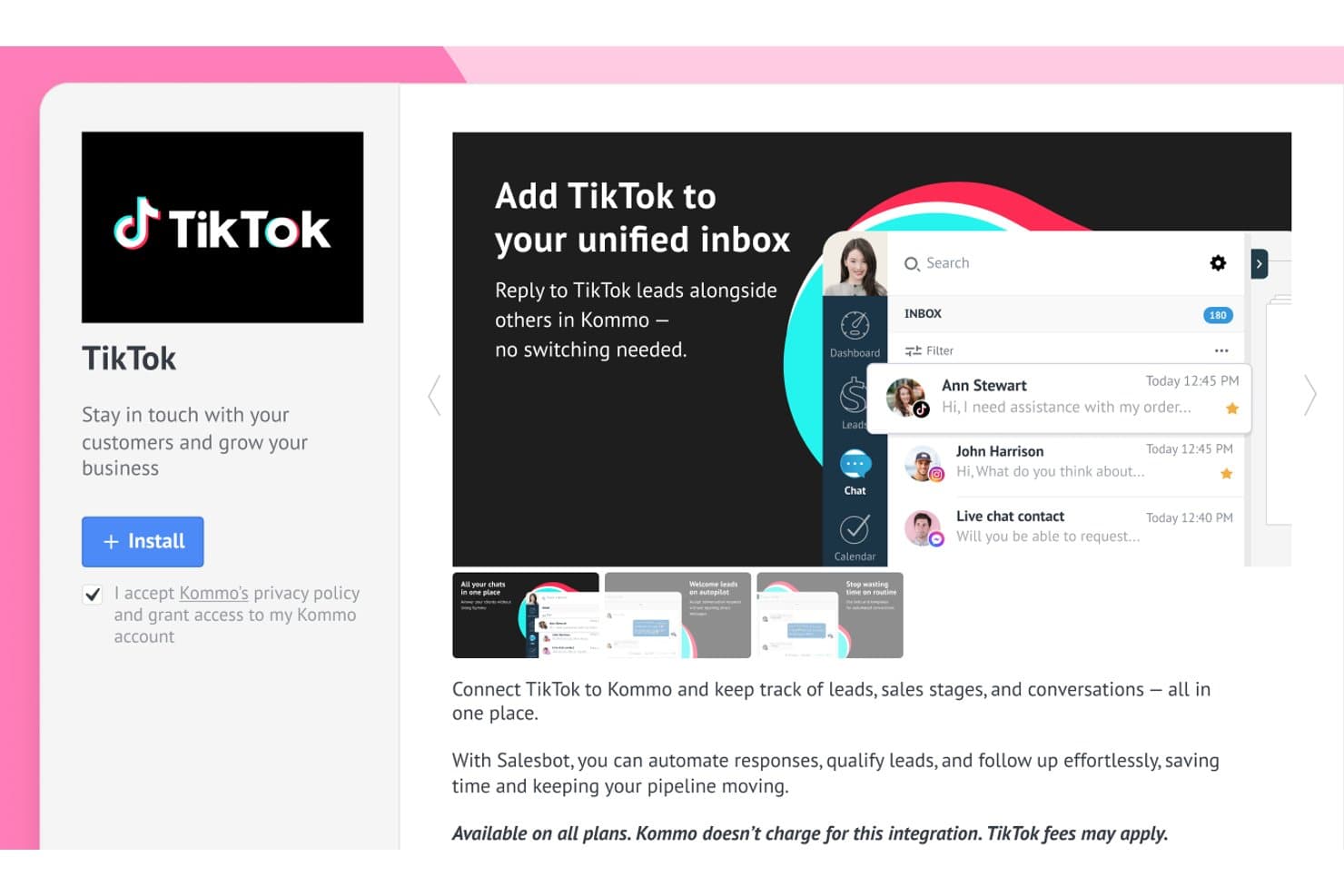
Kommo unifies TikTok messages with other social leads in one inbox. Kommo is a conversational CRM built around a unified messaging inbox that centralizes social and messaging channels—including WhatsApp, Instagram, TikTok, Facebook Messenger, Telegram, and WeChat—alongside pipeline management, no-code bot automation, and social lead capture.
Who Is Kommo Best For?
Kommo is a strong fit for small to mid-sized sales teams that run their pipelines primarily through WhatsApp, Instagram, TikTok, and Facebook.
Why I Picked Kommo
Kommo earns its spot on my shortlist because it's genuinely built around messaging, not just connected to it. I love how every WhatsApp conversation, TikTok DM, and Instagram comment lands directly in a unified inbox tied to a live deal card, so nothing slips between channels. The no-code Salesbot handles 24/7 lead qualification across all those channels automatically. Add TikTok Ads Manager lead capture (rare in CRMs) and you've got a true omnichannel sales engine.
Kommo Key Features
- Multi-pipeline management: Run separate, fully customizable pipelines for different sales workflows, teams, or products simultaneously within one account.
- Salesbot no-code builder: Build automated conversation flows across WhatsApp, Instagram, TikTok, and other channels using a visual, drag-and-drop interface with no coding required.
- AI Agent: Deploy autonomous AI agents that answer FAQs, recommend products, and assist in deal closure across connected messaging channels 24/7.
- ROI reporting with UTM attribution: Track ad spend and campaign investment against closed-deal revenue using UTM tag filtering across all social and paid channels.
Kommo Integrations
Kommo offers 200+ integrations, including native WhatsApp Business Cloud API, Instagram, Facebook Messenger, TikTok, Telegram, and WeChat connections, plus Facebook Lead Ads, Google Ads, Google Analytics, Shopify, and Google Sheets. It supports a REST API and Zapier.
Pros and Cons
Pros:
- Visual pipeline links every chat to sales stages
- Automates lead capture from Instagram and TikTok
- Centralizes all social conversations in one inbox
Cons:
- Advanced reporting features require exporting data
- No social listening for off-platform brand mentions
Learn more about Kommo:
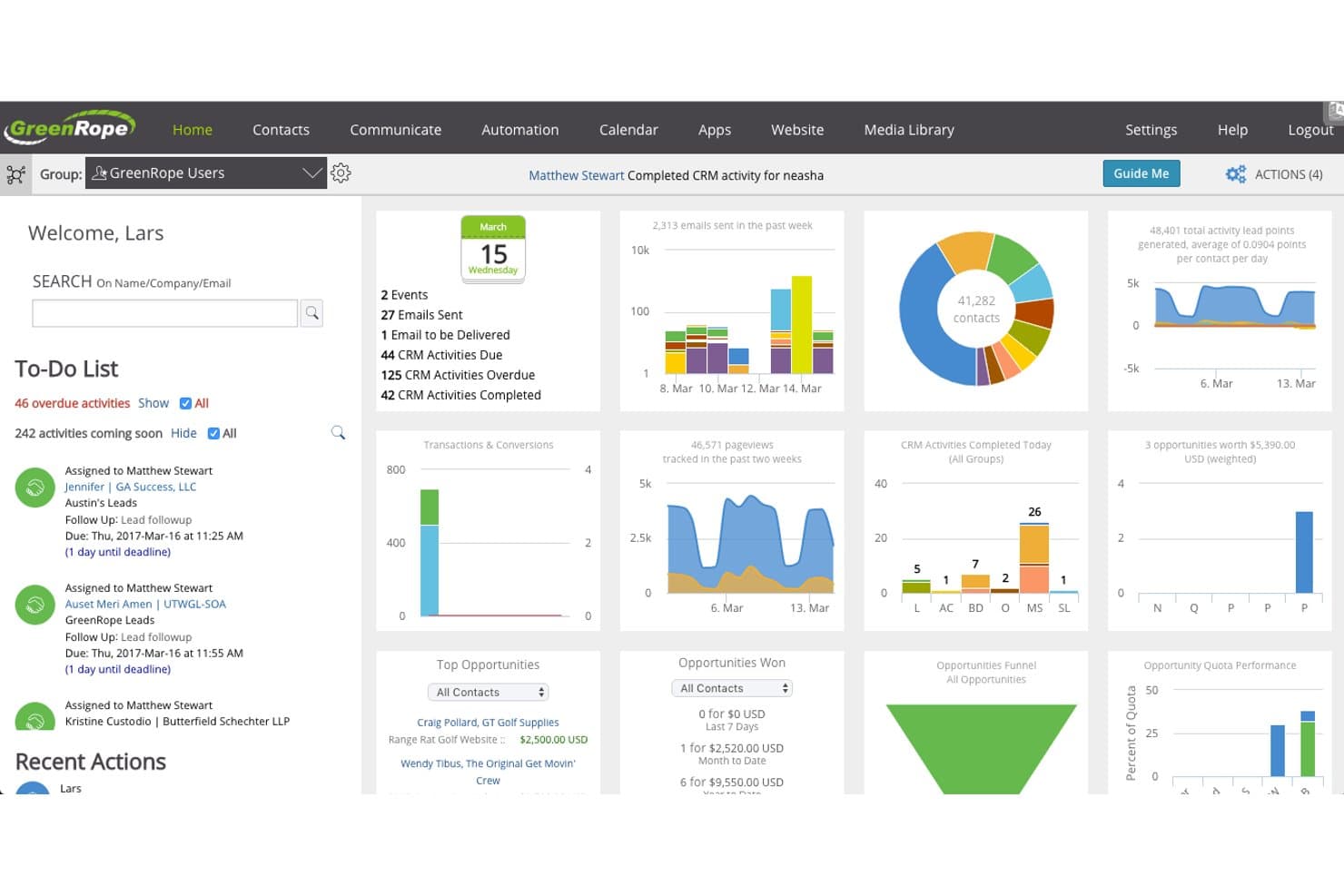
GreenRope centralizes contacts, activities, and sales data in one dashboard. GreenRope is an all-in-one CRM platform that combines contact management, social media monitoring, post scheduling, and marketing automation across Facebook, X, and LinkedIn in a single unified system.
Who Is GreenRope Best For?
GreenRope is a strong fit for marketing teams that want social engagement on Facebook, X, and LinkedIn to automatically trigger nurture workflows inside a unified CRM.
Why I Picked GreenRope
I picked GreenRope because social engagement on Facebook, X, and LinkedIn can directly trigger drip campaigns and lead scoring changes inside the same platform, with no manual re-entry. I love how the visual journey builder lets you wire a LinkedIn interaction to a full nurture sequence in minutes. The dual lead scoring system, which tracks both demographic fit and behavioral signals, means social activity isn't just logged but actually moves contacts through your pipeline.
GreenRope Key Features
- Social Dashboard: Monitor, schedule, and respond to posts across Facebook, X, and LinkedIn from within the CRM without switching tools.
- Dual lead scoring: Tracks both demographic fit and behavioral engagement as two separate scores to help prioritize outreach.
- FullContact enrichment: Automatically pulls social profile data, photos, and interests from public sources into contact records.
- WhatsApp messaging: Send personalized WhatsApp messages directly to contacts from inside GreenRope.
GreenRope Integrations
GreenRope offers native integrations with Facebook, Twitter/X, LinkedIn, WhatsApp, FullContact, OpenAI, Shopify, Stripe, Zoom, and Gmail. It also supports Zapier and an open API for custom integrations.
Pros and Cons
Pros:
- Unlimited users on every plan
- Unified timeline for all social touchpoints
- Social engagement triggers automated CRM workflows
Cons:
- Mandatory paid onboarding for all new accounts
- No native Instagram or TikTok support
Learn more about GreenRope: Best for AI-driven multi-channel communication
- Free demo available
- Pricing upon request
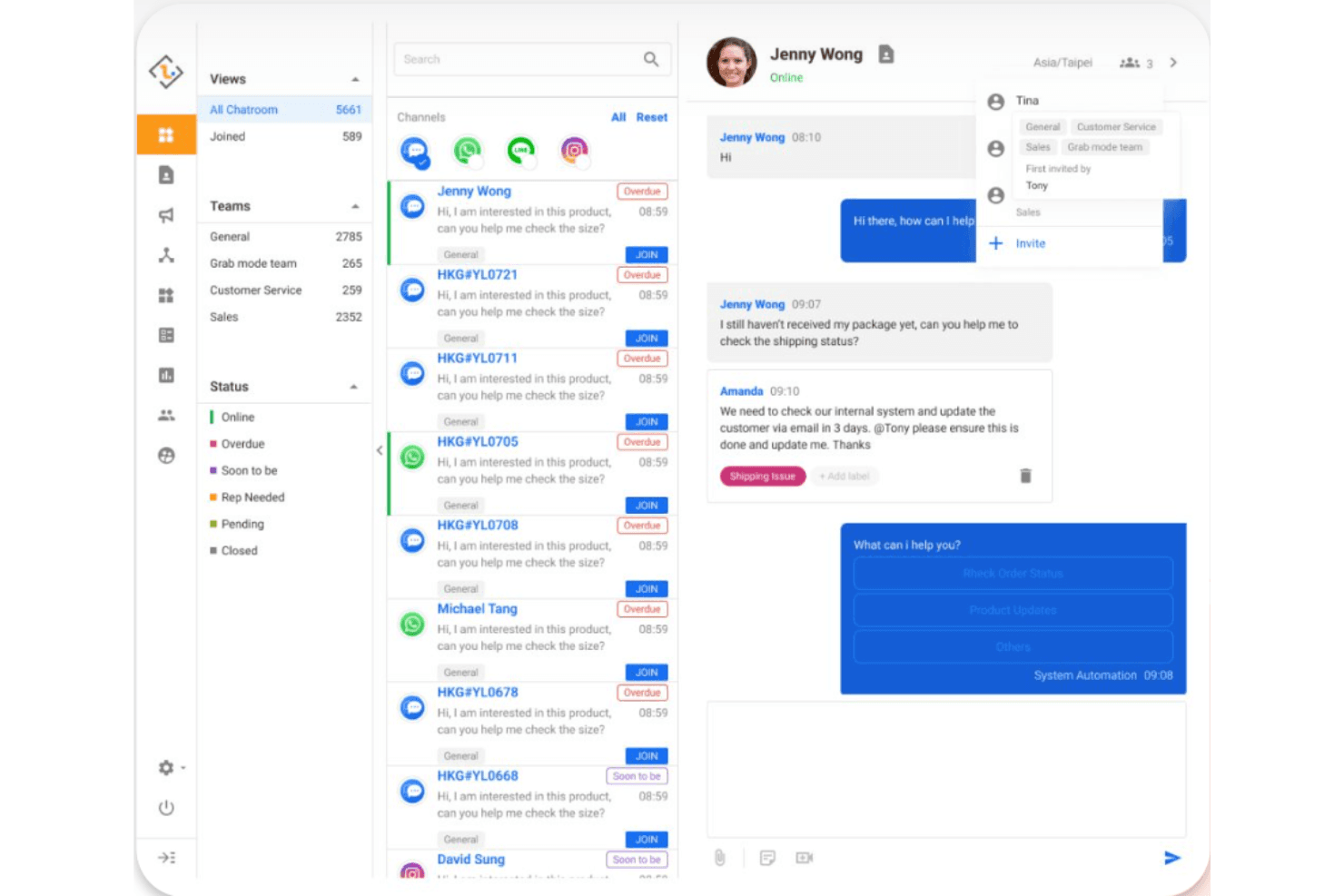
iMBrace unifies social media chats and CRM team workflows in one inbox. iMBrace is an AI-driven social CRM platform that unifies lead capture, contact management, and multi-channel messaging across WhatsApp, Facebook, Instagram, WeChat, Telegram, and more into a single inbox.
Who Is iMBrace Best For?
iMBrace is a strong fit for social media and sales teams managing high volumes of customer conversations across WhatsApp, Facebook, and Instagram—especially those operating in APAC markets.
Why I Picked iMBrace
I've included iMBrace in my top picks because its AI-driven comment classification is something I rarely see done this well: it reads every incoming Facebook and Instagram comment in real time, flags potential leads, and automatically fires an outbound message to collect contact details. I also like how Facebook Lead Ads flow directly into the Databoard contact record with zero manual import. That combination keeps lead capture running continuously across channels without anyone on the team having to babysit it.
iMBrace Key Features
- FlowOps™ no-code workflow builder: A drag-and-drop automation engine that lets you build multi-step lead routing and follow-up sequences without writing any code.
- Multi-channel unified inbox: Consolidates incoming messages from WhatsApp, Facebook, Instagram, WeChat, Telegram, and Line into a single view for your team to manage.
- Lead assignment engine: Automatically routes new leads to the right sales rep based on criteria like region, product interest, and skill set.
- Smart campaign management: Creates trackable QR codes and URLs that trigger automated workflows when a contact engages, logging activity directly into Databoard.
iMBrace Integrations
iMBrace supports 100+ channel and business integrations, including Facebook, Instagram, WhatsApp, Salesforce, Microsoft Dynamics 365, HubSpot, Zendesk, and Zoho. Its FlowOps™ builder supports 400+ integrations.
Pros and Cons
Pros:
- Automated outbound follow-ups for social comments
- Unified inbox for all messaging apps
- AI identifies social leads in real time
Cons:
- Visual sales pipeline features are limited
- No LinkedIn or X integration available
Learn more about iMBrace:
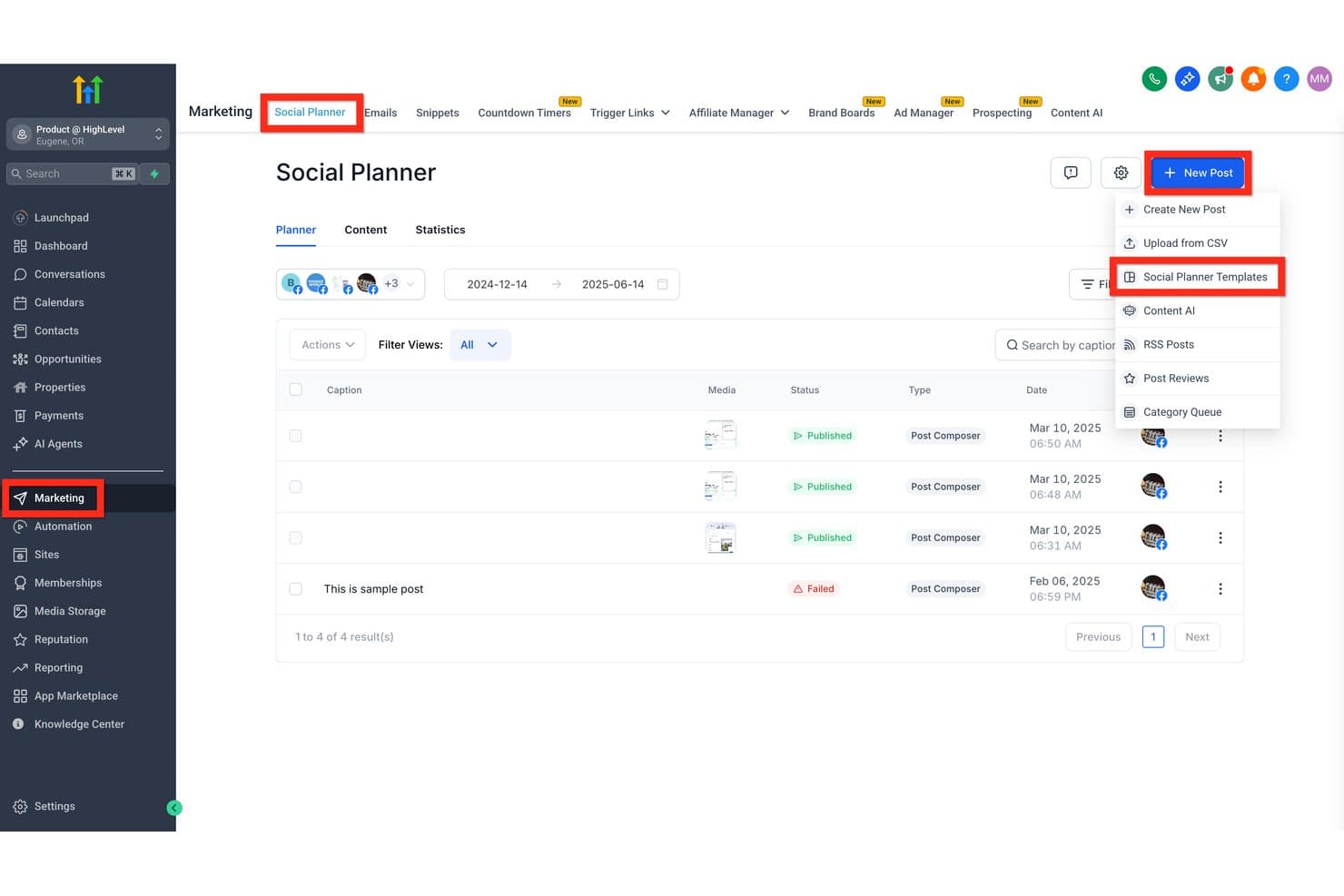
GoHighLevel lets users schedule and manage social posts with templates. GoHighLevel is an all-in-one CRM and marketing platform that combines contact and pipeline management, social media publishing across 10 platforms, automated social lead capture, a unified multi-channel inbox, and workflow automation.
Who Is GoHighLevel Best For?
GoHighLevel is a strong fit for marketing agencies managing multiple clients who need social publishing, lead capture, and CRM in one white-labeled platform.
Why I Picked GoHighLevel
I picked GoHighLevel as one of the best because it's purpose-built for agencies managing social and CRM across multiple clients in one platform. The Comment-to-Lead automation is what genuinely sets it apart: when someone comments on a Facebook or Instagram post, GoHighLevel captures them as a CRM contact, auto-replies, and triggers a personalized DM sequence automatically. Paired with white-label sub-accounts and client content approval workflows, it's a natural fit for agencies running social lead generation at scale.
GoHighLevel Key Features
- Unified conversation manager: Consolidates inbound Facebook Messenger, Instagram DMs, SMS, email, WhatsApp, and live chat messages into one threaded inbox tied to each contact record.
- Bulk social scheduling: Upload up to 90 posts at once via CSV or XLSX across all 10 supported platforms directly within the Social Planner.
- Engagement scoring: Automatically scores leads based on behavioral signals like email opens, form submissions, and link clicks, then triggers workflows to route high-priority contacts.
- Multi-level content approval workflows: Lets agencies submit social posts through a structured approval chain before publishing, with client-facing review built into the platform.
GoHighLevel Integrations
GoHighLevel offers native integrations across 10 social platforms, including Facebook, Instagram, LinkedIn, TikTok, YouTube, Pinterest, Threads, Bluesky, and Google Business Profile, plus WhatsApp as a paid add-on. It also supports Zapier and API access for custom integrations.
Pros and Cons
Pros:
- White-label sub-accounts for agency workflows
- Unified inbox for all social channels
- Comment-to-lead automation for Facebook and Instagram
Cons:
- X (Twitter) publishing and inbox not supported
- No true public brand mention listening
Learn more about GoHighLevel:
Andre CRM-systemer med integrasjon for sosiale medier
Nedenfor finner du en liste over flere CRM-systemer med integrasjon for sosiale medier som jeg valgte ut. Selv om de ikke kom med blant de 10 beste, er de fortsatt verdifulle og verdt å undersøke nærmere.
- 11NutshellBest for user-friendly CRM with sales automation
- 12Zoho CRMBest for small to medium businesses
- 13SugarAIBest for intelligent sales insights
- 14NimbleBest for social prospecting and contact enrichment
- 15Creatio CRMBest for no-code workflow automation
- 16EngageBayBest for all-in-one social suite on a free plan
- 17OdooBest for open-source flexibility
- 18Salesforce Sales CloudBest for enterprise AppExchange social-CRM stacks
- 19FreshmarketerBest for AI-powered marketing automation
Relaterte anmeldelser av HR-programvare
Hvis du fortsatt ikke har funnet det du leter etter her, kan du se på disse andre relaterte verktøyene som vi har testet og evaluert:
- HR-programvare
- Lønnsprogramvare
- Rekrutteringsprogramvare
- Tjenester for arbeidsgiver på vegne av andre
- Systemer for sporing av søkere
- Programvare for arbeidsstyring
How I Evaluate CRM With Social Media Integration
I split my evaluation into baseline criteria every tool must meet—like pulling social leads into contact records—and differentiators that separate the standouts from the rest.
Core Functionality (Table Stakes For This List)
When I'm selecting tools for my list, I rank each one on a scale from 0 (does not offer the functionality) to 5 (excels in this area) for each core functionality listed below. I then calculate the tool's total score into a percentage, using 65% as a benchmark to help assess its overall fit for the list.
- Contact & Pipeline Management: I look at whether contact records and deal stages are flexible enough to reflect real sales workflows—not just a static list of names.
- Native Social Media Connections: I check which platforms are directly integrated—Facebook, LinkedIn, X, Instagram—and whether the data sync is reliable rather than requiring constant manual refresh.
- Social Lead Capture: I evaluate whether leads from social channels flow into the CRM automatically or still require someone to manually export and re-enter them into the system.
- Social Engagement Monitoring: I look for the ability to view mentions, comments, and messages tied to specific contact records—ideally without leaving the CRM to check each platform separately.
- Unified Activity Timeline: I assess whether social interactions appear alongside emails and calls on a single contact record, giving your team full context before any outreach.
- Reporting on Social-Sourced Data: I consider whether the platform can connect social leads to pipeline outcomes—not just count them, but show how they move through and convert.
Once I have a list of tools that meet the criteria, I consider what sets each platform apart.
Differentiating Factors (What Sets Vendors Apart)
Here's how I compare and contrast different vendors:
Standout Features
Social listening matters here—I look for whether a CRM can track branded keywords and competitor mentions, not just direct messages. That's a different level of signal. I also evaluate team inbox functionality: can rules-based routing get social leads to the right rep without manual triage? For teams where marketing owns social and sales owns follow-up, that handoff is where deals get lost. AI lead scoring tied to social engagement signals is another factor I check, since prioritizing who to contact first changes actual pipeline outcomes.
Beyond Features
Data privacy and API compliance matter more in this category than most. Social CRMs depend on third-party APIs from Meta, LinkedIn, and X—and when those policies shift, data sync reliability follows. I check how each vendor handles stored social profile data and whether they maintain active compliance. I also consider cross-functional fit: when marketing owns social and sales owns follow-up, I look at whether the platform gives both teams shared visibility into engagement without creating competing records or ownership disputes.
Slik velger du et CRM-system med integrasjon for sosiale medier
Mens du går gjennom din egen unike prosess for valg av programvare, bør du ha følgende punkter i bakhodet:
- Effektiv kundestøtte: Et CRM-system med integrasjon med sosiale medier kan forbedre kundestøtten betydelig ved å sentralisere all kundeinteraksjon på tvers av ulike kanaler. Denne CRM-integrasjonen gjør det mulig for kundestøtteteam å svare på kundehenvendelser på sosiale medieplattformer som Facebook, Twitter og Instagram direkte fra CRM-systemet.
- Forbedret kundeinnsikt: Integrasjon av sosiale medier med CRM gir store mengder data om kundenes atferd, preferanser og holdninger. Disse dataene kan brukes til å opprette detaljerte kundeprofiler og kundepersonaer, noe som er uvurderlig for målrettede markedsføringskampanjer.
- Merkevaretillit og engasjement: Raske svar på kundehenvendelser og aktiv deltakelse i samtaler på sosiale medier kan gjøre merkevaren mer menneskelig og fremme en følelse av fellesskap. Et CRM-system med integrasjon med sosiale medier bidrar til å bygge tillit og engasjement ved å muliggjøre autentisk interaksjon med kunder i sanntid.
- Effektivitet i markedsføringskampanjer: Integrasjon med sosiale medier gjør det mulig for bedrifter å bruke CRM-data til å lage svært målrettede og personlig tilpassede markedsføringskampanjer. Ved å forstå kundenes preferanser og atferd gjennom interaksjoner på sosiale medier kan bedrifter utforme budskap som treffer målgruppen mer effektivt.
- Omfattende datahåndtering: Det er viktig å sikre datakonsistens og personvern på tvers av plattformer når CRM integreres med sosiale nettverk. Et solid CRM-system bør tilby verktøy for regelmessige datarevisjoner og synkronisering for å opprettholde nøyaktig og oppdatert kundeinformasjon. I tillegg er det avgjørende å overholde personvernlover som GDPR for å beskytte kundedata og opprettholde tillit.
Trender for CRM med integrasjon med sosiale medier
Her er noen trender jeg har lagt merke til for CRM-systemer med integrasjon med sosiale medier, samt hva de kan bety for fremtiden. Jeg har gått gjennom utallige produktoppdateringer, pressemeldinger og utgivelseslogger for å trekke frem de viktigste innsiktene.
- AI-integrasjon: Kunstig intelligens revolusjonerer CRM med integrasjon med sosiale medier ved å automatisere oppgaver og gi dyp innsikt. AI-drevne verktøy kan analysere kundeinteraksjoner på sosiale medier for å forutsi atferd og tilpasse markedsføringen. Denne trenden er viktig fordi den forbedrer kundeengasjementet og driftseffektiviteten på tvers av landingssider.
- Omnikanalopplevelse: Kunder forventer sømløs interaksjon på tvers av flere plattformer. Derfor integrerer CRM-systemer kanaler for sosiale medier for å gi en enhetlig kundeopplevelse. Denne trenden er viktig fordi den sikrer konsekvent kommunikasjon og forbedrer kundetilfredsheten ved å samle data fra ulike kontaktpunkter.
- Forbedret automatisering: Automatisering i CRM-systemer bidrar til å effektivisere prosesser som håndtering av potensielle kunder og kundeservice. Integrasjon med sosiale medier muliggjør svar i sanntid og automatisert engasjement, noe som er avgjørende for å opprettholde kunderelasjoner og forbedre tjenesteeffektiviteten.
- Mobil tilgjengelighet: Etterspørselen etter mobile CRM-løsninger øker. Integrasjon av sosiale medier med mobile CRM-apper gjør det mulig for salgsrepresentanter å få tilgang til kundedata og kommunisere med kunder på farten. Denne trenden er viktig fordi den støtter fjernarbeid og øker fleksibiliteten i kundeinteraksjonene.
- Datasikkerhet og personvern: Med økende bekymring for datainnbrudd styrker CRM-systemene sikkerhetstiltakene. Integrasjon med sosiale medier krever robust databeskyttelse for å sikre at kundeinformasjonen er trygg. Denne trenden er avgjørende for å bygge tillit og overholde regelverk som GDPR og CCPA.
Etter hvert som disse teknologiene fortsetter å utvikle seg, vil selskaper som utnytter disse trendene, være bedre posisjonert til å forstå kundenes atferd, forutse behov og skape sterkere og mer meningsfulle forbindelser. Å ta i bruk CRM med integrasjon med sosiale medier er ikke bare et konkurransefortrinn, men en nødvendighet i det moderne næringslivet.
Hva er CRM med integrasjon med sosiale medier?
CRM med integrasjon med sosiale medier kombinerer tradisjonelle funksjoner for kunderelasjonshåndtering med muligheten til å spore og administrere kundeinteraksjoner på sosiale medieplattformer som Twitter, Facebook og Instagram. Denne integrasjonen gjør det mulig for bedrifter å kommunisere med kunder gjennom deres foretrukne sosiale mediekanaler, noe som fører til bedre kundeservice og mer innsiktsfulle markedsføringsstrategier.
Funksjoner i CRM med integrasjon med sosiale medier
Når jeg ser etter et CRM-system med integrasjon med sosiale medier, fokuserer jeg på verktøy som forbedrer kundeinteraksjoner og effektiviserer kommunikasjonen. Her er noen av de viktigste funksjonene som er avgjørende for alle CRM-systemer med integrasjon med sosiale medier:
- Samlet innboks: Denne funksjonen gjør det mulig for bedrifter å administrere meldinger fra flere sosiale mediekanaler på ett sentralisert sted, noe som effektiviserer kommunikasjonen og sikrer at ingen henvendelser blir oversett.
- Overvåking av sosiale medier: Ved å spore omtaler, innlegg, emneknagger, kommentarer og interaksjoner på tvers av ulike plattformer hjelper denne funksjonen bedrifter med å holde seg informert om kundenes oppfatninger og engasjement.
- Automatiserte svar: Den gjør det mulig å konfigurere automatiske svar på vanlige spørsmål i sosiale medier, noe som forbedrer responstidene og kundetilfredsheten.
- Analyse og rapportering: Denne funksjonen gir detaljert innsikt i resultater og engasjementsmålinger for sosiale medier, og hjelper bedrifter med å måle hvor effektive strategiene deres for sosiale medier er overfor bestemte demografiske grupper.
- Innholdsplanlegging: Bedrifter kan planlegge innlegg på tvers av ulike sosiale medieplattformer på forhånd, slik at innholdet publiseres konsekvent og til rett tid.
- Leadgenerering: Denne funksjonen identifiserer og samler inn potensielle kunder fra interaksjoner i sosiale medier, og hjelper bedrifter med å utvide kundebasen og salgsmulighetene gjennom kontaktadministrasjon.
- Kundesegmentering: Den hjelper med å kategorisere kunder basert på atferden og interaksjonene deres i sosiale medier, slik at markedsføringen kan målrettes bedre og tilpasses individuelt.
- Sosial lytting: Ved å overvåke trender og samtaler i sosiale medier som er relevante for virksomheten, hjelper denne funksjonen bedrifter med å ligge i forkant av endringer i markedet og kundenes behov.
- Integrasjon med andre verktøy: Ved å koble seg sømløst til andre forretningsverktøy, som e-postmarkedsføring og salgsplattformer, forbedrer denne funksjonen den overordnede arbeidsflyten og effektiviteten.
- Støtte for flere kanaler: Denne funksjonen støtter kommunikasjon på tvers av ulike sosiale medieplattformer, slik at bedrifter får en helhetlig og omfattende strategi for sosiale medier og kunderelasjonshåndtering i sosiale medier.
Ved å samle interaksjoner i sosiale medier i CRM-systemet kan bedrifter få verdifull innsikt, tilpasse kundekommunikasjonen og forbedre den overordnede effektiviteten. Denne integrasjonen bidrar ikke bare til sterkere kunderelasjoner, men gir også et konkurransefortrinn i dagens digitaliserte marked.
Fordeler med CRM med integrasjon for sosiale medier
Ved å velge et sosialt CRM-system kan bedrifter forbedre måten de håndterer kunderelasjoner på, og effektivisere arbeidet med sosiale medier betydelig. Her er noen av de viktigste fordelene et slikt verktøy gir brukere og organisasjoner:
- Forbedret kundeengasjement: Ved å integrere sosiale medier med CRM-systemet kan du kommunisere med kunder i sanntid, noe som fører til mer personlige og raskere svar.
- Bedre datainnsikt: Tilgang til analyseverktøy for sosiale medier i CRM-systemet gir verdifull innsikt i kundenes atferd og preferanser, og gjør det enklere å tilpasse markedsføringsstrategiene effektivt.
- Effektivisert kommunikasjon: En samlet innboks for alle meldinger i sosiale medier sikrer at ingen kundehenvendelser blir oversett, og forbedrer kommunikasjonseffektiviteten.
- Økt leadgenerering: CRM med integrasjon for sosiale medier gjør det mulig å samle inn potensielle kunder direkte fra interaksjoner i sosiale medier, slik at den potensielle kundebasen utvides.
- Effektiv innholdsadministrasjon: Planlegging og publisering av innhold på tvers av flere sosiale medieplattformer fra CRM-systemet sparer tid og sikrer et konsekvent budskap fra merkevaren.
Disse fordelene viser hvordan CRM med integrasjon for sosiale medier kan øke engasjementet, gi dypere innsikt og effektivisere driften, noe som gjør det til et uvurderlig verktøy for moderne bedrifter.
Kostnader og priser for CRM med integrasjon for sosiale medier
Det er avgjørende å forstå kostnadene og prisalternativene for CRM med integrasjon for sosiale medier for å kunne ta en informert beslutning. Nedenfor har jeg beskrevet de vanligste abonnementstypene, gjennomsnittsprisene og typiske funksjonene for å hjelpe deg med å finne ut hvilken plan som passer best til behovene dine.
Sammenligningstabell for CRM med integrasjon for sosiale medier
| Plantype | Gjennomsnittspris | Vanlige funksjoner |
| Gratisabonnement | $0 | Grunnleggende CRM-funksjoner, begrenset integrasjon for sosiale medier og begrenset antall brukere |
| Grunnleggende abonnement | $15/user/month | Viktige CRM-funksjoner, planlegging i sosiale medier og grunnleggende analyse |
| Standardabonnement | $30/user/month | Avanserte CRM-funksjoner, støtte for flere kanaler og utvidet analyse |
| Profesjonelt abonnement | $50/user/month | Omfattende CRM-verktøy, KI-drevet innsikt og prioritert kundestøtte |
| Virksomhetsabonnement | Pris på forespørsel | Tilpassede løsninger, komplett integrasjonspakke og dedikert kundestøtte |
En oversikt over plantyper, kostnader og funksjoner for CRM med integrasjon for sosiale medier.
Selv om kostnadene kan variere betydelig avhengig av hvilke funksjoner og hvilken skalerbarhet som kreves, vil de langsiktige fordelene ved bedre kundeinnsikt og mer effektiv kommunikasjon ofte rettferdiggjøre utgiften. Ved å vurdere prismodellene og de tilgjengelige funksjonene nøye kan virksomheter velge en CRM-løsning som samsvarer med deres spesifikke behov og budsjett.
Vanlige spørsmål om CRM med integrasjon av sosiale medier
Her er noen vanlige spørsmål jeg har fått om CRM-systemer med integrasjon av sosiale medier.
Hvordan forbedrer et CRM-system med integrasjon av sosiale medier kundeservicen?
Det muliggjør sanntidsinteraksjon med kunder, raske svar på spørsmål og effektiv sporing av kundeproblemer. Dette fører til høyere kundetilfredshet og lojalitet.
Kan jeg administrere flere kontoer på sosiale medier med et CRM-system?
Ja, de fleste CRM-systemer med integrasjon av sosiale medier støtter administrasjon av flere kontoer fra ulike plattformer. Dette bidrar til å effektivisere publisering av innhold og engasjement.
Hvor sikre er dataene mine med et CRM-system med integrasjon av sosiale medier?
De fleste CRM-systemer tilbyr omfattende sikkerhetstiltak, inkludert datakryptering og overholdelse av personvernregler. Sjekk alltid CRM-systemets sikkerhetsfunksjoner og retningslinjer.
Kan små bedrifter dra nytte av et CRM-system med integrasjon av sosiale medier?
Ja, små bedrifter kan ha stor nytte av å forbedre kundeengasjementet, effektivisere prosesser og få verdifull innsikt fra aktiviteter på sosiale medier. Det finnes rimelige abonnementer som er tilpasset små bedrifter.