

Airtable er en populær programvare for forretningsanalyse som er kjent for å gjøre det enkelt å organisere og samarbeide om data gjennom tilpassbare regneark. Noen brukere kan imidlertid være på utkikk etter et alternativ til Airtable på grunn av begrensningene ved håndtering av komplekse databehov eller prismodellen, som kanskje ikke passer for større team eller prosjekter.
Med utgangspunkt i min erfaring med programvare for inntektsoperasjoner testet og sammenlignet jeg flere av de beste tilgjengelige alternativene til Airtable. Deretter samlet jeg resultatene i detaljerte vurderinger for å hjelpe deg med å finne den beste programvaren for dine unike behov.
Hva er Airtable?
Airtable er en programvare for forretningsanalyse som kombinerer et regnearkgrensesnitt med databasefunksjonalitet, noe som gjør det enkelt for brukere å organisere og administrere data. Den brukes ofte av prosjektledere, markedsføringsteam og kreative fagpersoner som må samarbeide og følge fremdriften effektivt. Airtable tilbyr tilpassbare maler, et dra-og-slipp-grensesnitt og funksjoner for samarbeid i sanntid, slik at du og teamet ditt enkelt kan organisere prosjekter, administrere arbeidsflyter og dele informasjon.
Sammenligningstabell over Airtable-alternativer
Denne sammenligningstabellen oppsummerer prisdetaljer for mine beste utvalgte Airtable-alternativer.
| Tool | Best For | Trial Info | Price | ||
|---|---|---|---|---|---|
| 1 | Best for automated workflows | Free plan available; 14-day free trial | From $9/user/month (billed annually) | Website | |
| 2 | Best for complex workflows | 14-day free trial | From $10/user/month (billed annually) | Website | |
| 3 | Best for diverse integrations | Free plan available | From $5/user/month (billed annually) | Website | |
| 4 | Best for custom app creation | Free plan available | From $5/user/month | Website | |
| 5 | Best for document integration | Free plan available | From $12/user/month (billed annually) | Website | |
| 6 | Best for all-in-one productivity | Free plan available | From $12/user/month | Website | |
| 7 | Best for project collaboration | 14-day free trial + free plan available | From $8/user/month (billed annually) | Website | |
| 8 | Best for no-code databases | Free plan available | From $10/user/month (billed annually) | Website | |
| 9 | Best for precise oversight | 2-week free trial; free demo available | From $8/user/month (billed annually) | Website | |
| 10 | Best for open-source flexibility | Free plan available | From $12/user/month (billed annually) | Website |


Why Trust Our Software Recommendations
6,700+
Reviews
20
Industry experts
16+
Evaluation factors
14
Years
Our reviews reflect our independent judgment—not a sales pitch. Learn how we stay transparent.
For this guide, we evaluated tools using hands-on testing and independent research, scoring tools using our selection criteria.
Our reviews reflect our human editorial judgment, not a sales pitch.
Vurderinger av de beste Airtable-alternativene
Nedenfor finner du mine detaljerte sammendrag av de beste Airtable-alternativene på kortlisten min. Vurderingene mine gir et detaljert innblikk i de viktigste funksjonene, fordelene & ulempene, integrasjonene og de ideelle bruksområdene for hvert verktøy, slik at du kan finne det beste alternativet for deg.
 Best for automated workflows
- Free plan available; 14-day free trial
- From $9/user/month (billed annually)
Visit WebsiteCustomer Rating:4.6/5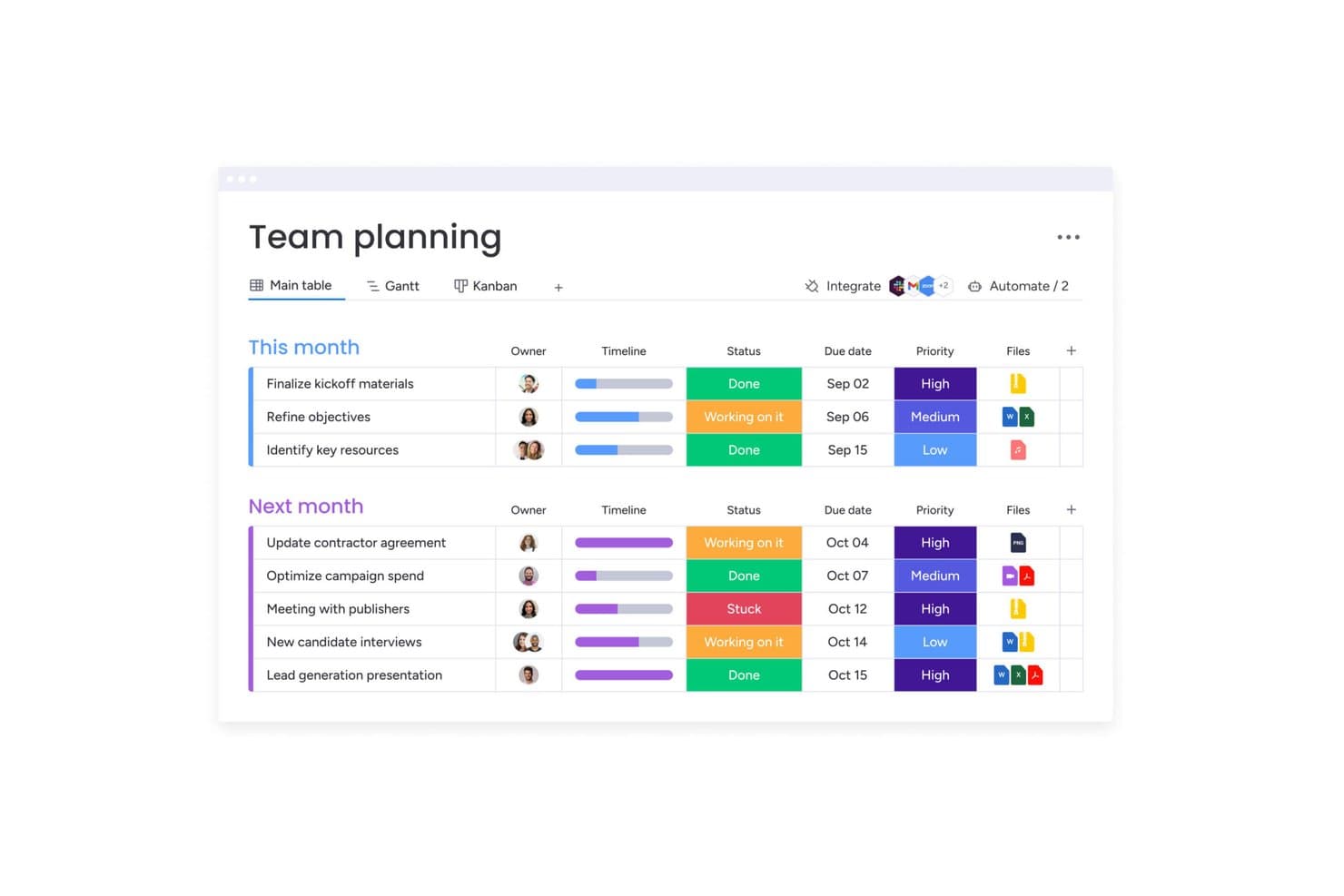
monday AI Workspace offers a team planning board with task status, priority levels, timelines, due dates, and file attachments organized into monthly groups. monday AI Workspace is a visual work management platform built for cross-functional teams that need to track projects, automate workflows, and centralize GTM data without relying on engineering support.
Who Is monday AI Workspace Best For?
It's a strong fit for mid-sized to enterprise teams running complex, multi-department operations that need automation and visibility across sales, marketing, and delivery workflows.
Why monday AI Workspace Is a Good Airtable Alternatives
I picked monday AI Workspace because its AI agents do something I haven't seen elsewhere: they predict task dependencies and flag resource conflicts before they surface as delays. I use the AI workflow builder to automate deal stage progressions and cross-board status updates without writing a single line of code. The AI-powered live dashboards pull that data into portfolio-level views that refresh automatically, so I'm never chasing a manual report.
monday AI Workspace Key Features
- Customizable boards: Build visual pipelines with multiple column types to track any workflow or GTM data set.
- Multi-view support: Switch between grid, Kanban, Gantt, calendar, and timeline to visualize projects from any angle.
- Granular permissions: Set board, workspace, and item-level access controls for secure collaboration across teams.
- Portfolio dashboards: Combine data from multiple boards into a unified, filterable dashboard for real-time revenue and project insights.
monday AI Workspace Integrations
monday AI Workspace offers a wide range of native integrations through its built-in integrations and marketplace, including Slack, Salesforce, HubSpot, Google Workspace, Microsoft 365, GitHub, Jira, Trello, Zendesk, and DocuSign. It also supports Zapier and provides an API for custom integrations.
Pros and Cons
Pros:
- No-code automation builder rivals developer tools
- Multi-view boards suit complex GTM workflows
- AI agents automate task and dependency tracking
Cons:
- Formula capabilities limited for complex revenue modeling
- Relational database features are less advanced
Learn more about monday AI Workspace: Best for complex workflows
- 14-day free trial
- From $10/user/month (billed annually)
Visit WebsiteCustomer Rating:4.3/5
Wrike organizes complex data with customizable table views and dropdown fields. Wrike is a versatile project management and collaboration platform designed to help teams organize their work, track progress, and achieve goals efficiently.
Why Wrike is a good Airtable alternative: I chose Wrike because of its customizable workflows and dynamic request forms. You can shape complex workflows around your team's real-life processes, which helps with consistency and visibility. The request forms use conditional logic to collect the info you need before work even starts. This cuts down on back-and-forth and lets your team get moving faster. Together, these features support organized, reliable task management. They’re especially useful if you need more structure than what Airtable typically offers.
Standout features & integrations:
Features include interactive Gantt charts that provide a visual timeline of your project schedule, allowing you to set dependencies and adjust plans easily. Time tracking capabilities enable team members to log hours directly within tasks, facilitating accurate reporting and resource allocation. Additionally, Wrike offers workload management tools that give visibility into team capacity.
Integrations include QuickBooks, Skyvia, Power BI, Tableau, Google Sheets, Miro, Salesforce, Microsoft Teams, Google Drive, Microsoft SharePoint, Adobe Creative Cloud, and Slack.
Pros and Cons
Pros:
- Customizable workflows and item types
- Effective proofing and approval tools
- Comprehensive project management features
Cons:
- Some integrations are only available on higher-tier plans
- Learning curve for new users
Learn more about Wrike: Best for diverse integrations
- Free plan available
- From $5/user/month (billed annually)
Visit WebsiteCustomer Rating:4.7/5
Stackby is a cloud tool that blends spreadsheets with databases for workflow automation. Stackby is a cloud-based tool that combines spreadsheets with databases, and is designed for teams looking to organize and automate their workflows. It's popular among marketing teams, project managers, and small businesses for its ease of use in managing data and collaboration.
Why Stackby is a good Airtable alternative: The platform has a similar functionality to Airtable, but offers diverse integrations so your team can connect it with various other applications. Stackby provides pre-built API connectors and plugins, and automation capabilities that let you customize workflows easily. Meanwhile, its user-friendly interface makes it simple for teams to set up and manage their data.
Standout features & integrations:
Features include customizable columns, real-time collaboration, and API automation. You can build your workflows with drag-and-drop ease and automate repetitive tasks. Stackby also allows you to create dynamic dashboards for visualizing data in various formats.
Integrations include Google Sheets, Slack, Zapier, Integromat, Mailchimp, YouTube, Facebook Ads, Google Analytics, Twitter, and Stripe.
Pros and Cons
Pros:
- Visual dashboard creation
- Real-time data updates
- Customizable workflows and automations
Cons:
- Limited customer support options
- Limited advanced analytics
Learn more about Stackby:

AppSheet is a no-code platform for creating custom mobile and web applications. AppSheet is a no-code platform that allows users to create custom mobile and web applications. It's mainly utilized by business teams and developers who need to build apps without extensive programming knowledge.
Why AppSheet is a good Airtable alternative: AppSheet allows your team to create custom apps tailored to specific workflows and business needs. This goes beyond Airtable’s functionality because more than just managing data, your team can integrate systems and enable smoother data management across platforms. Its no-code interface also benefits teams that lack programming expertise but still need to develop functional applications.
Standout features & integrations:
Features include a no-code app builder that lets your team create custom mobile and web apps. You can connect to various data sources to keep your information synchronized. AppSheet also offers powerful automation for streamlining tasks and workflows.
Integrations include Google Workspace, Office 365, Salesforce, Smartsheet, Box, Dropbox, OneDrive, AWS, SQL Server, and Zapier.
Pros and Cons
Pros:
- Automation capabilities to reduce manual tasks
- Integrates with existing data sources
- Supports mobile and web app development
Cons:
- Requires data connection with other systems
- Limited advanced analytics features
Learn more about AppSheet: 5Best for document integration
Coda
- Free plan available
- From $12/user/month (billed annually)
Visit WebsiteCustomer Rating:4.7/5
Coda is a platform merging documents and spreadsheets for streamlined team workflows. Coda is a versatile document creation platform that combines documents and spreadsheets into a single canvas, helping teams consolidate their document and data management. Project managers, product teams, and creative professionals use it to manage tasks, data, and communication in one place.
Why Coda is a good Airtable alternative: Coda sets itself apart from Airtable with how it integrates spreadsheets with docs. This allows your team to create interactive and dynamic documents that can adapt to your workflow. You can embed tables, charts, and interactive elements directly within documents, enhancing collaboration. Its customizable templates and building blocks also let you design solutions without coding expertise.
Standout features & integrations:
Features include building blocks to create customized solutions tailored to your workflow. Coda also supports embedding interactive elements like tables and charts within documents for better collaboration.
Integrations include Google Calendar, Slack, Zapier, GitHub, JIRA, Figma, Asana, Trello, Dropbox, and Salesforce.
Pros and Cons
Pros:
- Supports team collaboration
- Interactive document elements
- Customizable templates and building blocks
Cons:
- Some features need technical setup
- Limited advanced analytics capabilities
Learn more about Coda: Best for all-in-one productivity
- Free plan available
- From $12/user/month
Visit WebsiteCustomer Rating:4.7/5
ClickUp is a productivity platform for managing tasks, documents, goals, and projects. ClickUp is a comprehensive productivity platform that helps teams manage tasks, documents, goals, and projects in one place. It's designed for businesses looking to improve efficiency and streamline workflow processes.
Why ClickUp is a good Airtable alternative: ClickUp offers a versatile platform that combines project management, task tracking, and document collaboration into a single interface. This is how it differentiates itself from other project management solutions as well as Airtable's spreadsheet-centric approach. Your team can customize dashboards, set goals, and automate workflows to fit specific project needs.
Standout features & integrations:
Features include customizable dashboards that let your team tailor the interface to match your workflow. You can automate tasks and workflows, reducing the time spent on repetitive processes. ClickUp also provides built-in time tracking and resource management to help your team stay on schedule.
Integrations include Slack, Google Drive, Dropbox, Microsoft Teams, GitHub, Evernote, Outlook, Zoom, Zapier, and Trello.
Pros and Cons
Pros:
- Centralized work management
- Time tracking and project management features
- Task and project automation
Cons:
- Requires setup time
- Complexity for new users
Learn more about ClickUp: Best for project collaboration
- 14-day free trial + free plan available
- From $8/user/month (billed annually)
Visit WebsiteCustomer Rating:4.6/5
Zenkit is a project management tool for organizing tasks and boosting productivity. Zenkit is a collaborative project management tool designed for teams that want to to organize tasks, projects, and data together. It's widely used by organizations looking to enhance team productivity and manage workflows efficiently.
Why Zenkit is a good Airtable alternative: Zenkit's flexibility in managing projects and tasks sets it apart as an Airtable alternative. By offering various views like Kanban, table, and calendar to suit your team's needs, it allows you to switch between these views easily, making collaboration more intuitive. Zenkit also provides task assignment and progress tracking features, helping everyone stay on the same page.
Standout features & integrations:
Features include multiple project views, real-time collaboration, and task management. You can switch between Kanban, list, and calendar views to suit your workflow. Zenkit supports detailed task assignments with progress tracking to keep your team aligned.
Integrations include Google Calendar, Slack, Zapier, Microsoft Teams, Trello, Evernote, GitHub, Bitbucket, Asana, and Todoist.
Pros and Cons
Pros:
- Easy switching between views
- Real-time collaboration tools
- Multiple task assignment options
Cons:
- Learning curve for new users
- Limited reporting capabilities
Learn more about Zenkit: Best for no-code databases
- Free plan available
- From $10/user/month (billed annually)
Visit WebsiteCustomer Rating:4.7/5
Baserow is an open-source, no-code platform for customizable, collaborative databases. Baserow is an open-source database platform designed for users who need a customizable and collaborative environment to manage data without coding. It's ideal for small businesses, teams, and developers who want to create and manage databases efficiently.
Why Baserow is a good Airtable alternative: Baserow allows you to build no-code databases tailored to your team's specific needs, offering greater flexibility than Airtable. You can self-host Baserow, giving you control over your data and privacy and security. Baserow's open-source nature also means you can customize the platform to fit your business requirements.
Standout features & integrations:
Features include the ability to create no-code databases, allowing your team to manage data efficiently. The platform's collaborative features make it easy for team members to collaborate on projects.
Integrations include Zapier, Integromat, Slack, Microsoft Excel, Google Sheets, Airtable, Trello, Jira, Asana, and Monday.com.
Pros and Cons
Pros:
- No-code database creation
- Data self-hosting option
- Open-source customization
Cons:
- Limited advanced analytics
- Requires technical setup
Learn more about Baserow: Best for precise oversight
- 2-week free trial; free demo available
- From $8/user/month (billed annually)
Visit WebsiteCustomer Rating:4.7/5
Workzone is project management software for teams to collaborate and boost productivity. Workzone is a project management software designed to help teams collaborate effectively across various tasks and projects. It's primarily used by marketing teams, agencies, and operations teams seeking a comprehensive solution for managing workflows and improving productivity.
Why Workzone is a good Airtable alternative: Workzone offers a centralized platform that provides detailed project tracking and reporting capabilities, making it suitable for industries that require precise oversight. Its advanced task management features allow your team to prioritize and organize projects efficiently, and to set up custom project dashboards to monitor progress and allocate resources effectively. This makes Workzone a solid choice for teams needing more structured project management than Airtable provides.
Standout features & integrations:
Features include advanced task management, which lets you prioritize and organize projects efficiently. You can also create custom project dashboards to monitor progress and resource allocation. Workzone also offers detailed project tracking and reporting, ensuring your team stays informed about project developments.
Integrations include Slack, Microsoft Outlook, Google Drive, Dropbox, Box, Salesforce, Microsoft Excel, Evernote, QuickBooks, and Zapier.
Pros and Cons
Pros:
- Suitable for complex projects
- Advanced task management
- Centralized project tracking
Cons:
- Initial setup complexity
- Limited mobile functionality
Learn more about Workzone:

NocoDB turns SQL databases into a bright, user-friendly spreadsheet interface. NocoDB is an open-source platform that converts your SQL database into an intelligent spreadsheet interface. It caters to developers and teams looking for customizable data management solutions, and is trendy among IT professionals and businesses seeking a database tool to transform their database into a more user-friendly format.
Why NocoDB is a good Airtable alternative: NocoDB offers flexibility by being an open-source product, allowing you to customize the platform according to your team's needs. You can host it on your servers, providing data privacy and security control. It supports many SQL databases, making integrating with your current infrastructure easy. This adaptability makes it attractive for those needing more power than Airtable's cloud-dependence.
Standout features & integrations:
Features include the ability to convert SQL databases into spreadsheets, offering a user-friendly interface for data management. You can customize it to fit your team's specific needs. NocoDB also provides self-hosting options for enhanced data control and privacy.
Integrations include MySQL, PostgreSQL, Microsoft SQL Server, MariaDB, Amazon RDS, SQLite, Airtable, MongoDB, Google Sheets, and Oracle.
Pros and Cons
Pros:
- Customizable interface
- Supports multiple databases
- Self-hosting capability
Cons:
- Limited out-of-box features
- Requires technical setup
Learn more about NocoDB:
Andre Airtable-alternativer
Her er noen flere Airtable-alternativer som ikke kom med på kortlisten min, men som likevel er verdt å se nærmere på:
How I Evaluate Airtable Alternatives
I split my evaluation into two layers: the core baseline—relational structure, automation, CRM connectivity—and the differentiating factors that separate the right pick for RevOps from the rest.
Core Functionality (Table Stakes For This List)
When I'm selecting tools for my list, I rank each one on a scale from 0 (does not offer the functionality) to 5 (excels in this area) for each core functionality listed below. Then, I calculate the tool's total score into a percentage. Each tool needs to achieve a minimum total score of 65% to be considered for inclusion.
- Relational Database Structure: I check whether a tool supports linked records, rollups, and lookups—essentials for modeling account-to-deal-to-contact relationships across a GTM dataset.
- Custom Views & Filtering: Each tool should let you build kanban views for deal stages, filtered grids by territory, and calendar views for renewal dates from the same data.
- Workflow Automation: I evaluate whether the automation builder handles real RevOps triggers like moving a deal to "closed-won" and auto-notifying the CS team for handoff.
- Native Integrations & API: The tool needs connectors to CRM and marketing platforms like Salesforce and HubSpot, plus a REST API for syncing with data warehouses.
- Collaboration & Permissions: I look at whether you can lock down sensitive fields (revenue forecasts, comp data) while still sharing pipeline views with cross-functional stakeholders.
- Dashboards & Reporting: The platform should support built-in charts and dashboards—things like weighted pipeline summaries or win-rate breakdowns—without exporting to a BI tool.
Once I have a list of tools that meet this criteria, I consider what sets each platform apart.
Differentiating Factors (What Sets Vendors Apart)
Here's how I compare and contrast different vendors:
Standout Features
Two-way CRM sync is a big differentiator—I want to know if updates in the platform flow back into Salesforce or HubSpot without manual re-entry. No-code app builders also matter because RevOps teams often need to spin up custom deal desks or renewal trackers without waiting on engineering. I also evaluate AI-powered features like formula generation and record summarization, which can save hours when you're working across hundreds of pipeline records.
Beyond Features
Scalability matters a lot here. RevOps datasets grow fast, so I check whether a platform can handle large record volumes without slowing down when you're linking deal tables to account and contact records. Pricing structure is another key consideration—per-seat models can get expensive quickly when you're giving access to sales, marketing, and CS teams. I also evaluate time-to-value by looking at whether a tool offers RevOps-ready templates and migration paths from Airtable or spreadsheets that let a small ops team get running without a lengthy implementation.
Hvorfor se etter et alternativ til Airtable?
Selv om Airtable er et godt valg av programvare for forretningsanalyse, ser noen brukere etter alternative løsninger av flere grunner. Det kan være at du ser etter et alternativ til Airtable fordi …
- Det håndterer ikke kompleks dataanalyse godt nok
- Du ønsker rimeligere priser for et stort team
- Du trenger avanserte automatiseringsfunksjoner
- Teamet ditt trenger tilgang til data uten nettforbindelse
- Du ser etter et verktøy med bedre kundestøtte
- Du trenger samsvar med bestemte bransjeforskrifter
Hvis noe av dette høres kjent ut, har du kommet til rett sted. Listen min inneholder flere alternativer innen programvare for forretningsanalyse som passer bedre for team som møter disse utfordringene med Airtable og ser etter alternative løsninger.
Viktige funksjoner i Airtable
Her er noen av de viktigste funksjonene i Airtable, slik at du kan sammenligne hva alternative løsninger tilbyr:
- Tilpassbare visninger: Du kan velge hvordan du vil visualisere dataene dine, enten i rutenett, kalendere eller Kanban-tavler, slik at de passer til behovene i teamets arbeidsflyt.
- Samarbeidsverktøy: Del enkelt tabeller og prosjekter med teamet ditt, tildel oppgaver og kommuniser direkte i plattformen.
- Integrasjon med tredjepartsapper: Airtable kobles sammen med verktøyene du allerede bruker, slik at du kan synkronisere data mellom Airtable og eksterne apper som Slack, Google Workspace og Salesforce.
- Automatiseringer: Du kan automatisere repetitive oppgaver, for eksempel å sende e-poster eller oppdatere poster, slik at teamet sparer tid og reduserer manuelt arbeid.
- Malbibliotek: Velg blant et stort utvalg ferdiglagde maler for å komme raskt i gang, enten du sporer prosjekter, administrerer kunder eller planlegger arrangementer.
- Avansert filtrering og sortering: Tilpass hvordan du filtrerer og sorterer dataene dine, slik at det blir enkelt å finne informasjonen du trenger uten å måtte lete gjennom irrelevante detaljer.
- Egendefinerte skjemaer: Du kan opprette skjemaer for å samle inn informasjon fra teammedlemmer eller kunder, som sendes direkte inn i Airtable-databasene dine for enkel datahåndtering.
- Mobil tilgang: Få tilgang til og administrer dataene dine hvor som helst med Airtables mobilapp, slik at teamet ditt kan være produktivt også når dere er på farten.
- Synkronisering på tvers av tabeller: Med Airtable kan du synkronisere poster på tvers av flere tabeller eller baser, slik at dataene dine forblir konsistente og oppdaterte, uansett hvor de brukes.