

Intuit virksomhedspakke vs. Dynamics 365 Business Central: Sammenligning og anmeldelser for 2026
Intuits virksomhedspakke og Microsoft Dynamics 365 Business Central understøtter begge omsætningsstyring gennem rapportering, prognoser, indsigt i pengestrømme og operationelle kontroller. Læs, hvordan deres funktioner, priser, styrker og afvejninger sammenlignes i 2026.

We review tools independently, and commissions help fund our testing. See our transparency policy, our methodology, or suggest a tool.
When revenue, payments, reporting, and operational data are spread across separate tools, it becomes harder to see what’s driving growth. Teams need a clearer way to track cash flow, forecast performance, and keep finance, sales, and operations aligned.
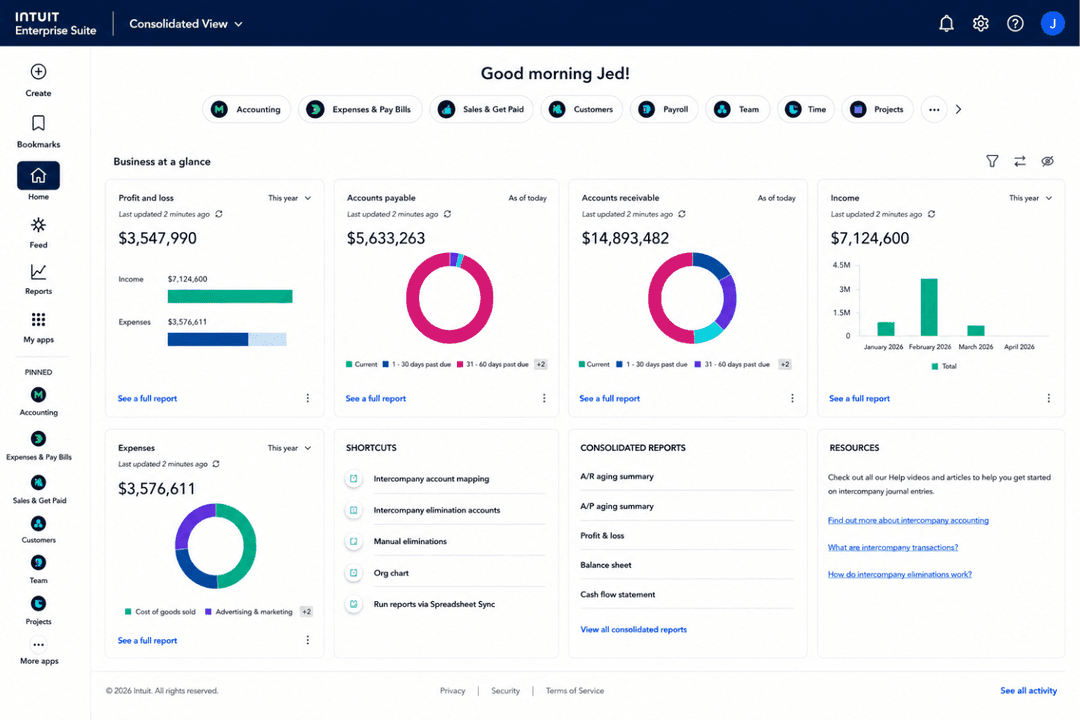
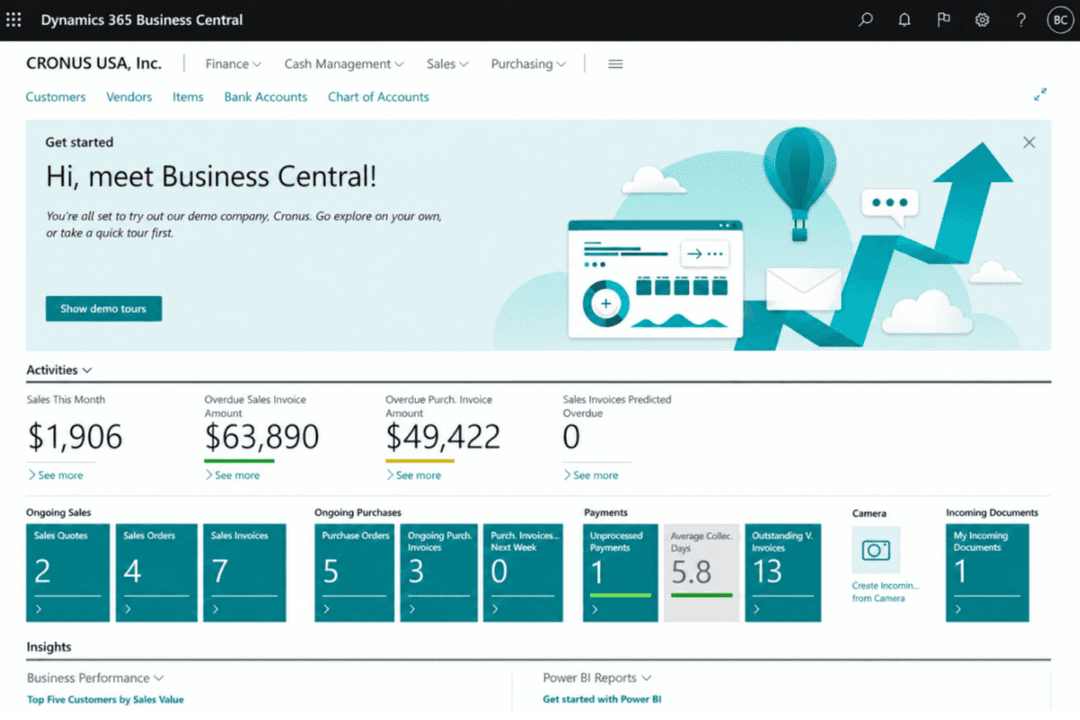
Intuit Enterprise Suite and Microsoft Dynamics 365 Business Central are both evaluated among revenue management systems because they help growing organizations improve revenue visibility and financial control. Intuit Enterprise Suite focuses on revenue visibility, cash flow, payments, forecasting, and connected financial operations through the Intuit ecosystem, while Business Central supports broader business processes across finance, sales, service, inventory, projects, and operations.
In this comparison, I’ll break down their features, pricing, pros and cons, security, ease of use, and ideal use cases to help you decide which platform fits your business best.
Intuit Enterprise Suite
4.6/5
- Free demo available
- Pricing upon request
Microsoft Dynamics 365 Business Central
4/5
- Free plan available
- From $80/user/month (billed annually)
Why Trust Our Software Recommendations
6,700+
Reviews
20
Industry experts
16+
Evaluation factors
14
Years
Our reviews reflect our independent judgment—not a sales pitch. Learn how we stay transparent.
For this guide, we evaluated tools using hands-on testing and independent research, scoring tools using our selection criteria.
Our reviews reflect our human editorial judgment, not a sales pitch.
| Intuit Enterprise Suite | Microsoft Dynamics 365 Business Central | |
|---|---|---|
| Free Trial | Free demo available | Free plan available |
| Pricing | Pricing upon request | From $80/user/month (billed annually) |
Priser og skjulte omkostninger for Intuit Enterprise Suite vs. Microsoft Dynamics 365 Business Central
Intuit Enterprise Suite anvender tilpassede, tilbudsbaserede priser, så omkostningerne afhænger af brugere, enheder, valgte funktioner, tilføjelser, integrationer og implementeringsbehov. Microsoft Dynamics 365 Business Central har mere gennemsigtige priser med en gratis prøveperiode og separate abonnementer til fulde brugere, premiumfunktionalitet og teammedlemmer med begrænset adgang.
Når det gælder skjulte omkostninger, kan begge platforme kræve et ekstra budget til implementering, datamigrering, oplæring, opsætning af arbejdsgange, integrationer, tilpasninger, premiumsupport og løbende administrativt arbejde. Business Central er lettere at estimere på forhånd, fordi priserne på abonnementerne er offentligt tilgængelige, mens Intuit Enterprise Suite kræver et skræddersyet tilbud baseret på virksomhedens kompleksitet. For at sammenligne begge platforme retfærdigt bør du bede om en fuldstændig omkostningsoversigt, der omfatter opsætning, support, integrationer, tilføjelser og fremtidige skaleringsbehov.
Intuit Enterprise Suite og Microsoft Dynamics 365 Business Central understøtter begge integrationer på tværs af e-handel, betalinger, CRM, økonomi og arbejdsgange for indtægter.
| Faktor | Intuit Enterprise Suite | Microsoft Dynamics 365 Business Central |
|---|---|---|
| FaktorDatakryptering | Intuit Enterprise SuiteKrypterer data under overførsel og i hvile for at beskytte omsætnings-, finans-, løn- og driftsdata. | Microsoft Dynamics 365 Business Central Krypterer kundedata i hvile og under overførsel på tværs af Microsofts cloudmiljøer. |
| FaktorLovgivningsmæssig compliance | Intuit Enterprise SuiteUnderstøtter SOC-rapporter, ISO 27001-certificerede praksisser, PCI DSS for relevante betalingstjenester og VPAT-dokumentation. | Microsoft Dynamics 365 Business Central Understøtter Microsofts cloud-complianceprogrammer, herunder ISO 27001, SOC-rapporter og globale privatlivsstandarder. |
| FaktorAdgangskontroller | Intuit Enterprise SuiteAnvender rollebaserede adgangskontroller til at begrænse adgangen til følsomme omsætnings-, finans-, løn- og driftsdata. | Microsoft Dynamics 365 Business Central Anvender Microsoft Entra ID, rollebaseret adgang, betinget adgang og MFA-muligheder. |
| FaktorRevision og aktivitetssporing | Intuit Enterprise SuiteUnderstøtter revisionsbehov gennem tilladelser, finansielle kontroller, transaktionssynlighed og rapporteringskontrol. | Microsoft Dynamics 365 Business Central Giver revisionslogning, aktivitetssporing og Microsoft-administreret sikkerhedsovervågning. |
| FaktorBetalingssikkerhed | Intuit Enterprise SuiteUnderstøtter PCI DSS-compliance for relevante betalingstjenester. | Microsoft Dynamics 365 Business Central Understøtter sikre betalings- og finansarbejdsgange gennem Microsofts cloudkontroller og partnerintegrationer. |
Intuit Enterprise Suite dækker de vigtigste sikkerhedsbehov for omsætnings- og finansdrift, herunder kryptering, rollebaseret adgang, SOC-rapporter, ISO 27001-certificerede praksisser, PCI DSS for relevante betalingstjenester og revisionsunderstøttelse. Business Central tilbyder også stærk Microsoft-cloudsikkerhed, men Intuit Enterprise Suite giver voksende teams solid beskyttelse af betalinger, rapportering, løn og finansielle arbejdsgange.
| Faktor | Intuit Enterprise Suite | Microsoft Dynamics 365 Business Central |
|---|---|---|
| FaktorBrugergrænseflade | Intuit Enterprise SuiteModerne Intuit-lignende oplevelse for teams, der håndterer omsætning, likviditet, betalinger og finansiel rapportering. | Microsoft Dynamics 365 Business Central Rollebaseret arbejdsområde, der kan tilpasses efter bruger, opgave og forretningsfunktion. |
| FaktorIntroduktion | Intuit Enterprise SuiteGuidet implementering med en dedikeret kundesuccesansvarlig, hjælp til migrering, oplæring, opsætning af rapportering og systemforbindelser. | Microsoft Dynamics 365 Business Central Tilbyder Microsoft Learn-ressourcer, assisteret opsætning og implementeringssupport fra partnere. |
| FaktorLæringskurve | Intuit Enterprise SuiteLettere for teams, der kender Intuit, selvom opsætning af enheder, rapportering og omsætningsarbejdsgange stadig kræver planlægning. | Microsoft Dynamics 365 Business Central Kan kræve mere oplæring, fordi løsningen dækker økonomi, salg, service, lager, projekter og drift. |
| FaktorSupportressourcer | Intuit Enterprise SuiteTilbyder produktsupport, vejledning fra kundesucces, oplæring og implementeringsressourcer. | Microsoft Dynamics 365 Business Central Tilbyder Microsoft Learn, dokumentation, hjælperessourcer, tekniske supportmuligheder og partnersupport. |
| FaktorTilpasning | Intuit Enterprise SuiteUnderstøtter konfigurerbare arbejdsgange, rapporter, tilladelser, integrationer og forretningsprocesser uden en omfattende ERP-opbygning. | Microsoft Dynamics 365 Business Central Understøtter rollebaseret personalisering, sidelayouts, rapporter, dashboards og Microsoft 365-forbundne arbejdsgange. |
Set fra et brugervenlighedsperspektiv er Intuit Enterprise Suite mere tilgængelig for teams, der fokuserer på omsætningssynlighed, likviditetssporing, betalinger, rapportering og finansielle arbejdsgange. Den guidede introduktion, den dedikerede kundesuccessupport og den Intuit-lignende oplevelse gør det lettere for voksende teams at tage løsningen i brug. Business Central tilbyder flere Microsoft-baserede tilpasningsmuligheder, men kan kræve mere opsætning og oplæring, fordi løsningen dækker et bredere udvalg af driftsområder.
Intuit Enterprise Suite
- Connects revenue, cash flow, payments, and financial data for clearer visibility.
- Supports AI-powered reporting, forecasting, and insights for teams managing revenue performance.
- Helps manage multi-entity financial operations as the business grows.
- Setup requires planning around entities, reporting, workflows, and integrations.
- May be more than smaller teams need if they only want basic revenue tracking.
- Not a dedicated revenue tool, so advanced revenue recognition or subscription billing may require add-ons.
Microsoft Dynamics 365 Business Central
- Handles multi-entity and multi-currency revenue consolidation well
- Provides detailed, drill-down financial reporting and audit trails
- Strong workflow automation for recurring revenue processes
- Steep per-user pricing for growing revenue teams
- Advanced revenue recognition features require custom configurations
- Native customer support response times can be inconsistent
Intuit Enterprise Suite
- Multi-Entity OrganizationsManage revenue and financial performance across multiple legal entities while consolidating reporting from one system.
- Professional Services FirmsTrack project revenue, manage financial performance, and improve visibility across teams and client work.
- Technology & SaaS CompaniesSupport growing revenue operations with AI-powered reporting, forecasting, and financial controls.
- Construction & Project-Based BusinessesManage project accounting, budgets, and revenue-related reporting for project-driven work.
- Manufacturing, Wholesale & DistributionMonitor revenue and financial performance across products, locations, and business units.
- Growing Mid-Market BusinessesUse enterprise-level financial management and reporting without taking on the full complexity of a traditional ERP.
Microsoft Dynamics 365 Business Central
- Midsize EnterprisesIts feature set balances depth and usability for organizations scaling up from basic accounting software.
- Multi-Entity BusinessesBusiness Central consolidates revenue, warehouse management, and reporting across branches, subsidiaries, and global locations in one unified view.
- Subscription-Based CompaniesRecurring billing, revenue recognition, and contract management help SaaS and service firms get revenue clarity.
- Finance DepartmentsCustomizable dashboards, compliance tools, and audit trails support detailed revenue analysis and regulatory requirements.
- International FirmsMulti-currency support, language packs, and region-specific compliance make cross-border revenue management straightforward.
- Project-Based TeamsIntegrated project accounting, project costing, job costing, and time tracking enable granular visibility into project revenues and costs.
Hvem bør bruge Intuit Enterprise Suite, og hvem bør bruge Microsoft Dynamics 365 Business Central?
Intuit Enterprise Suite er velegnet til voksende virksomheder og mellemstore virksomheder, der har brug for bedre omsætningssynlighed, likviditetssporing, betalinger, prognoser og finansiel rapportering uden en omfattende ERP-opsætning. Den fungerer især godt for teams, der allerede bruger Intuit-økosystemet og ønsker sammenkoblede omsætnings- og finansarbejdsgange, rapportering på tværs af flere enheder, AI-drevet indsigt og guidet implementering.
Microsoft Dynamics 365 Business Central kan derimod passe til mellemstore virksomheder, der har brug for bredere driftsdækning inden for økonomi, salg, service, lager, projekter, indkøb og leverandørstyring. Overordnet set er Intuit Enterprise Suite bedre til teams, der søger en mere håndterbar vej til omsætnings- og finansiel synlighed, mens Business Central egner sig bedre til Microsoft-baserede teams, der håndterer bredere forretningsdrift.
| Intuit Enterprise Suite | Microsoft Dynamics 365 Business Central | |
|---|---|---|
| Ecosystem Fit | Intuit Enterprise Suite Built around Intuit tools for finance, payroll, payments, workforce management, marketing, and supported apps. | Microsoft Dynamics 365 Business Central Built around Microsoft 365, Power BI, Teams, Copilot, AppSource, and Microsoft partner tools. |
| Implementation Approach | Intuit Enterprise Suite Uses guided onboarding with a dedicated customer success manager, migration help, training, reporting setup, and system connections. | Microsoft Dynamics 365 Business Central Often involves assisted setup, Microsoft Learn resources, and partner-led implementation depending on complexity. |
| Operational Scope | Intuit Enterprise Suite Centers revenue, cash flow, payments, payroll, reporting, and financial workflows. | Microsoft Dynamics 365 Business Central Extends into sales, service, inventory, projects, purchasing, and operations. |
| Pricing Structure | Intuit Enterprise Suite Uses custom, quote-based pricing based on users, entities, capabilities, add-ons, integrations, and implementation needs. | Microsoft Dynamics 365 Business Central Uses public subscription plans based on user access and functionality level. |
| Product Orientation | Intuit Enterprise Suite Focuses on revenue visibility, cash flow, payments, forecasting, and connected financial operations. | Microsoft Dynamics 365 Business Central Supports broader business management across finance, sales, service, inventory, projects, purchasing, and operations. |
| Cloud-Based Access | Both are cloud-based systems that help teams manage financial and revenue-related data online. |
|---|---|
| Reporting & Analytics | Both provide dashboards, reports, and analytics to help teams monitor performance and business health. |
| Security Controls | Both support key security needs through encryption, access controls, and compliance-related protections. |
| User Permissions | Both include roles and permissions to help protect sensitive financial and revenue data. |
| Workflow Automation | Both support automation for approvals, finance processes, and operational tasks. |